Anthropic shipped a major Claude Design update on June 17, adding design system imports, a /design-sync command for Claude Code, and two-way handoff between design and code. If you ship UI-heavy products, the update ends the step where you paste a screenshot into Claude Code and describe what you want rebuilt.
The update is in beta at claude.ai/design and in the Claude desktop sidebar, included on Pro, Max, Team, and Enterprise plans at no extra cost.
Why did AI design tools always feel disconnected from your actual product
The core friction was that AI-generated screens used approximated colors, invented component names, and spacing that matched no token in your real system. The first implementation session corrected drift rather than built features.
Claude Design's June update addresses the root cause. It now imports your actual design system from GitHub, uploaded files, or your local codebase. Generated screens start from your real tokens and component names. Claude Design also checks its own output against your design system before you see the result, correcting mismatches internally.
Run /design-sync in Claude Code v2.1.181 or later to import your design system into Claude Design. Generated screens then use your actual components and tokens. When a screen is ready to ship, the Claude Code handoff picks it up without a screenshot step. Available on Pro, Max, Team, and Enterprise, included in your subscription.
The update brought over one million users in Claude Design's first week, according to Anthropic's announcement.
How does the /design-sync command actually work
The /design-sync command runs inside Claude Code and has two directions. Pulling: it imports your local codebase's design system into Claude Design, so every screen Claude Design generates uses your real components. Pushing: after you have implemented a design in code, /design-sync pushes the current state back into Claude Design, keeping the canvas in sync with what you have actually built.
You can also import a design system from outside Claude Code: directly from a GitHub repository, from a design file in a supported format, or from a raw file upload. The /design terminal command lets you create, edit, and sync design projects without leaving the terminal.
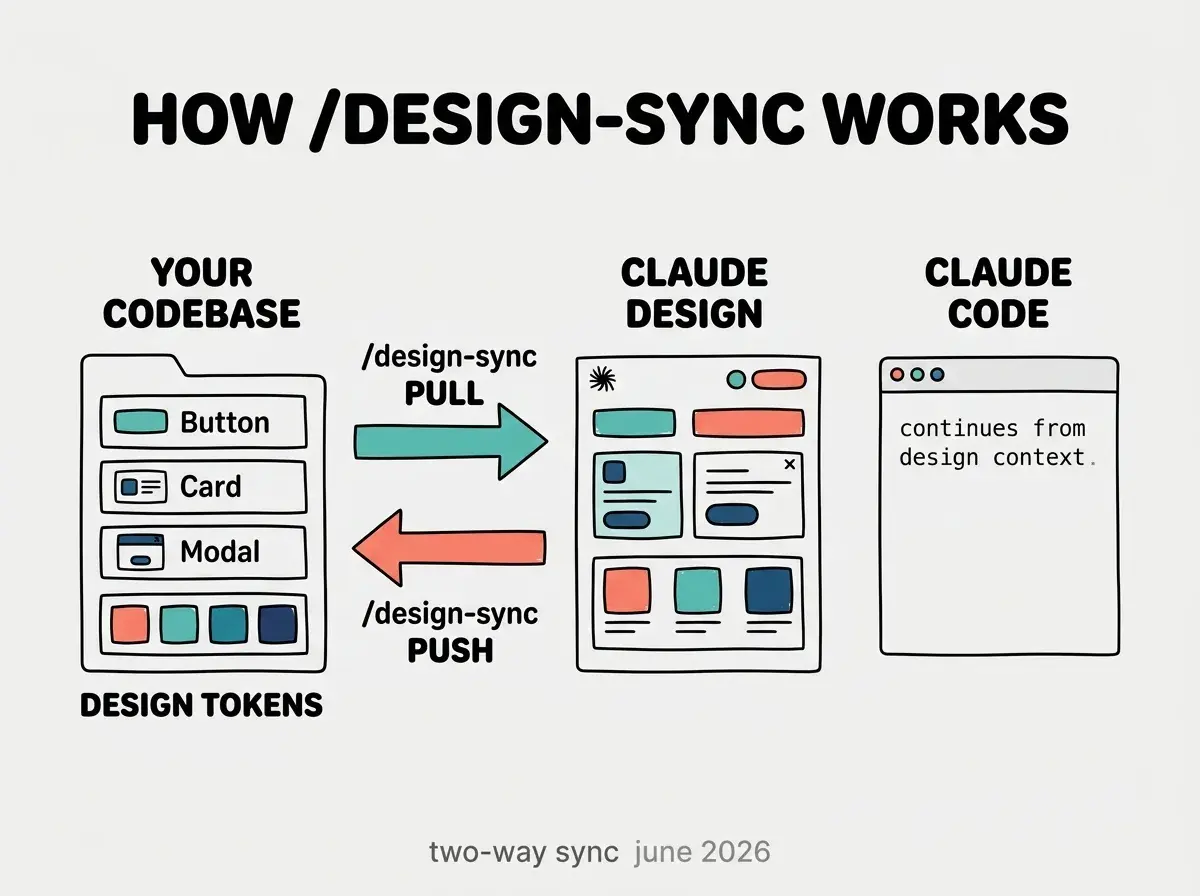
For projects that alternate between design iteration and coding, the bidirectional sync means neither environment becomes stale. Previously, keeping design and code aligned required manually updating one or accepting drift between them. The sync makes that a one-command operation.
One constraint to know: /design-sync does not watch your repository for changes. If you update your component library or tokens after an initial import, run /design-sync again to bring Claude Design current. Treat it like rebuilding a snapshot test after a design system update.
What does WYSIWYG canvas editing add to the workflow
Before this update, all iteration in Claude Design happened through prompts. To move a button, you described where it should go. To adjust spacing, you explained which element and what value. Generating a new screen is still prompt-driven, but the June update adds direct canvas editing for refinement: click an element, resize it, reposition it, update its properties, and annotate it without a prompt round.
The annotations matter for the handoff to Claude Code. Any notes you add to a canvas element travel with the handoff. Claude Code receives both the layout and the annotations, so you can flag implementation details ("this button needs a loading state") directly in the design canvas and Claude Code reads them.
The Vibe Coder Blog covers the AI coding tool changes that matter for vibecoders building real products.
Browse All PostsThe canvas and prompt workflows coexist. Generate a screen with a prompt, refine directly on the canvas, annotate specific elements, then hand off. That sequence is faster than the prior prompt-only iteration for UI work where the overall structure is right but the details need adjustment.
How does the Claude Code handoff close the implementation gap
The old path from design to code was: export an image, paste it into Claude Code, describe what you see, watch Claude Code reconstruct the layout from the screenshot. The new path: finish a screen in Claude Design, use the handoff option, and Claude Code opens with the design context already loaded including which components were used, how they are arranged, and any canvas annotations.
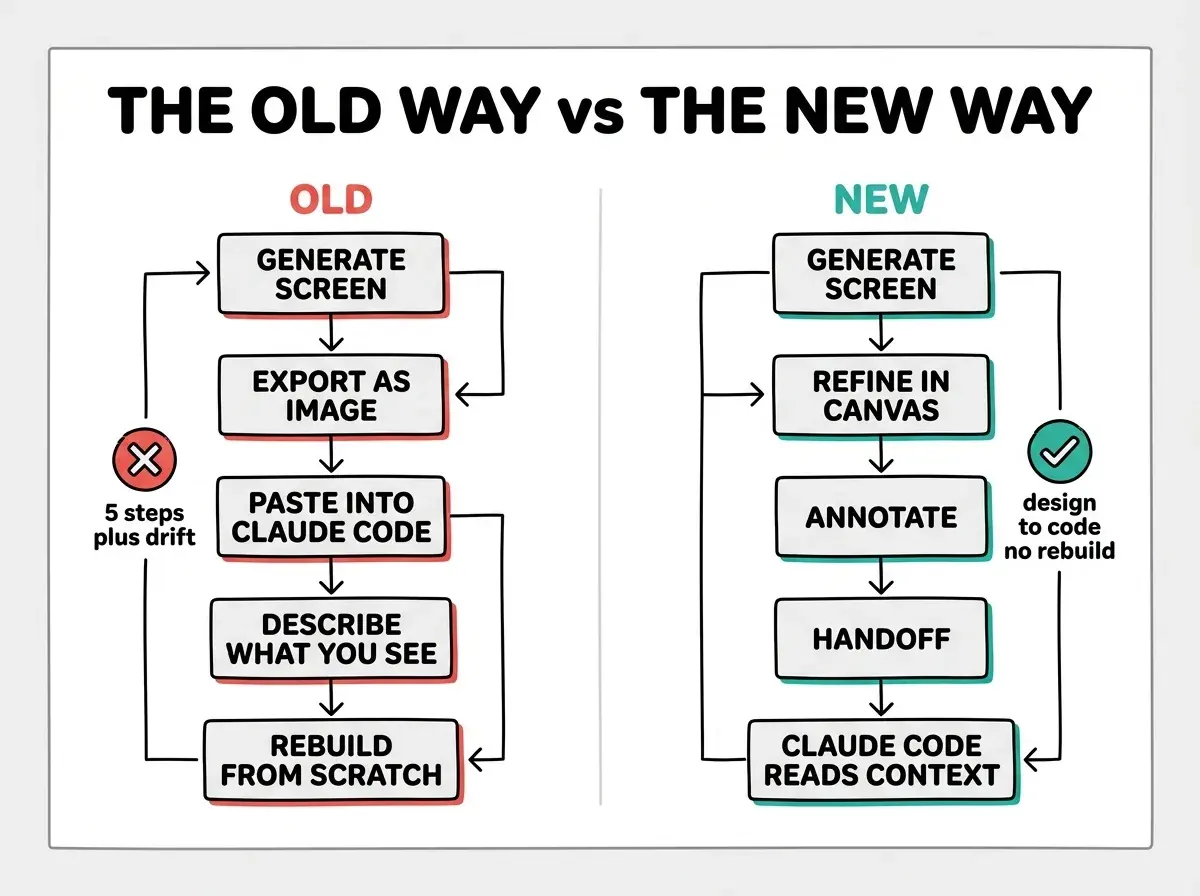
The handoff opens a new Claude Code session rather than injecting into an existing one. If you want to continue in an active session, use /design-sync to pull the current design state instead of using the handoff button.
Expecting the design system import to stay current automatically. Claude Design imports a snapshot at the time you run /design-sync or import from GitHub. Changes to your components or tokens after that point are not reflected until you re-run /design-sync. Build the habit of syncing after any design system update the same way you would regenerate types after a schema change.
The token usage improvement is also worth noting. Claude Design now uses fewer tokens per turn for the same result, with sharply lower error rates. It shares a usage pool with Claude Code and Claude chat, so there is a unified limit across tools rather than separate caps for each product.
What should you do differently starting today
Run claude update to reach v2.1.181 or later, then run /design-sync inside any Claude Code session on a project with a real design system. Check what Claude Design generates against your actual UI.
For teams with mature design systems, the immediate win is in the handoff. Stop screenshotting designs to paste into Claude Code. Use the handoff instead and compare the implementation time against the old path.
For solo vibecoders who skipped Claude Design because generated screens looked nothing like their product: the design system import changes that baseline. Test it on one screen from your current project. If the components match your actual UI, the import worked and the tool is now useful to you.
The full announcement from Anthropic includes additional detail on design system import formats and enterprise brand control configuration.
The Vibe Coder Blog covers Claude Code, Claude Design, Cursor, and the rest of the vibecoder stack.
Read More