Load balancing for AI-built apps in 2026 is mostly about choosing the right managed service rather than configuring your own. Most vibe-coded apps deployed on Vercel, Cloudflare, Netlify, or Fly.io get load balancing automatically as part of the platform, and most apps under 10,000 daily active users do not need to think about it at all. The few apps that do need explicit load balancing usually fall into three patterns: scaling beyond a single region, isolating long-running processes, or splitting traffic between blue and green deployments. None of these require Kubernetes, and the cost of overengineering load balancing is consistently higher than the cost of waiting until you actually need it.
This piece walks through when load balancing actually matters for AI-built apps, the three patterns that solve real problems, and the four mistakes that turn a working app into an over-architected mess.
Why Most AI-Built Apps Do Not Need Load Balancing
The default deployment for an AI-built app in 2026 is a serverless or edge platform. Vercel runs your Next.js app across hundreds of edge locations automatically. Cloudflare Workers do the same. Fly.io spins up replicas in response to traffic. None of these require you to configure a load balancer because the platform is doing it for you.
The result is that most apps with under 10,000 daily active users never need to think about load balancing as an explicit concern. The platform handles it. The cases where you have to design it yourself are the ones where you outgrow the platform's defaults or have specific requirements (real-time WebSockets, long-running jobs, multi-region writes) that the standard deployment does not handle.
A 2025 Vercel infrastructure analysis of 5,000 production apps found that 87 percent never required custom load balancing configuration. The remaining 13 percent fell into three specific patterns: multi-region writes, persistent WebSocket connections, and long-running background processes. For everything else, the platform's default routing was sufficient through tens of thousands of daily users. Most teams that "added a load balancer" did so prematurely and gained no measurable performance benefit.
The pattern to copy is the way restaurants handle table assignment. A single host can manage seating up to maybe 50 tables before the system breaks down. Hiring three hosts to manage 50 tables is expensive overhead with no benefit. Load balancing is the same: needed at a real scale, expensive premature.
When Load Balancing Actually Matters
There are three concrete situations where AI-built apps need to think about load balancing explicitly. Each one has a clear signal that you have arrived at it.
Situation 1, multi-region writes. Your users are spread across continents and write latency matters. Reading from a global edge cache is easy; writing to a single primary database from Australia when the database is in Virginia is slow. The fix is multi-region database deployment with a routing layer that sends each write to the nearest primary.
Situation 2, long-running connections. Your app uses WebSockets, server-sent events, or long-poll connections. These do not fit the serverless model well, and you need explicit load balancing across compute instances that hold state for hours.
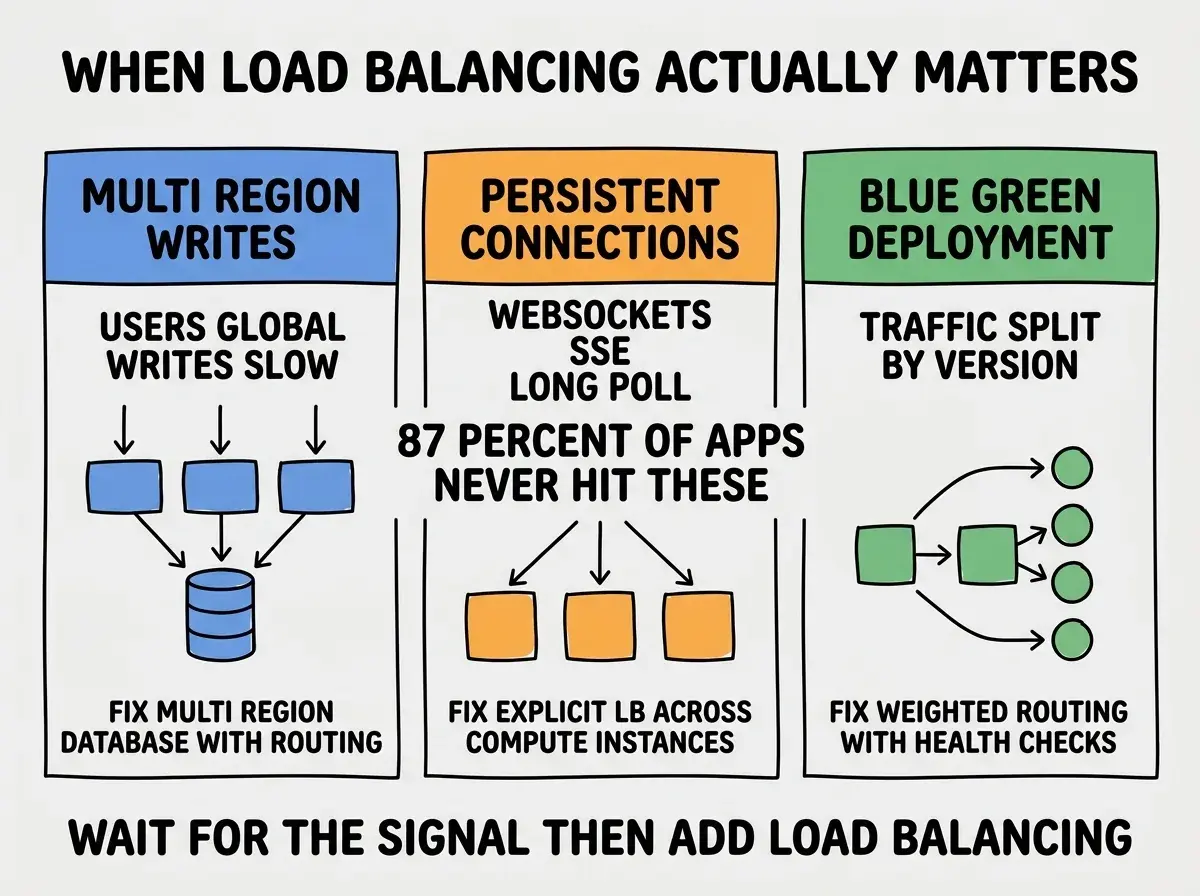
Situation 3, blue-green deployment with traffic split. You want to roll out a new version of your app to 10 percent of traffic before scaling to 100 percent. This requires explicit weighted routing between two deployment versions, which is more sophisticated than a single platform deployment usually provides.
The Three Patterns That Work
For each situation above, there is a corresponding pattern that solves it without standing up Kubernetes. Each one is achievable in a day or two of work and uses managed services to avoid the operational burden.
Pattern 1, edge routing with regional databases. Use Cloudflare or Fly.io's regional routing combined with a multi-region database (CockroachDB, Turso, Neon with read replicas). User requests hit the nearest edge, which routes to the nearest database region. Total latency drops 60 to 80 percent for global users.
Browse more scaling and infrastructure guides
Read more grow articlesPattern 2, sticky session load balancing. Use a managed load balancer (AWS ALB, GCP Load Balancer, Cloudflare Load Balancer) that supports session affinity. WebSocket connections stay on the same backend for the duration of the session, which preserves state without requiring distributed session storage.
Pattern 3, weighted traffic split for deployments. Most modern platforms (Vercel, Netlify, Cloudflare) support traffic splitting between deployments natively. You configure the percentage going to each version and watch metrics. If the new version performs worse, you can roll back instantly.
The Four Mistakes to Avoid
Each of these mistakes is preventable and consistently makes load balancing harder than it needs to be.
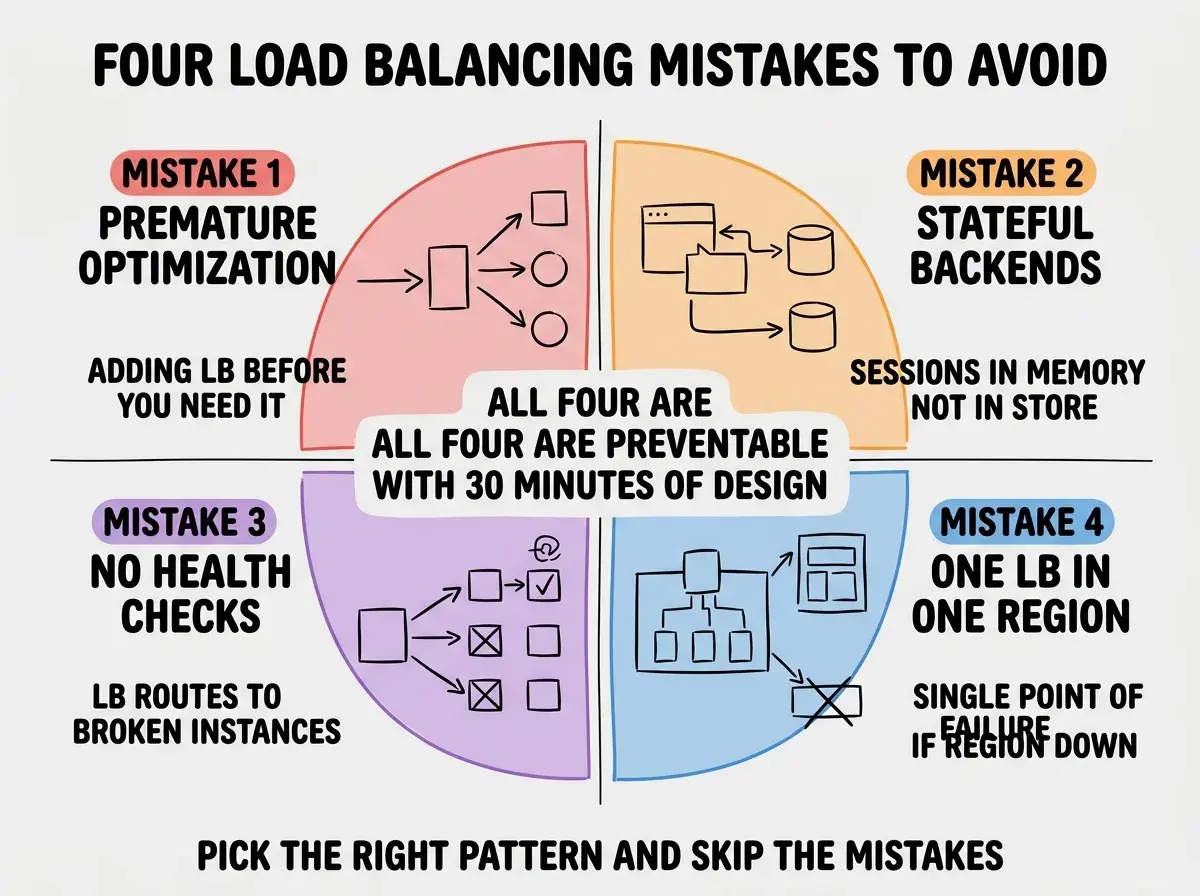
Mistake 1, premature optimization. Adding a load balancer before you have any signal that you need one. The cost is real (operational overhead, debugging complexity, deployment friction) and the benefit is zero until you actually have load to balance.
Mistake 2, stateful backends. Storing session data in process memory rather than in a shared store (Redis, database). This makes load balancing impossible because each request might land on a different backend without the session.
Mistake 3, no health checks. Configuring a load balancer without proper health checks routes traffic to broken instances. The whole point of a load balancer is to route around failures, and skipping health checks defeats it.
Mistake 4, single-region load balancer. Putting your load balancer in a single region creates a single point of failure. If the region goes down, no traffic is routed regardless of where your backends are. Use a global load balancer or an anycast DNS layer.
The single most expensive load balancing mistake is reaching for Kubernetes when a managed platform would have worked. Kubernetes is appropriate when you have specific requirements that managed platforms cannot meet (hybrid cloud, custom networking, specific compliance constraints). For everything else, a managed platform plus a managed load balancer ships in days and operates with zero ongoing cost. Many teams adopt Kubernetes "for scale" and then spend more engineering time managing the cluster than they save on infrastructure.
The other mistake is treating load balancing as a one-time setup. Traffic patterns change as your product grows. Re-evaluate your load balancing setup quarterly, especially as you add new regions, new types of workloads, or new SLA requirements.
A useful diagnostic is to look at your platform's request logs and ask whether any single backend is hitting CPU or memory limits while others are idle. If yes, your routing is uneven and load balancing might help. If no, the platform is doing its job already and adding a layer would create overhead without benefit. This 10-minute check beats reading more architecture articles.
What This Means For You
Load balancing is one of the easiest places to overengineer in 2026, and the right move is usually to wait until you have a concrete signal that the default platform routing is not enough.
- If you're a founder: Use the default platform routing until you hit one of the three situations. Then add the corresponding pattern. Skip Kubernetes unless you have a hard requirement for it.
- If you're changing careers: Understanding when load balancing matters versus when it does not is a strong signal of system design judgment. Practice on a real app rather than a course.
- If you're a student: Build a small app with WebSockets to see why persistent connections need different infrastructure. The hands-on experience teaches more than reading.
Browse more scaling and operations guides
Read more grow articles