Cloudflare R2 pricing changed the economics of image hosting for indie developers in 2026. Before R2, storing images was cheap but serving them was not. Bandwidth bills from AWS S3 could quietly climb into hundreds of dollars per month. This article breaks down the exact costs of five major options at every scale.
I run this blog on Cloudflare R2. Every hero image and inline diagram is served from an R2 bucket through a custom domain. My current bill is $0.00 per month because I am well within the free tier. But I did the math for every scenario before choosing, and the numbers told a clear story that applies whether you are serving 1,000 images or 100,000.
The Five Contenders
Here is the pricing landscape for image hosting as of early 2026. These are the services that vibe coders actually use, not the enterprise options that require a sales call.
| Provider | Storage | Egress (Bandwidth) | Free Tier | Min Monthly Cost |
|---|---|---|---|---|
| Cloudflare R2 | $0.015/GB/month | $0 (zero) | 10 GB + 1M reads | $0 |
| AWS S3 | $0.023/GB/month | $0.09/GB | 5 GB for 12 months | $0 (temporary) |
| DigitalOcean Spaces | Flat $5/month | Included (1 TB) | None | $5 |
| Backblaze B2 | $0.006/GB/month | $0.01/GB | 10 GB | $0 |
| Bunny.net | $0.005/GB/month | $0.005-0.06/GB CDN | None | Pay-as-you-go |
That table reveals the first critical insight. Storage costs are similar across all five providers, ranging from half a cent to two cents per gigabyte per month. The difference that actually matters is egress, the cost of delivering images to your users' browsers. And that is where Cloudflare R2 stands alone.
Storage is cheap everywhere. Egress is what kills your budget. Cloudflare R2 charges exactly $0 for egress, which means your bill does not increase as your traffic grows. Every other provider charges between $0.01 and $0.09 per gigabyte of bandwidth, and those costs scale linearly with every new user who loads your pages.
R2's zero egress is not a promotional offer. It is the core pricing model. Cloudflare built R2 specifically to undercut AWS S3's bandwidth charges, and they have maintained zero egress since launch. For any app where images are a significant portion of page weight, this single feature saves hundreds of dollars per month at scale.
Real Costs at Three Scales
Abstract pricing tables are useful, but real numbers at real scales tell the full story. Here are the monthly costs for three scenarios that cover the range most vibe-coded apps will hit.
1,000 Images (Small App or Blog)
Assumptions: 1,000 images averaging 500 KB each (500 MB total storage), served 50,000 times per month (roughly 25 GB of bandwidth).
| Provider | Storage Cost | Egress Cost | Total Monthly |
|---|---|---|---|
| Cloudflare R2 | $0.00 (free tier) | $0.00 | $0.00 |
| AWS S3 | $0.00 (free tier*) | $2.25 | $2.25 |
| DigitalOcean Spaces | $5.00 (flat) | $0.00 (included) | $5.00 |
| Backblaze B2 | $0.00 (free tier) | $0.25 | $0.25 |
| Bunny.net | $0.003 | $0.13-1.50 | $0.13-1.50 |
*AWS S3 free tier expires after 12 months, then storage becomes $0.012/month.
At small scale, the differences look trivial. A couple dollars here and there. But notice that R2 is genuinely free for this workload, not temporarily free with an expiring promotion. You could run a blog or portfolio with 1,000 images indefinitely without paying a cent for image hosting.
10,000 Images (Growing Product)
Assumptions: 10,000 images averaging 500 KB each (5 GB total storage), served 500,000 times per month (roughly 250 GB of bandwidth).
| Provider | Storage Cost | Egress Cost | Total Monthly |
|---|---|---|---|
| Cloudflare R2 | $0.075 | $0.00 | $0.08 |
| AWS S3 | $0.115 | $22.50 | $22.62 |
| DigitalOcean Spaces | $5.00 | $0.00 (within 1 TB) | $5.00 |
| Backblaze B2 | $0.030 | $2.50 | $2.53 |
| Bunny.net | $0.025 | $1.25-15.00 | $1.28-15.03 |
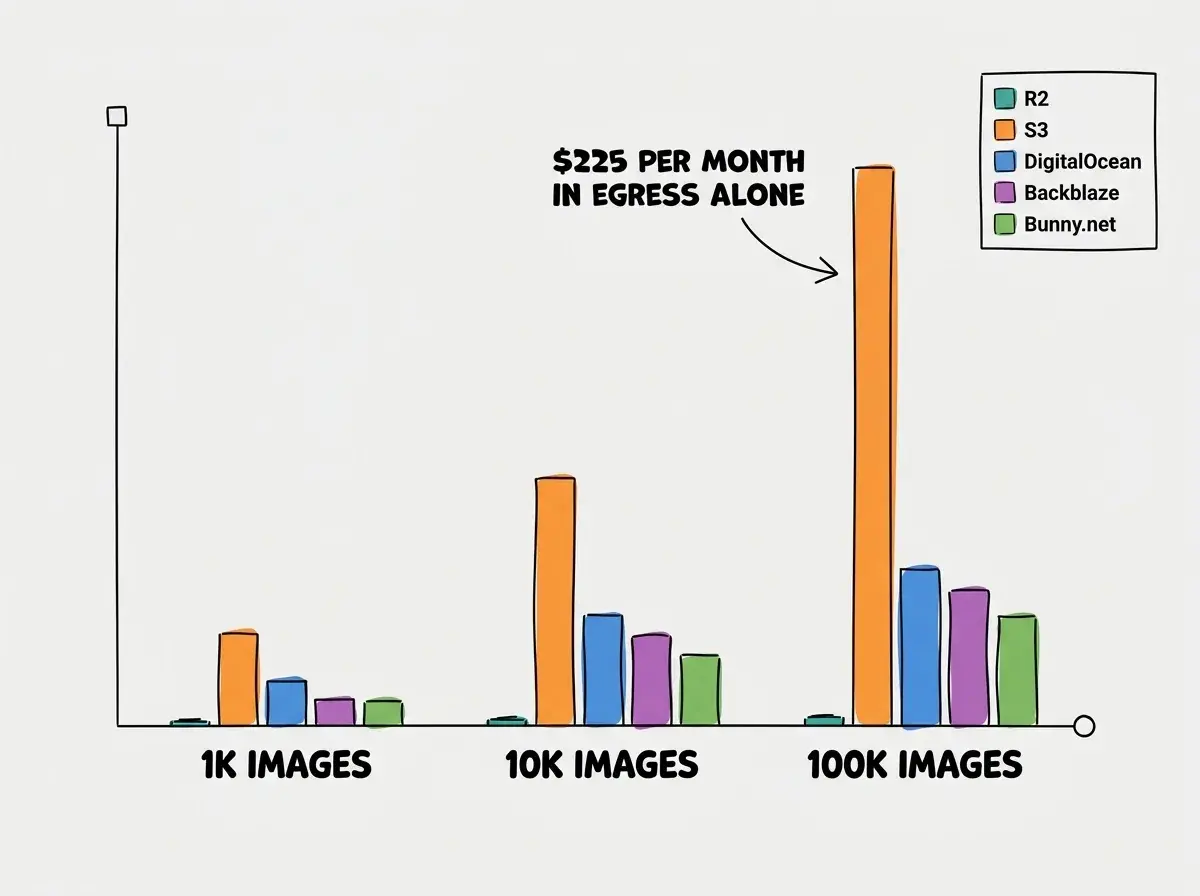
Now the picture changes dramatically. AWS S3 costs $22.62 per month, almost entirely from egress charges. R2 costs eight cents. That is a 280x difference. Even DigitalOcean Spaces at its flat $5 rate is 60x more expensive than R2 for this workload. The only scenario where S3 makes sense at this scale is if you are already deep in the AWS ecosystem and the operational simplicity of staying on one platform is worth $22 per month to you.
100,000 Images (Scaling Platform)
Assumptions: 100,000 images averaging 500 KB each (50 GB total storage), served 5,000,000 times per month (roughly 2.5 TB of bandwidth).
| Provider | Storage Cost | Egress Cost | Total Monthly |
|---|---|---|---|
| Cloudflare R2 | $0.75 | $0.00 | $0.75 |
| AWS S3 | $1.15 | $225.00 | $226.15 |
| DigitalOcean Spaces | $5.00 + $10.00 overage | $0.00 (1 TB included + $10/TB) | $30.00 |
| Backblaze B2 | $0.30 | $25.00 | $25.30 |
| Bunny.net | $0.25 | $12.50-150.00 | $12.75-150.25 |
At 100,000 images, the numbers speak for themselves. R2 costs 75 cents per month. S3 costs $226. Over a year, choosing R2 over S3 for this workload saves you $2,700. For an indie hacker or small startup, that is real money that goes back into building product instead of paying Amazon for the privilege of serving images.
The Egress Trap Explained
Egress is the technical term for data leaving a cloud provider's network. Every time a user's browser requests an image from your S3 bucket, AWS charges you for the bandwidth used to deliver that image. The image might only be 500 KB, but multiply that by millions of requests and the bill grows fast.
Here is why this matters specifically for image-heavy apps. A typical blog post page weighs 200 to 500 KB in HTML, CSS, and JavaScript. But the images on that page can easily add 2 to 5 MB. Images account for 60% to 80% of the total bandwidth on most content-heavy sites. So when a provider charges for egress, images are by far the largest contributor to that charge.
Many developers choose AWS S3 because it is the default recommendation in tutorials and AI-generated code. S3 is an excellent storage service, but the $0.09/GB egress fee adds up fast for image-heavy applications. Before committing to S3, calculate your expected monthly bandwidth. If images will be served directly to browsers (not processed through a CDN that absorbs egress), R2 or Backblaze B2 will almost certainly be cheaper.
R2 eliminates this entire category of cost. Your bill is based purely on how much data you store, not how many times it gets requested. For an app where traffic can spike unpredictably (a Product Hunt launch, a viral tweet, a newsletter mention), this predictability is worth more than the dollar savings. You never have to worry about a traffic spike turning into a four-figure bandwidth bill.
Beyond Raw Pricing
Price per gigabyte is not the only factor. Here is how the five options compare on the features that matter for day-to-day development.
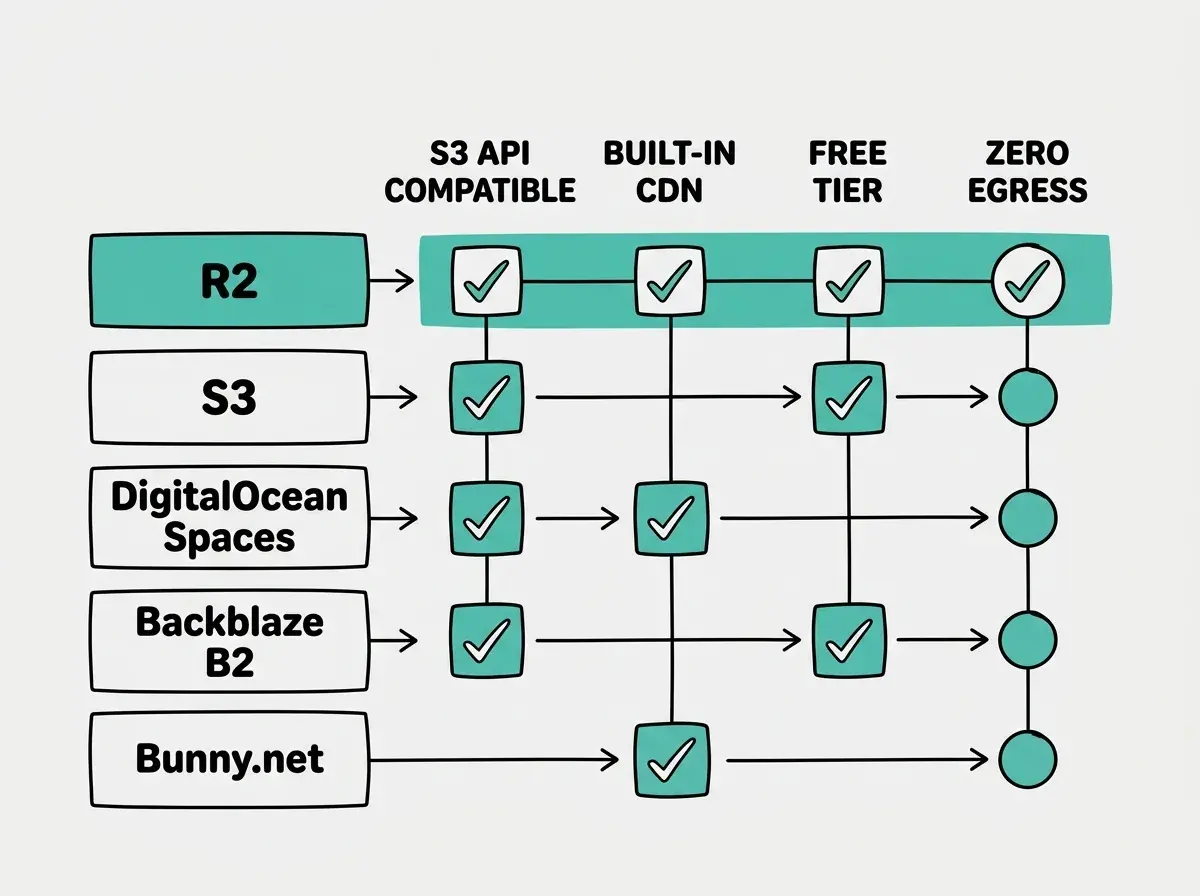
Developer experience. R2 uses the S3-compatible API, so any tool or library that works with S3 works with R2. Switching from S3 to R2 typically requires changing three environment variables and nothing else in your code.
CDN integration. R2 buckets can be exposed through a custom domain on Cloudflare's network, which means your images are served through one of the largest CDNs in the world at no additional cost. S3 requires pairing with CloudFront (which has its own pricing). Backblaze B2 works well with Cloudflare's CDN through the Bandwidth Alliance, which eliminates B2 egress fees.
Free tier durability. R2's free tier (10 GB storage, 1 million reads per month) does not expire. AWS S3's free tier disappears after 12 months. DigitalOcean Spaces has no free tier at all.
Upload and management. All five providers support programmatic uploads via API. R2 and S3 have the most mature tooling. DigitalOcean Spaces and Backblaze B2 both offer S3-compatible APIs. Bunny.net uses a simpler REST API focused on CDN delivery.
When R2 Is Not the Right Choice
R2 wins on price for most image hosting workloads, but there are scenarios where other options make more sense.
If you need the AWS ecosystem. If your app already runs on AWS and uses IAM roles, VPC networking, Lambda triggers on upload, and CloudWatch monitoring, keeping images on S3 keeps your infrastructure unified. The operational simplicity of a single cloud provider has real value, even if it costs more per gigabyte.
If you need the cheapest possible storage. Backblaze B2 at $0.006/GB is less than half the price of R2 for raw storage. If you are archiving millions of images and serving them infrequently, B2's lower storage cost combined with Cloudflare's Bandwidth Alliance (which eliminates B2 egress fees when served through Cloudflare) can be cheaper than R2.
If you want simple flat-rate pricing. DigitalOcean Spaces at $5/month for 250 GB of storage and 1 TB of bandwidth is predictable and simple. No metering, no per-request calculations, just a flat bill. For developers who want to set it and forget it without ever thinking about pricing tiers, Spaces delivers that peace of mind.
Understanding where your app's images live is part of understanding your full tech stack.
See all guidesWhat This Means For You
- If you are an indie hacker building a new app: Start with Cloudflare R2. The free tier covers most early-stage apps completely, the S3-compatible API means you are not locked in, and you will never get a surprise bandwidth bill. Set up a custom domain on Cloudflare for your image bucket and forget about image hosting costs until you are well past 100,000 images.
- If you are a senior dev optimizing an existing stack: Calculate your current monthly egress costs on S3. If bandwidth exceeds $20 per month, migrating to R2 pays for itself immediately. Because R2 is S3-compatible, the migration is a configuration change (three environment variables), not a rewrite.
Image hosting is one piece of the puzzle. See what every part of your app actually costs.
Read the full cost guide