Microsoft Build 2026 opened its keynote on June 2 with two announcements that change what GitHub Copilot is at its model layer and its execution layer. Project Polaris replaces GPT-4 Turbo as the default model for every Copilot subscriber in August. Multi-agent VS Code, available in public preview today, lets an orchestrator agent spawn parallel subagents that run linting, testing, documentation, and security review simultaneously rather than one at a time.
Both changes are automatic for existing subscribers. Neither requires a plan change or additional cost.
Why Is Microsoft Building Its Own Coding Model
The dependency on OpenAI models for GitHub Copilot has been both an asset and a constraint since Copilot launched. GPT-4 Turbo was the obvious default when it shipped, and OpenAI's research pace gave Microsoft an upgrade path without investing in model development. But as Microsoft has built out its own Maia AI accelerator infrastructure on Azure, the economics of routing every Copilot request through OpenAI's API grew less attractive, and the control tradeoffs became harder to justify.
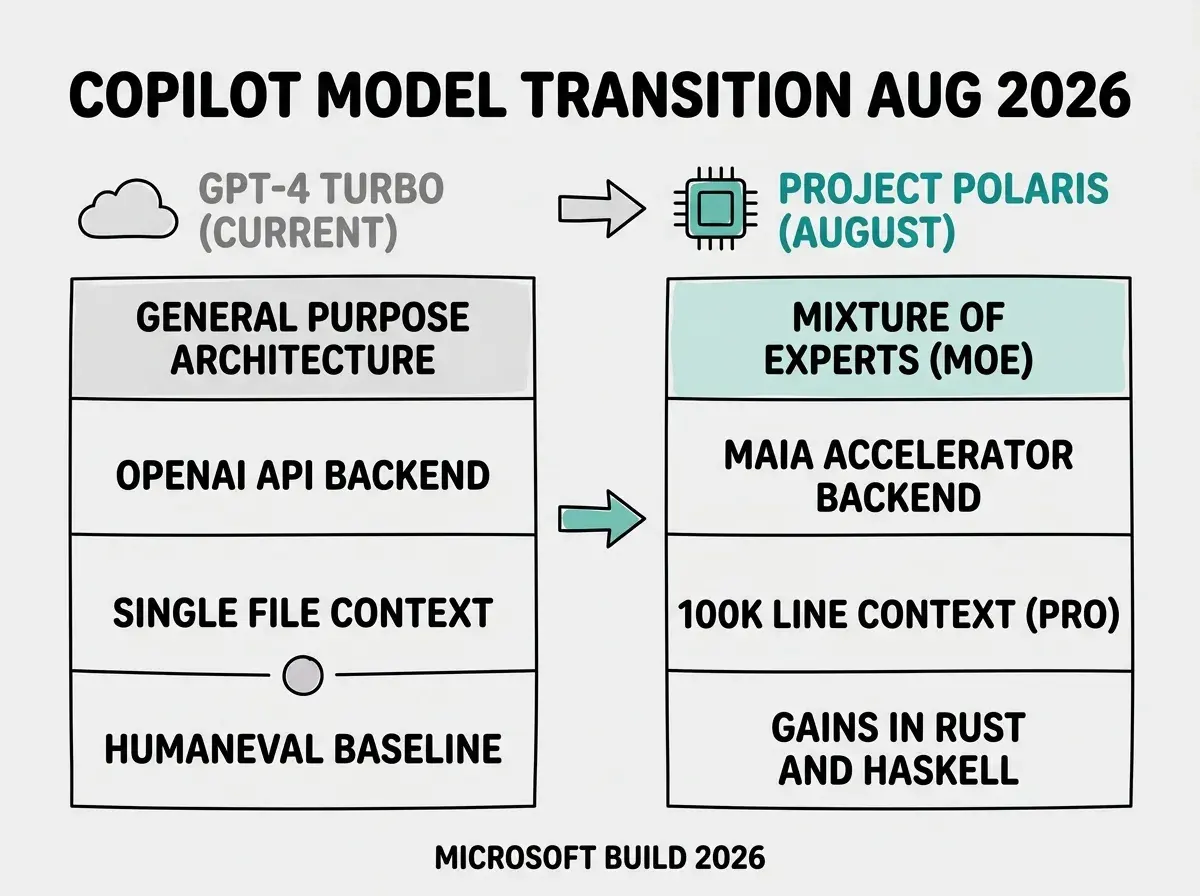
Project Polaris is a mixture-of-experts architecture with specialized sub-modules tuned for specific programming languages and frameworks. Microsoft says it outperforms GPT-4 Turbo on HumanEval and MBPP, the two most commonly cited code generation benchmarks, with the largest claimed gains in low-resource languages including Rust and Haskell. Running on Maia accelerators inside Azure rather than OpenAI's backend is expected to reduce per-inference latency and lower Microsoft's cost per request, which may translate to faster inline completions for users.
Project Polaris ships as the default model for all GitHub Copilot subscribers in August 2026 with automatic migration and an optional three-month fallback to GPT-4 Turbo through November. Multi-agent VS Code is available now in public preview for Copilot Pro, Business, and Enterprise subscribers via VS Code 1.102 and the multi-agent experimental flag in Copilot settings. Pro tier subscribers also gain multi-file context up to 100,000 lines and autonomous test generation with Polaris.
Two caveats are worth naming. The HumanEval and MBPP benchmark figures come from Microsoft and have not been independently audited at the time of this announcement. Those benchmarks measure accuracy on well-defined code generation problems, not the multi-file refactoring, instruction-following, and debugging quality that matters most in daily vibecoder sessions. Independent community benchmarks and head-to-head comparisons against Claude Sonnet 4.6 and GPT-5.5 will take a few weeks to surface. Treat the official benchmark claims as a starting point, not a verdict.
What Does Multi-Agent VS Code Actually Change
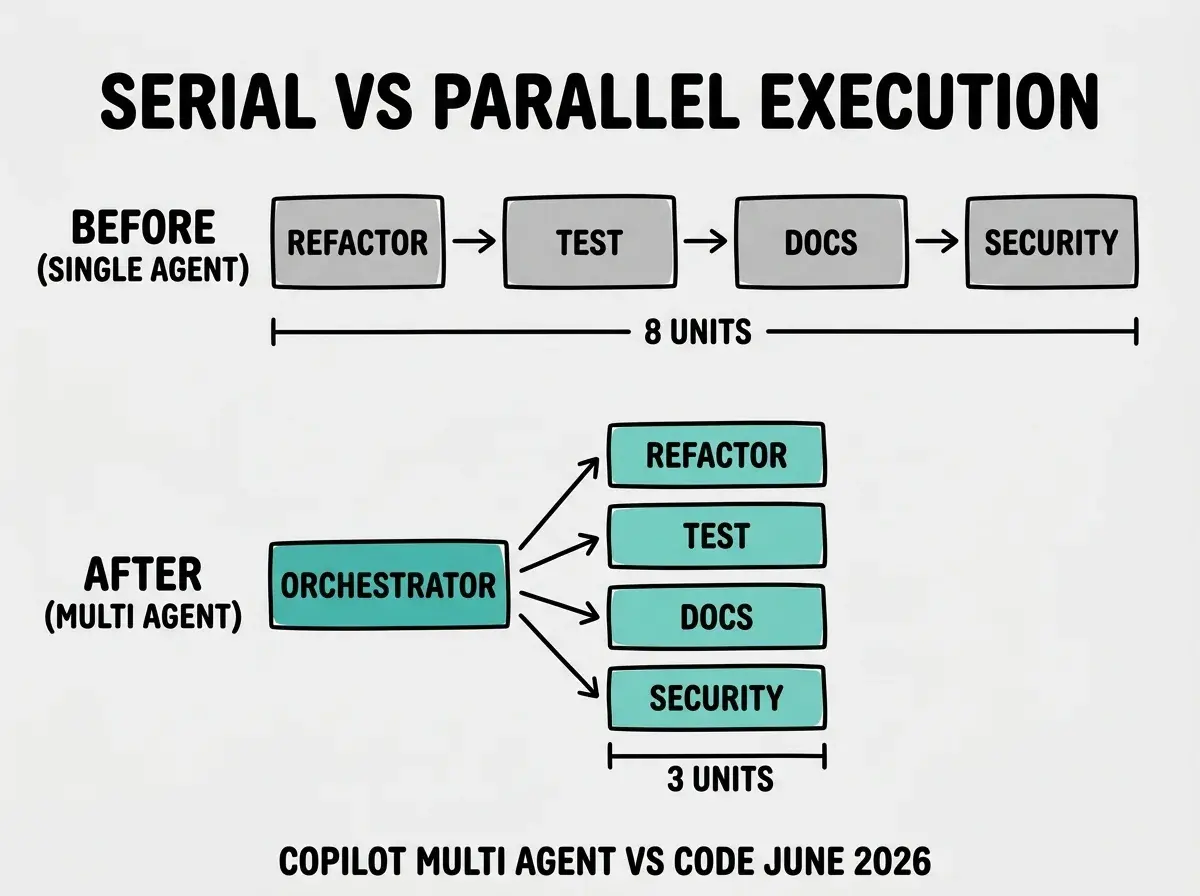
Before multi-agent mode, Copilot's VS Code agent ran tasks serially in a single context window. Ask it to refactor a module, add tests, update inline documentation, and run a security scan, and those workstreams queued behind each other. Each step waited for the previous one to complete, and each one drew from the same context budget.
Multi-agent mode changes the execution model. An orchestrator agent receives your task description, decomposes it into parallel workstreams, and spawns a dedicated subagent for each. The subagents run concurrently, each with its own isolated context window. The orchestrator collects results and surfaces them in a unified interface in the editor. Developers can monitor progress in real time and redirect or cancel individual subagents without abandoning the entire session.
The design decision that matters most is the isolated context window per subagent. In single-agent mode, a test-generation step and a documentation step competed for the same context budget. In multi-agent mode, they do not. A documentation subagent's full attention is on documentation; the test-generation subagent is not diluting its context with documentation history. That isolation is why parallel execution here is different from simply running the same agent twice.
The Vibe Coder Blog covers the tooling and pricing shifts that matter to builders who ship.
Read MoreThe practical gain shows up in wall-clock time for tasks that decompose cleanly. A refactor-and-test cycle that previously required sequential execution may complete noticeably faster when linting and test generation run in parallel. The benefit is proportional to how parallelizable your specific task is. Purely sequential work where each step depends on the previous output gets limited benefit from the new architecture.
The multi-agent extension extends the /fleet command already available in Copilot CLI, which dispatches multiple subagents across files in the terminal. Build 2026 brings that orchestration model into the editor itself.
Who Gets Project Polaris in August and What Changes for Them
All GitHub Copilot subscribers get Project Polaris as their default model in August via automatic migration. There are no enrollment steps, and plan prices are not changing. Microsoft is providing an optional fallback window through November 2026 that lets individuals and teams revert to GPT-4 Turbo via Copilot settings if they encounter regressions in specific workflows.
Pro tier subscribers gain two capabilities alongside the model switch. Multi-file context expands to 100,000 lines, up from the current single-file and limited project context. For vibecoders working on mid-sized or larger codebases, this means Polaris can hold substantially more of the codebase in context when generating completions or reviewing a pull request, rather than losing context at file boundaries.
Autonomous test generation is the second Pro tier addition. Rather than asking Copilot to write tests as a separate step, Polaris will generate test stubs alongside implementation code when it detects a new function or class. Test generation is opt-in per session, not forced on by default.
The most common mistake vibecoders will make is treating the August Polaris migration as a non-event and not testing their most important workflows before the fallback window closes in November. If you rely on Copilot for specific code review automation, Copilot Workspace tasks, or CI-integrated agent sessions, run those workflows against Polaris as soon as the preview flag becomes available and note any regressions. The three-month fallback window exists precisely because model transitions create edge case failures. Missing November and then discovering a regression costs more time to unwind than a proactive test.
How Should You Configure Multi-Agent Mode Today
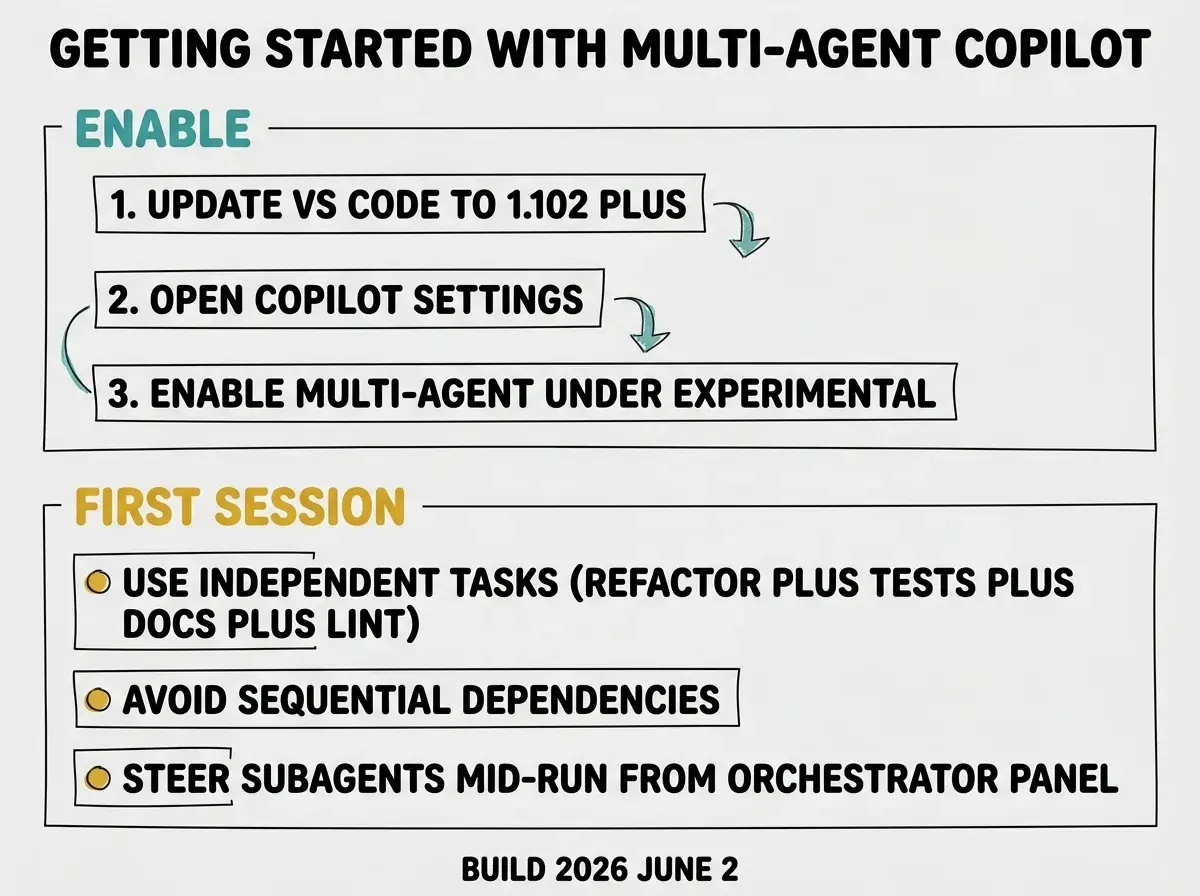
Multi-agent mode is available now in public preview for Copilot Pro, Business, and Enterprise subscribers. To enable it, install or update VS Code to 1.102 or later, open GitHub Copilot settings, and enable the multi-agent flag under the Experimental section. The orchestrator activates automatically once the flag is on.
The most effective way to start is with tasks that decompose into genuinely independent workstreams. "Refactor this module, add unit tests, update the module's JSDoc comments, and run ESLint" is a well-suited first session because none of those four tasks depends on the output of the others. Avoid tasks with tight sequential dependencies in early sessions; the orchestrator performs better with explicit parallel instructions than with vague, open-ended objectives.
You can steer individual subagents mid-run from the orchestrator panel without canceling the session. If the test-generation subagent takes an approach you want to change, redirect it directly; the linting and documentation subagents keep running while you do.
Copilot Workspace, also reaching general availability today at Build, is the companion to multi-agent mode for planning and cross-repository tasks. Workspace lets you describe a feature or bug fix in natural language, get a task plan before any code is generated, and then execute the plan with agent sessions. It now integrates with multi-agent mode so individual plan steps can run in parallel when the dependencies allow.
The Vibe Coder Blog publishes analysis for builders who ship with AI.
Browse All Posts