GDPR compliance for your app is not optional if a single person in Europe uses it. 92% of developers now use AI coding tools daily, and 63% of the people building apps that collect user data have no traditional development background. The regulation does not care how the app was built. It cares what the app does with personal data.
Most vibe-coded apps collect user data from the first day. A signup form captures emails. An analytics script tracks page views. A contact form stores names and messages. Every one of those actions falls under GDPR if the person providing that data is in the EU. The fines start at 20 million euros or 4% of global annual revenue, whichever is higher.
This is not a theoretical risk. In 2024 alone, EU data protection authorities issued over 2 billion euros in GDPR fines. Small companies and solo developers are not immune.
Who GDPR Applies To
The answer is almost certainly yes if any of these are true:
- Your app has users in the EU. It does not matter where you are based. If someone in France, Germany, or any EU member state can sign up, GDPR applies to you.
- You collect any personal data. Email addresses, names, IP addresses, device identifiers, location data, and cookies all count as personal data under GDPR.
- You use third-party services that process EU user data. Stripe, Firebase, Supabase, Google Analytics, Mailchimp. If they handle your EU users' data, you are responsible for ensuring compliance.
If you checked even one of those boxes, keep reading. Privacy regulations similar to GDPR now exist in Brazil, Japan, South Korea, and multiple US states, so these practices apply broadly.
The Consent Requirements
GDPR requires that users give informed, specific, and freely given consent before you collect their data. "Informed" means they know what you are collecting and why. "Specific" means they consent to each purpose separately. "Freely given" means you cannot block access to the app if they refuse.
- Add a clear consent mechanism before collecting any personal data. A checkbox on your signup form that is unchecked by default, with plain-language text explaining what data you collect and why.
- Separate consent for different purposes. If you collect email for account access AND marketing newsletters, those need separate opt-ins. Pre-checked boxes or bundled consent violates the regulation.
- Record when and how consent was given. Store a timestamp and the version of your consent text for each user. You need to prove consent was given if challenged.
- Make it as easy to withdraw consent as it was to give it. If signing up took one click, opting out should take one click too. A "manage preferences" link in every email and a settings page in your app.
The biggest misconception about GDPR consent is that a cookie banner covers everything. Cookie consent is one small piece. You need separate, documented consent for every type of data collection: account creation, email marketing, analytics tracking, and any third-party data sharing. A single "I agree" checkbox for all of it is not compliant.
Privacy Policy Requirements
Every app that collects personal data needs a privacy policy. Not a template copied from another site. A document that accurately describes what your specific app does with data.
- Write a privacy policy that covers these specifics. What data you collect, why you collect it, how long you keep it, who you share it with (including third-party services), and how users can request deletion or export.
- Name every third-party service that processes user data. Supabase for your database, Resend for emails, Stripe for payments, Vercel for hosting. Each one needs to be listed.
- Link your privacy policy from every page. Footer link at minimum. Also link it from your signup form and any data collection point.
- Keep it updated. Every time you add a new service or change how you handle data, update the policy. An outdated privacy policy is almost as bad as not having one.
You do not need a lawyer for version one. Write it in plain language. Describe what your app actually does.
Data Deletion and Export Rights
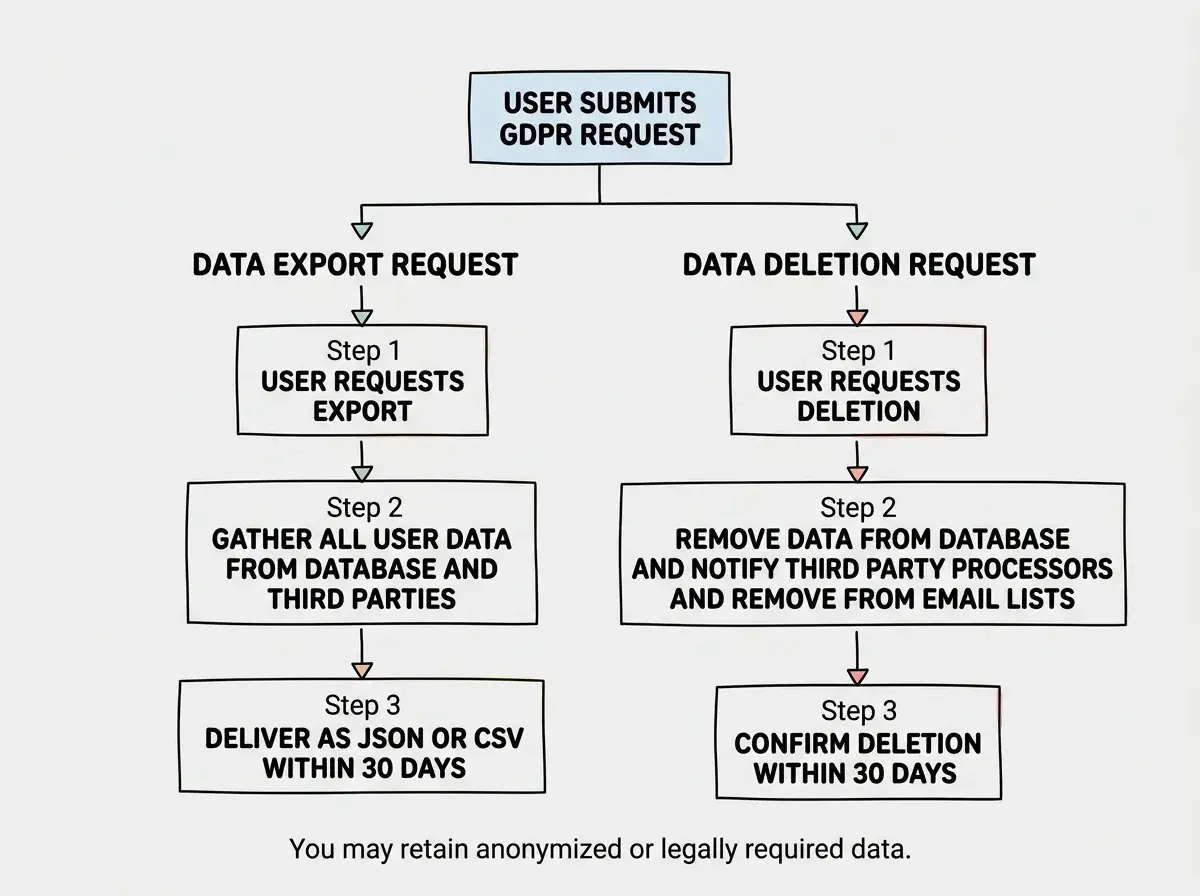
Under GDPR, users have the right to request a copy of all their data (data portability) and the right to have their data deleted (right to erasure). Your app needs to support both.
- Build a data export feature. Users should be able to download everything you have stored about them. JSON or CSV format is fine. This can be a button in account settings or a manual process you handle via email for now, but it must exist.
- Build a data deletion feature. When a user requests deletion, remove their personal data from your database, your email lists, and notify any third-party processors. "Delete account" in settings is the cleanest approach.
- Handle deletion requests within 30 days. GDPR gives you one month. Respond to every request, even if you need more time.
- Document what gets deleted and what gets retained. You can keep anonymized data for analytics or data required for legal obligations. Document this in your privacy policy.
If you are using Supabase, it has built-in features that help here. Row Level Security ensures users can only access their own data. You can write a database function that deletes all rows associated with a user ID across every table. Supabase also lets you run SQL exports filtered by user, which covers the data portability requirement.
Cookie Consent and Analytics
Cookies are the most visible part of GDPR compliance because of the consent banners. Here is what actually matters.
- Audit every cookie your app sets. Open DevTools, Application tab, Cookies. List every cookie, who sets it, and what it does. AI-generated apps often include tracking scripts you never explicitly added.
- Show a cookie consent banner before setting non-essential cookies. Essential cookies (session tokens, CSRF protection) do not need consent. Analytics cookies, advertising cookies, and third-party tracking cookies do. The banner must allow users to reject non-essential cookies, and rejecting them must actually prevent those cookies from loading.
- Switch to privacy-friendly analytics. Google Analytics is a GDPR headache. It transfers data to the US, requires consent banners, and has been ruled non-compliant by multiple EU data protection authorities. Alternatives like Plausible and Umami are cookieless, do not track personal data, and can run without a consent banner. Plausible costs $9/month. Umami is free and self-hostable.
- If you keep Google Analytics, gate it behind consent. Only load the GA script after the user explicitly accepts analytics cookies. Not before. Loading the script and then asking for consent is a violation.
Using a cookie consent banner that does not actually block cookies. Many templates show a banner but load Google Analytics, Facebook Pixel, and other trackers regardless of what the user clicks. Your banner must programmatically prevent non-essential scripts from loading until consent is given. Test this by rejecting cookies and checking DevTools to confirm no tracking cookies appear.
The Minimum Viable Compliance Checklist
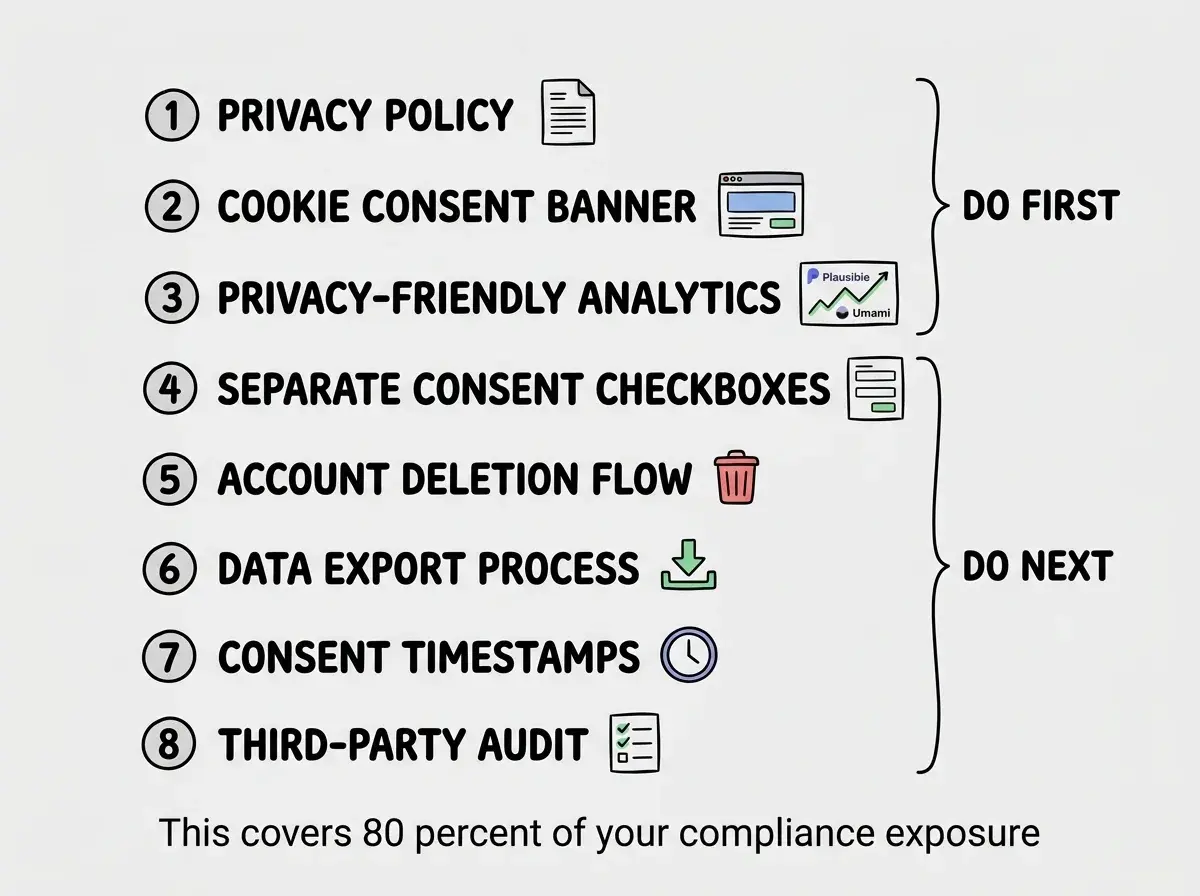
If the sections above feel overwhelming, here is the stripped-down version. Do these things first. They cover 80% of your compliance exposure.
- Write and publish a privacy policy that describes what you collect, why, and who processes it.
- Add a cookie consent banner that actually blocks non-essential cookies when rejected.
- Switch to Plausible or Umami so you can drop the analytics consent requirement entirely.
- Add separate consent checkboxes for signup and marketing emails.
- Build a basic account deletion flow so users can request their data be removed.
- Add a "data export" process even if it is manual for now.
- Record consent timestamps for every user who signs up.
- List all third-party services in your privacy policy and verify each one has GDPR data processing agreements (most major services like Supabase, Stripe, and Resend already do).
Get the fundamentals right before you worry about compliance.
Start with the basicsOngoing Compliance
GDPR is not a one-time checkbox. It requires ongoing attention.
- Review your data practices when you add new features. Every new form field, integration, or analytics tool potentially changes your compliance posture.
- Update your privacy policy when your stack changes. Your privacy policy needs to reflect reality at all times.
- Respond to data requests promptly. Set up an email alias like privacy@yourdomain.com and check it regularly.
- Keep consent records. If a regulator asks you to prove a specific user consented, you need that evidence.
The regulation is not going away. Building privacy-respecting habits now means you are ready for whatever comes next.
Dig deeper
A few hand-picked sources if you want to go further.
What This Means For You
- If you are a founder: GDPR compliance is a trust signal. Customers check for privacy policies. Enterprise buyers require them. Getting compliant now removes a blocker from every future sales conversation and partnership.
- If you are an experienced developer: You likely already know the principles but may not have applied them to your vibe-coded side projects. The same standards apply. Treat every project that collects data as production software, because to your users, it is.
- If you are building with Supabase: You have a head start. Row Level Security, built-in auth, and SQL access make the technical requirements straightforward. Focus your effort on the policy and consent documentation.
Start building with the right foundations from day one.
Explore the guides