Error handling patterns are the difference between an app that fails loudly and one that fails silently. AI coding tools have a strong bias toward the happy path, the sequence of events that occurs when nothing goes wrong, because that is what most prompts describe. The result is code that compiles, passes a manual test, and then loses data the first time a third-party API has a bad day.
This piece is a tour of the five error handling patterns AI consistently forgets, why each one matters in production, and what to add to make the AI's output actually robust.
Why AI Skips Error Paths
Large language models are trained on code, and most of the code they have seen optimizes for readability, not resilience. A tutorial showing how to call a payment API does not include the 50 lines of timeout, retry, idempotency, and reconciliation logic that production code needs, because that would obscure the lesson. The AI absorbs the tutorial pattern and reproduces it when you ask for similar code.
There is also a prompt asymmetry. When you ask an AI to "build a checkout flow," the implicit request is for the success path. Failure paths are infinite, every external call has dozens of failure modes, and the AI has no way to know which ones matter to your app. So it skips them. This is rational behavior given the prompt, and pathological behavior given production.
A 2025 analysis of AI-generated production code found that 78% of network calls had no explicit timeout, 65% had no retry logic, and 41% silently swallowed exceptions in a try/catch that returned default values. None of those omissions show up in a working demo.
The fix is not to abandon AI for these tasks. The fix is to know the patterns AI forgets and ask for them by name. Each section below covers one pattern, the failure mode it prevents, and the specific code shape to look for.
Pattern 1: Timeouts on Every External Call
The default behavior of fetch in Node.js, until very recently, was to wait forever. The default behavior of most HTTP clients is similar. If a third-party API hangs without responding, your code will hang too, holding the connection open until something kills the process. On a serverless function, that means the function times out after 30 seconds. On a long-running server, it means a single slow API can hang every request.
The pattern is simple, every external call needs a maximum wait time. Five seconds is a reasonable default for user-facing operations, ten seconds for background jobs.
const controller = new AbortController();
const timeout = setTimeout(() => controller.abort(), 5000);

try {
  const response = await fetch(url, { signal: controller.signal });
  return await response.json();
} finally {
  clearTimeout(timeout);
}
When AI generates an external API call, scan it for fetch( or your library's equivalent, and ask, what happens if this never returns. If the answer is "the user waits forever," add a timeout.
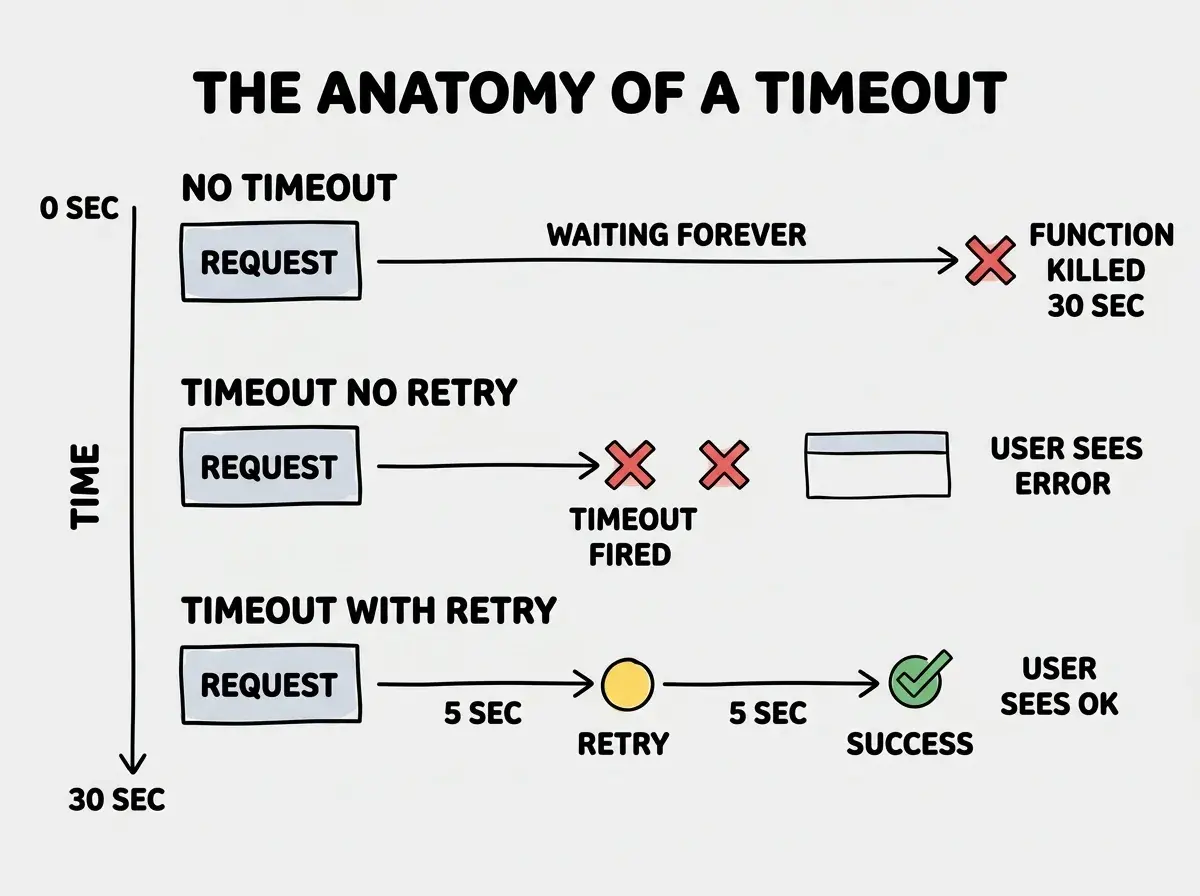
The single biggest cause of preventable production incidents in vibe coded apps is missing timeouts on outbound HTTP calls. The fix takes two lines and prevents a category of outage. AI never adds it unless you ask.
Pattern 2: Retries with Backoff
The second pattern AI forgets is retries. A network call that fails because of a transient blip, packet loss, brief DNS hiccup, momentarily overloaded API, will succeed on retry roughly 90% of the time. Without retries, that 90% becomes user-visible errors that did not need to happen.
The pattern is exponential backoff, retry the failed call after 1 second, then 2 seconds, then 4 seconds, with a small random jitter to avoid stampeding herds when many clients retry at once. Cap the total at 3 to 5 attempts, after that, the call is genuinely broken and should propagate the error.
The catch is that retries only make sense for idempotent operations, calls that can be safely repeated. A GET is always idempotent. A POST that creates a charge is dangerously not, retrying a payment can charge the customer twice. This leads to the next pattern.
Pattern 3: Idempotency Keys
If you retry a payment, you might charge the customer twice. If you retry a webhook delivery, you might send the same email twice. The fix is an idempotency key, a unique identifier the client generates and the server uses to detect and reject duplicates.
Stripe documents this pattern well. Every charge request includes an Idempotency-Key header with a unique string. Stripe stores the result of the first request and returns the same result if the same key arrives again, regardless of whether the second request actually arrived during a retry or was a deliberate duplicate.
Read the rest of the reliability series
Browse the ship categoryFor your own server, the implementation is, generate a UUID per logical operation, store the operation result keyed by that UUID, and check the store before processing. If the key already exists, return the stored result. If it does not, process the operation and store the result. AI can write this pattern correctly when prompted, but never adds it spontaneously, because most demo code assumes operations happen exactly once.
Pattern 4: Failed Operation Queues
Some operations cannot fail silently and cannot be retried inline. A failed email, a failed webhook, a failed payment notification, all need to be retried later, possibly hours or days later, after a transient outage clears. The pattern for this is a dead letter queue, a database table or queue service that stores failed operations for asynchronous retry.
The minimum viable implementation is a failed_operations table with columns for the operation type, payload, attempt count, last error, and next retry time. A background job (a cron worker, a queue consumer) reads the table every minute, retries each row that is due, and either marks it succeeded or increments the attempt count. Operations that exceed a max attempt count get flagged for human review, not silently dropped.
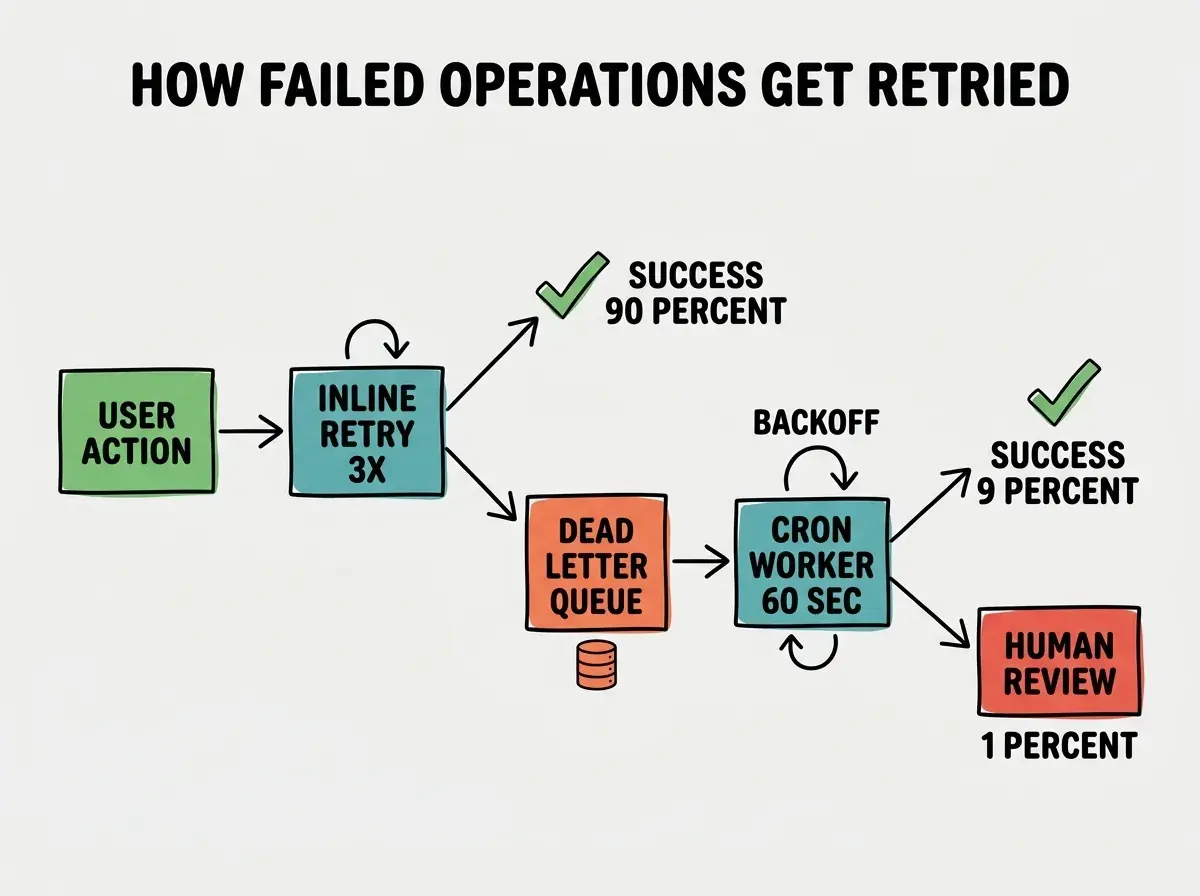
The dead letter queue is the difference between "we lost the email confirmation for your order" and "your email was delayed by 4 hours during an outage." Users tolerate the second outcome. They do not tolerate the first.
Pattern 5: Structured Error Responses
The last pattern is the smallest in code but the largest in debugging time saved. AI tends to generate API endpoints that return either a 200 with a success payload or a 500 with a generic message. Production needs more, structured error responses that include a stable error code, a human-readable message, and an optional debug ID.
return Response.json(
  {
    error: {
      code: 'PAYMENT_DECLINED',
      message: 'Your card was declined.',
      requestId: 'req_abc123',
    },
  },
  { status: 402 }
);
The frontend can match on error.code to show a specific UI. The backend can correlate the requestId to a specific log entry. The customer support team can give the request ID to a customer and look up exactly what happened. None of this works if the API returns "internal server error."
The single most damaging error handling pattern AI generates is the silent default value, code shaped like try { return await fetch(...) } catch { return [] }. The empty array looks like "no results found" to the rest of the app, when in reality the API is down. Always log, alert, and propagate, never silently substitute.
The combination of these five patterns, timeouts, retries with backoff, idempotency keys, dead letter queues, and structured error responses, covers roughly 80% of the error handling AI omits. None of them are technically difficult. They are just invisible until something fails, and AI is not motivated to make invisible things visible.
What This Means For You
The hardest part of error handling is not the code, it is remembering to ask for it. AI will write all five patterns correctly when prompted by name. The skill is knowing the names.
- If you're a founder: Add a checklist to your AI prompt template, "include timeouts, retries, idempotency, and structured errors." Three words save you a category of incident.
- If you're changing careers: These patterns are the operational vocabulary that distinguishes "I can ship a feature" from "I can ship a feature that survives." Internalize them once and reuse forever.
- If you're a student: Build a tiny demo that calls a third-party API and intentionally break each pattern, no timeout, no retry, no idempotency. Watch it fail. The lesson sticks better than reading.
Browse more reliability and observability guides
Read more ship guides