Resend vs SendGrid is the comparison most vibe coders face when their app needs transactional email. Resend charges $20 per month for 50,000 emails. SendGrid charges $19.95 for the same volume. The real differences are in free tiers, deliverability, and what happens when you scale.
I have set up transactional email on six projects in the past year using Resend, SendGrid, and Amazon SES. The deciding factor was never the headline price. It was the combination of free tier limits, setup time, and how each service handled bounces and domain verification. This guide gives you the exact numbers I wish I had before making those choices.
What Each Service Actually Costs
Here are the real prices across all four services, stripped of marketing language and based on current 2026 pricing.
Resend gives you 3,000 emails per month for free. The Pro plan is $20 per month for 50,000 emails and includes React Email, so you write templates in JSX the same way you write app components. The API is clean, the docs are excellent, and setup takes about 15 minutes.
SendGrid gives you 100 emails per day for free (roughly 3,000 per month). The Essentials plan starts at $19.95 per month for 50,000 emails. SendGrid has been around since 2009 and offers the broadest feature set: marketing campaigns, contact lists, A/B testing, and webhooks for every email event.
Postmark offers 100 emails per month on its trial tier, barely enough to test your integration. Paid plans start at $15 per month for 10,000 emails and $55 per month for 50,000. Postmark has the best deliverability reputation in the industry because they refuse to send marketing email, keeping their IP addresses clean.
Amazon SES charges $0.10 per 1,000 emails with no meaningful free tier. At 50,000 emails per month, that is $5 total. SES is the cheapest at scale, but you manage bounce handling, complaint processing, and reputation monitoring yourself.
| Free Tier | 10K emails/mo | 50K emails/mo | 100K emails/mo | |
|---|---|---|---|---|
| Resend | 3,000/mo | $20 | $20 | $50 |
| SendGrid | ~3,000/mo | $19.95 | $19.95 | $34.95 |
| Postmark | 100/mo (trial) | $15 | $55 | $100 |
| Amazon SES | None | $1 | $5 | $10 |
The table makes SES look like the obvious winner. It is not. The price gap between SES at $5 per month and Resend at $20 per month is $15. That $15 buys you a managed service with automatic bounce handling, a dashboard for debugging delivery issues, and React Email templates that save hours of development time. For a vibe-coded app where your time is the most expensive resource, the cheapest per-email price is rarely the cheapest total cost.
At the volumes most vibe-coded apps generate (under 50,000 emails per month), the price difference between services is $15 to $50 per month. Your decision should be based on developer experience, deliverability reputation, and setup time, not on saving $10 per month. The exception is if you are sending over 100,000 emails per month, where Amazon SES becomes meaningfully cheaper.
How the Free Tiers Compare in Practice
The free tier is where most vibe coders start, and the differences matter more than the headline numbers suggest.
Resend's 3,000 emails per month is genuinely usable. If your app has 200 active users sending an average of 10 transactional emails each (welcome emails, password resets, notifications), you are at 2,000 and comfortably within the limit.
SendGrid's 100 emails per day sounds similar, but the daily cap creates real problems. If 150 users sign up in one day, the 101st user does not get a welcome email. Daily limits punish growth spikes in a way that monthly limits do not.
Postmark's 100 emails per month is a trial, not a production-viable plan. Plan to be on the $15 per month tier from the start if you choose Postmark.
SES has no free tier worth mentioning. Your first month might cost $0.50 total, which is functionally free but still requires full production setup.
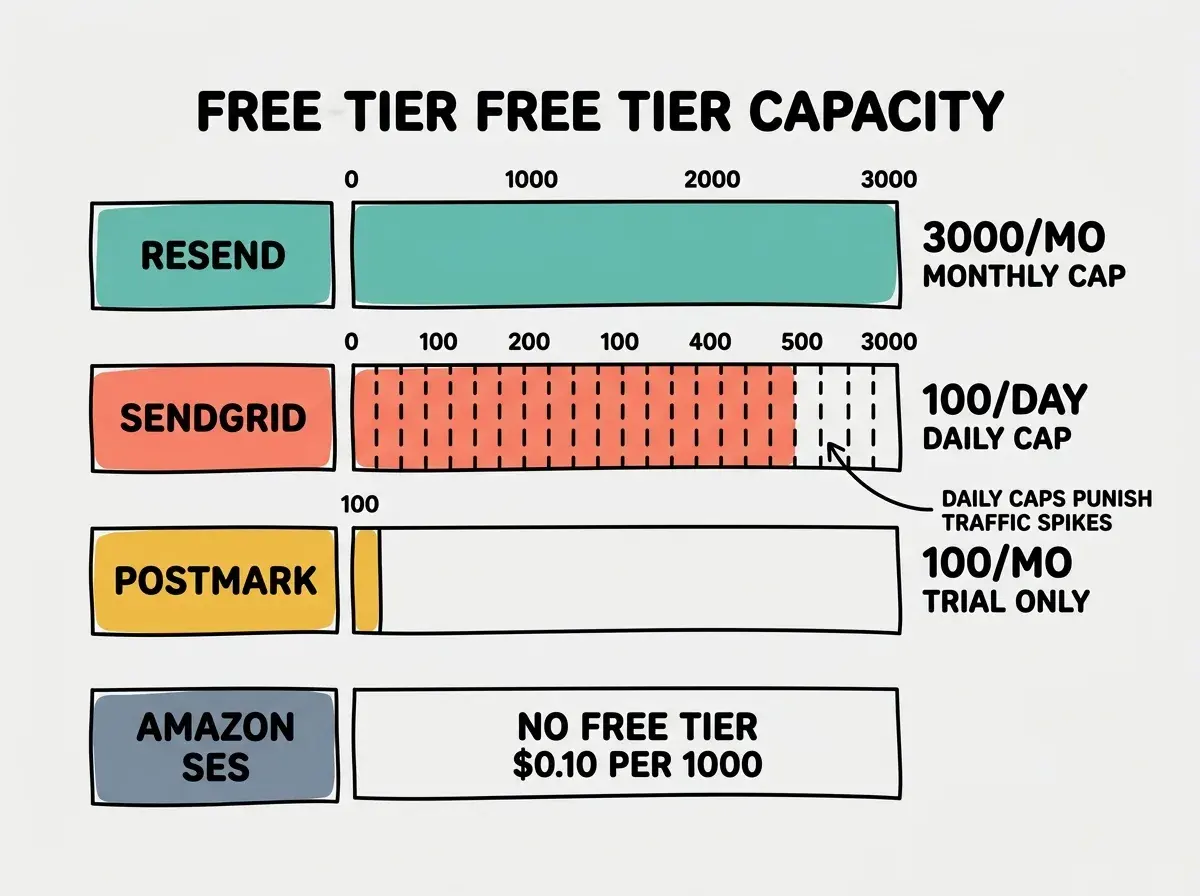
For most vibe coders building their first product, Resend's free tier gives you the most room to grow without hitting artificial limits. SendGrid's daily cap is workable if your traffic is steady, but it becomes a problem the moment your app has a good day.
Developer Experience and Setup Time
The price comparison only tells half the story. The other half is how long it takes to go from zero to sending your first email, and how pleasant the ongoing experience is.
If you are still choosing your tech stack, understand the full picture before picking services.
See what apps really costResend takes about 15 minutes. Add your domain, verify DNS records, install the npm package, and send your first email. React Email means you build templates in JSX with no context switching. For vibe coders working in Next.js, this is a significant productivity advantage.
SendGrid takes about 30 minutes. The process is similar, but the dashboard is more complex because it serves both transactional and marketing use cases. Templates use a drag-and-drop builder or Handlebars syntax, neither of which feels natural coming from a React codebase.
Postmark takes about 20 minutes. The onboarding is clean and focused. Their "server" concept adds a small learning curve but keeps things organized. The dashboard is the most readable of all four services for monitoring delivery rates.
Amazon SES takes 45 minutes to several hours. You need an AWS account, IAM credentials, domain verification, and you must request production access (SES starts in sandbox mode). Moving out of sandbox requires a support ticket that can take 24 hours. Bounce handling must be configured manually through SNS topics. For a solo builder, this setup cost in time frequently exceeds the money saved.
Deliverability and Reputation
Sending email is easy. Getting email into the inbox is the hard part. Deliverability varies significantly across services.
Postmark has the strongest deliverability because they refuse marketing email entirely. Their IP pools carry only transactional messages, so Gmail and Outlook trust Postmark's servers more. If your app sends time-sensitive messages (two-factor codes, payment confirmations, booking notifications), Postmark's deliverability advantage is worth the higher price.
Resend is newer but has built strong deliverability quickly. Their default shared IPs maintain good standing, and they offer dedicated IPs for higher-volume senders. For apps sending under 50,000 emails per month, Resend's inbox placement is excellent.
SendGrid's deliverability depends on your tier. Free and Essentials plans use shared IP pools that include marketing traffic, which can hurt your transactional delivery rates. Dedicated IPs start at $89.95 per month.
SES deliverability is entirely your responsibility. Neglect bounce handling or complaint processing and Amazon will throttle or suspend your sending ability.
Choosing an email service based only on per-email cost without considering deliverability. A $5 per month SES bill means nothing if 15% of your password reset emails land in spam folders because you did not configure bounce handling. For apps where email delivery is critical (authentication, payments, bookings), pay for a managed service with proven inbox placement rates. The $15 to $50 per month premium over SES is insurance against lost users and lost revenue.
Scaling Past 50,000 Emails Per Month
The pricing dynamics shift once your app sends more than 50,000 emails per month. At this volume, you are running a real product with real users, and the cost differences become meaningful.
At 100,000 emails per month, Resend charges $50, SendGrid charges $34.95, Postmark charges $100, and SES charges $10. The spread is $90 per month or $1,080 per year. Real money, but still a rounding error for a product generating revenue at that volume.
At 500,000 emails per month, SES costs $50 while Resend and SendGrid are in the $200 to $400 range and Postmark charges roughly $500. At this volume, the savings from SES start to justify the engineering overhead.
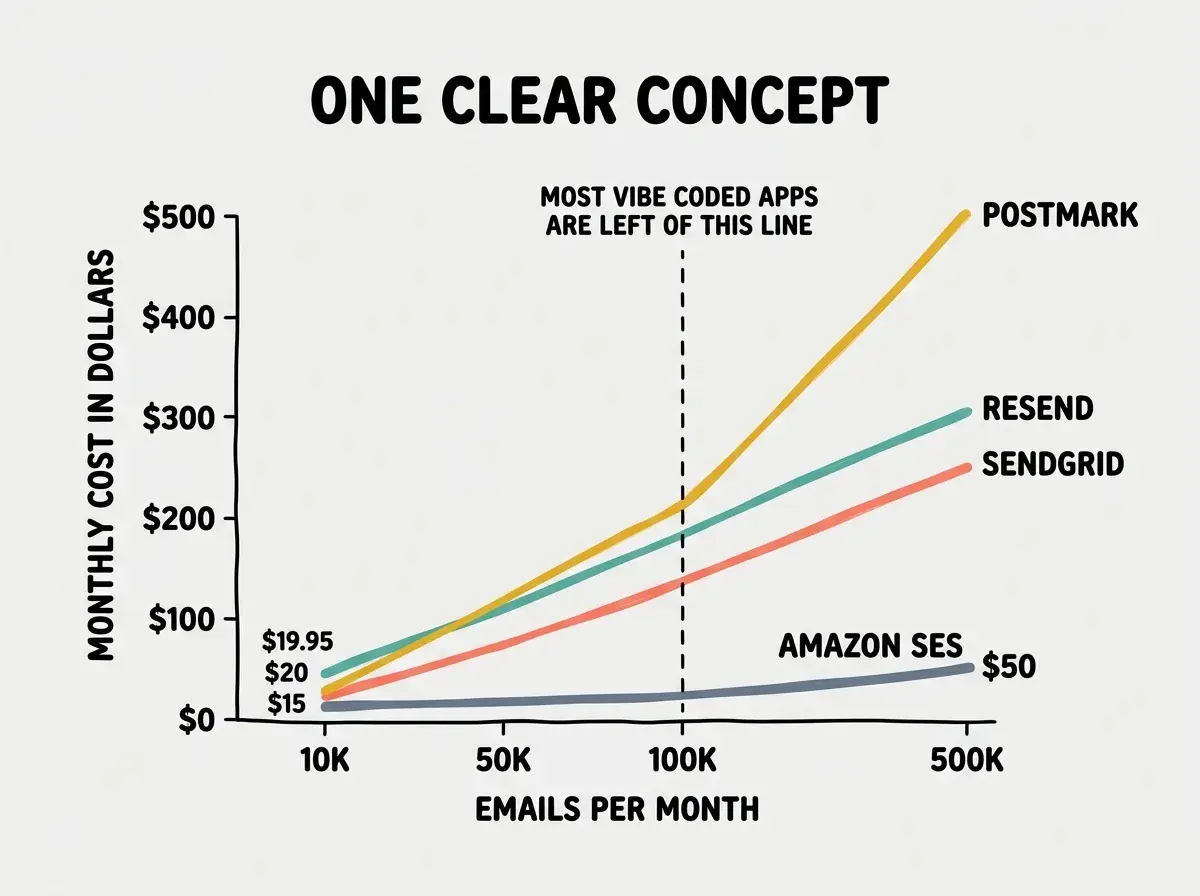
The crossover point where SES becomes the pragmatic choice is around 200,000 emails per month for teams that have the engineering capacity to manage it. Below that, the managed services (Resend, SendGrid, Postmark) save you enough time and headache to justify the premium.
Frequently Asked Questions
Which Service Fits Your Situation
The right email service depends on three things: your current volume, your framework, and how critical inbox placement is for your product.
Choose Resend if you are building with React or Next.js and your volume is under 100,000 emails per month. React Email saves hours on templates. Resend is the natural choice for most vibe coders in 2026.
Choose SendGrid if you need transactional and marketing email from one platform or your organization already has an account. The ecosystem of integrations is unmatched.
Choose Postmark if deliverability is mission-critical. Booking platforms, financial apps, anything where a missed email means a missed transaction. Worth the premium.
Choose Amazon SES if you send over 200,000 emails per month and have the engineering skills to manage bounce handling yourself. Not the right choice for solo builders shipping their first product.
Email is one piece of the cost puzzle. Understand the full picture before you launch.
See the full cost breakdownWhat This Means For You
- If you are an indie hacker building your first product: Start with Resend's free tier of 3,000 emails per month. The React Email integration will save you time on templates, the API is the cleanest in the industry, and you will not hit the free tier limit until you have real traction. When you outgrow the free tier, $20 per month for 50,000 emails is a reasonable cost for any product generating revenue.
- If you are a founder scaling past your MVP: Evaluate whether your current email service is costing you in deliverability, not just dollars. If users complain about missing emails, the $15 to $50 per month difference between services is irrelevant compared to the users you are losing. Consider Postmark if inbox placement is critical, or stick with Resend or SendGrid if your current delivery rates are healthy. Only move to SES when your volume justifies the engineering overhead of managing it yourself.