Choosing between Drizzle vs Prisma in 2026 comes down to what you value most. Prisma gives you a mature ecosystem with studio tooling and a schema-first workflow that 92% of developers using AI tools daily will find well-supported by their code generators. Drizzle gives you a SQL-like TypeScript API, a dramatically smaller bundle, and edge runtime compatibility out of the box.
Quick Verdict
| Prisma | Drizzle ORM | |
|---|---|---|
| Best for | Teams wanting mature tooling, schema-first workflows | Performance-focused apps, edge runtimes, SQL-native devs |
| Bundle size | ~2.5 MB (engine + client) | ~50 KB (client only) |
| Strength | Prisma Studio, migrations, massive ecosystem | SQL-like syntax, tiny footprint, zero dependencies |
| Weakness | Heavy runtime, poor edge support | Smaller ecosystem, fewer learning resources |
The table gives you the quick answer. The rest of this article explains when each tool actually wins in practice, especially when AI is writing most of your database code.
What Prisma Does Well
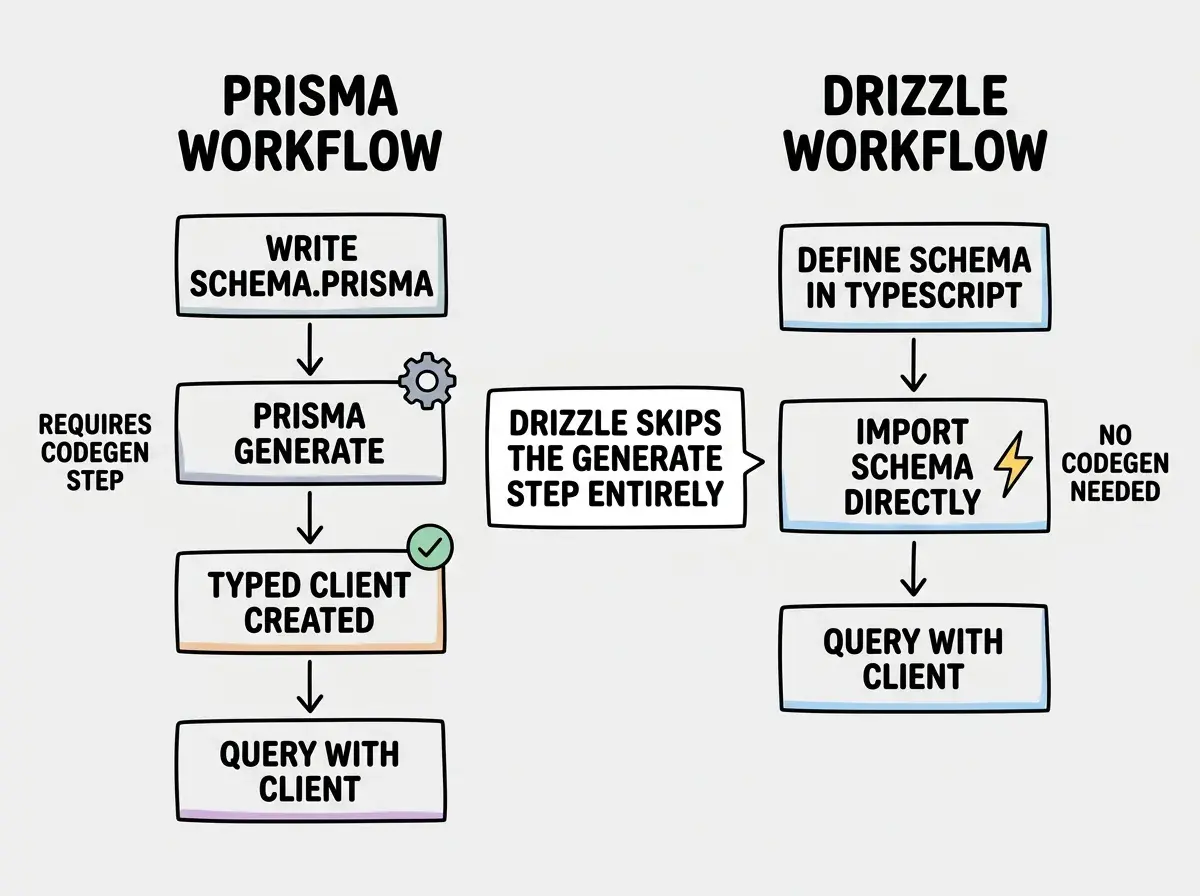
Schema-first design that reads like documentation. Prisma's .prisma schema file is one of the cleanest ways to define your data model. You write your models in a dedicated DSL, run prisma generate, and get a fully typed client. The schema acts as a single source of truth that both humans and AI tools can read without ambiguity. When you hand an AI your schema.prisma file, it immediately understands your data relationships, field types, and constraints.
Prisma Studio for visual database exploration. Run npx prisma studio and you get a browser-based GUI for viewing and editing your data. No SQL queries, no separate database client. For vibe coders who are not comfortable writing raw SQL to debug data issues, this is genuinely useful. You can filter records, edit fields inline, and see relationships visually. It turns your database from an invisible black box into something you can actually interact with.
The most mature migration workflow in the TypeScript ORM space. prisma migrate dev generates SQL migration files from your schema changes, applies them to your development database, and regenerates the client. prisma migrate deploy runs pending migrations in production. The migration files are plain SQL, so you can review exactly what will happen before it runs. This workflow has been battle-tested across thousands of production apps since 2019.
Massive ecosystem and community support. Prisma has more Stack Overflow answers, more tutorials, more example repos, and more third-party integrations than any other TypeScript ORM. When something goes wrong, you will find someone who already solved that problem. For indie hackers shipping fast, the depth of available help matters as much as the tool itself.
Drizzle vs Prisma is not a question of which ORM is objectively better. It is a question of tradeoffs. Prisma optimizes for developer experience and tooling maturity. Drizzle optimizes for runtime performance and deployment flexibility. The right choice depends on where your app runs, how large your bundle budget is, and whether you think in SQL or in abstractions.
What Drizzle Does Well
SQL-like syntax that teaches you SQL while you use it. Drizzle queries look like SQL translated directly into TypeScript. Instead of hiding SQL behind method chains, Drizzle embraces it. db.select().from(users).where(eq(users.email, email)) reads almost exactly like the SQL it generates. If you are learning databases while vibe coding, Drizzle builds real SQL intuition. If you already know SQL, Drizzle feels immediately familiar rather than forcing you to learn a new abstraction layer.
A bundle size that actually works on edge runtimes. The Drizzle client weighs roughly 50 KB. Prisma's client plus its query engine weighs roughly 2.5 MB. On Cloudflare Workers with a 3 MB compressed limit (free tier), Prisma physically does not fit in many cases. Drizzle fits comfortably with room to spare. If you are deploying to Cloudflare Workers, Vercel Edge Functions, or any environment with size constraints, this is not a nice-to-have. It is a hard requirement.
Zero-dependency, zero-codegen architecture. Drizzle does not have a generate step. You define your schema in TypeScript files, import them, and use them directly. There is no build step that transforms a DSL into a client library. This simplifies your CI/CD pipeline, eliminates an entire category of "forgot to run generate" bugs, and means your schema is just TypeScript that your IDE already understands with full autocomplete and type checking.
Drizzle Kit for migrations without lock-in. drizzle-kit generate creates SQL migration files from your schema changes. drizzle-kit push applies schema changes directly to your database without migration files (useful for prototyping). You get flexibility to choose the workflow that matches your current stage. Prototyping? Push directly. Production? Generate and review migration files.
Head-to-Head on What Matters
Query Performance
Drizzle queries run faster in benchmarks. Prisma's query engine adds overhead because queries pass through a Rust-based engine before reaching your database. Drizzle generates SQL directly from your TypeScript calls with no intermediate layer. In practice, the difference ranges from 2x to 5x on simple queries. For most CRUD apps, Prisma is fast enough. For high-throughput APIs or latency-sensitive endpoints, the gap matters.
Prisma has improved significantly with the "Accelerate" caching layer and recent engine optimizations. But the architectural overhead of an external query engine means Drizzle will likely always have an edge on raw query speed.
Bundle Size and Edge Compatibility
This is where the comparison gets decisive. Drizzle works on every edge runtime without configuration. Prisma requires the Accelerate service or the newer "driver adapter" pattern to work on edge runtimes, and even then the bundle is significantly larger.
If your app runs on a traditional Node.js server or a container, bundle size is irrelevant. If your app runs on Cloudflare Workers, Vercel Edge, Deno Deploy, or any V8-isolate environment, Drizzle is the practical choice. Prisma's team is actively working on edge support, but as of early 2026, Drizzle has a substantial lead here.
Migration Workflows
Both tools generate SQL migration files. Both let you review those files before applying them.
Prisma's prisma migrate is more opinionated and more guardrailed. It tracks migration state in a dedicated database table, warns you about destructive changes, and integrates tightly with the Prisma schema file. For teams, the structured workflow prevents mistakes.
Drizzle Kit's generate and push commands are more flexible. The push command is especially useful during rapid prototyping because it skips migration files entirely and syncs your schema directly. This speed comes at a cost: there are fewer safety nets if you accidentally push a destructive change to production.
Using drizzle-kit push in production instead of drizzle-kit generate plus drizzle-kit migrate. The push command is designed for development and prototyping. It applies schema changes directly without creating migration files, which means you have no rollback path and no audit trail. Always use the generate-then-migrate workflow for any database that holds real user data.
Which ORM AI Tools Generate Better
Prisma has more training data. It has been in production since 2019, and virtually every Next.js tutorial from the past five years uses Prisma for the database layer. When you ask Cursor, Claude Code, or any AI tool to "add a database to this app," there is a strong chance it reaches for Prisma first. The generated code is usually correct because the patterns are well-established in training data.
Drizzle's training data is thinner but growing. AI tools sometimes generate slightly outdated Drizzle syntax or mix up the v0.28 and v0.30+ APIs. The workaround is simple: include your Drizzle schema file in context and tell the AI which version you are using. AI-generated Drizzle code works well when you give it enough context, but it requires more guidance than Prisma.
For AI-heavy workflows where you want to minimize manual corrections, Prisma currently generates more reliable code out of the box. This gap is narrowing as Drizzle's popularity grows and more Drizzle code enters training datasets.
Learn what a database is and how your app uses one before choosing an ORM.
Read the guide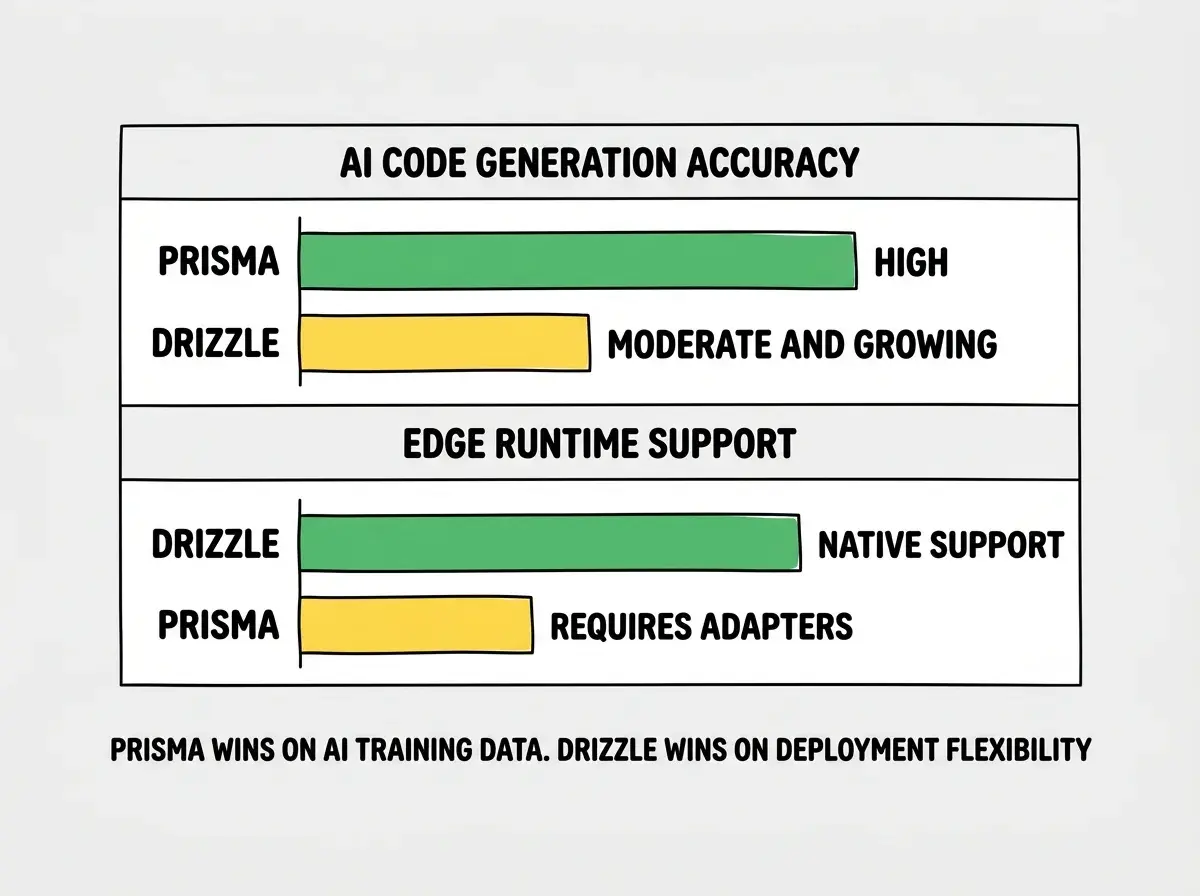
Who Should Use What
Use Prisma if you:
- Want the most mature ecosystem with extensive documentation and community support
- Use Prisma Studio for visual database management
- Are deploying to traditional Node.js servers or containers where bundle size is not a concern
- Want AI tools to generate database code with minimal manual correction
- Prefer a schema-first workflow with a dedicated DSL
Use Drizzle if you:
- Are deploying to edge runtimes like Cloudflare Workers or Vercel Edge Functions
- Care about bundle size and query performance
- Prefer writing queries that look like SQL rather than learning a new abstraction
- Want a zero-codegen workflow with schemas defined in plain TypeScript
- Are building high-throughput APIs where every millisecond of query latency matters
Learn what it actually costs to run your app in production.
See the real costsWhat This Means For You
The Drizzle vs Prisma decision is really about where your app lives and how you think about databases.
- If you are an indie hacker shipping fast with AI tools: Prisma gets you to a working database layer faster because AI generates better Prisma code today. The ecosystem depth means fewer roadblocks when you hit edge cases. Start here unless you have a specific reason not to.
- If you are deploying to edge runtimes: Drizzle is the practical choice. Prisma's bundle size makes edge deployment difficult, and Drizzle's native compatibility means zero workarounds. This is not a preference. It is a constraint.
- If you are a senior dev optimizing for performance: Drizzle's SQL-like API gives you more control over the queries your app generates, and the performance benchmarks back this up. The smaller ecosystem is a tradeoff, but one that matters less when you have the experience to solve problems without leaning on Stack Overflow.
Both tools are actively maintained, well-funded, and improving fast. The wrong choice is not picking either one. The wrong choice is spending a week agonizing about ORMs instead of shipping the app that needs a database in the first place.