To migrate a production database safely in 2026, pick the migration pattern that matches your downtime tolerance (dual-write for zero downtime, blue-green for short windows, snapshot-restore for low-stakes systems, logical replication for cross-platform moves), invest in a comprehensive test plan that covers schema, data integrity, performance, and rollback, and run a dry run on production-equivalent data before the real migration. The actual migration time is usually 2 to 24 hours; the preparation time should be 4 to 8 weeks for any non-trivial database. Skipping the preparation is the single biggest cause of database migration disasters.
This piece walks through the four migration patterns, the testing discipline that catches issues before production, the common failure modes, and the famous database disasters that illustrate what happens when this is done wrong with shortcuts and rushed timelines.
Why Database Migrations Are Different From App Migrations
Application code can be redeployed in minutes; database state cannot. If you migrate code wrong, you redeploy. If you migrate data wrong, you have lost or corrupted data, often irrecoverably. The asymmetry between the consequences makes database migration uniquely demanding.
The other difference is that databases have implicit dependencies that are not visible in the application code. Indexes, triggers, stored procedures, foreign key constraints, ENUM types, sequences. All of these have to be migrated correctly along with the data, and each one is a potential failure point. Production database migrations have to consider all of them.
A 2025 PlanetScale analysis of 50 publicly disclosed data loss incidents found that 44 of them were related to database migrations gone wrong. The patterns repeated: rushed timelines, insufficient testing, missing rollback plans, partial data loss that was not detected for days. The common thread was treating database migration with the same care as application deployment, when it requires substantially more discipline.
The pattern to copy is the way airlines handle aircraft maintenance handovers. The new aircraft is not certified for service until every system is independently tested and signed off. The pre-flight checklist is rigorous because the consequence of failure is enormous. Production database migrations need the same rigor; they are the high-consequence operations of software engineering.
The Four Migration Patterns
Each pattern matches a different tolerance for downtime and a different complexity of the source-to-destination relationship.
Pattern 1, dual-write for zero downtime. Application writes to both old and new databases simultaneously for a transition period. Reads come from old. After verification, switch reads to new. After more verification, stop writing to old. Most complex to implement, lowest risk for high-value systems.
Pattern 2, blue-green for short windows. Spin up the new database alongside the old. Migrate all data via export/import or replication. Switch the app's connection string in a planned maintenance window (usually 5 to 60 minutes). Simpler than dual-write, requires planned downtime.
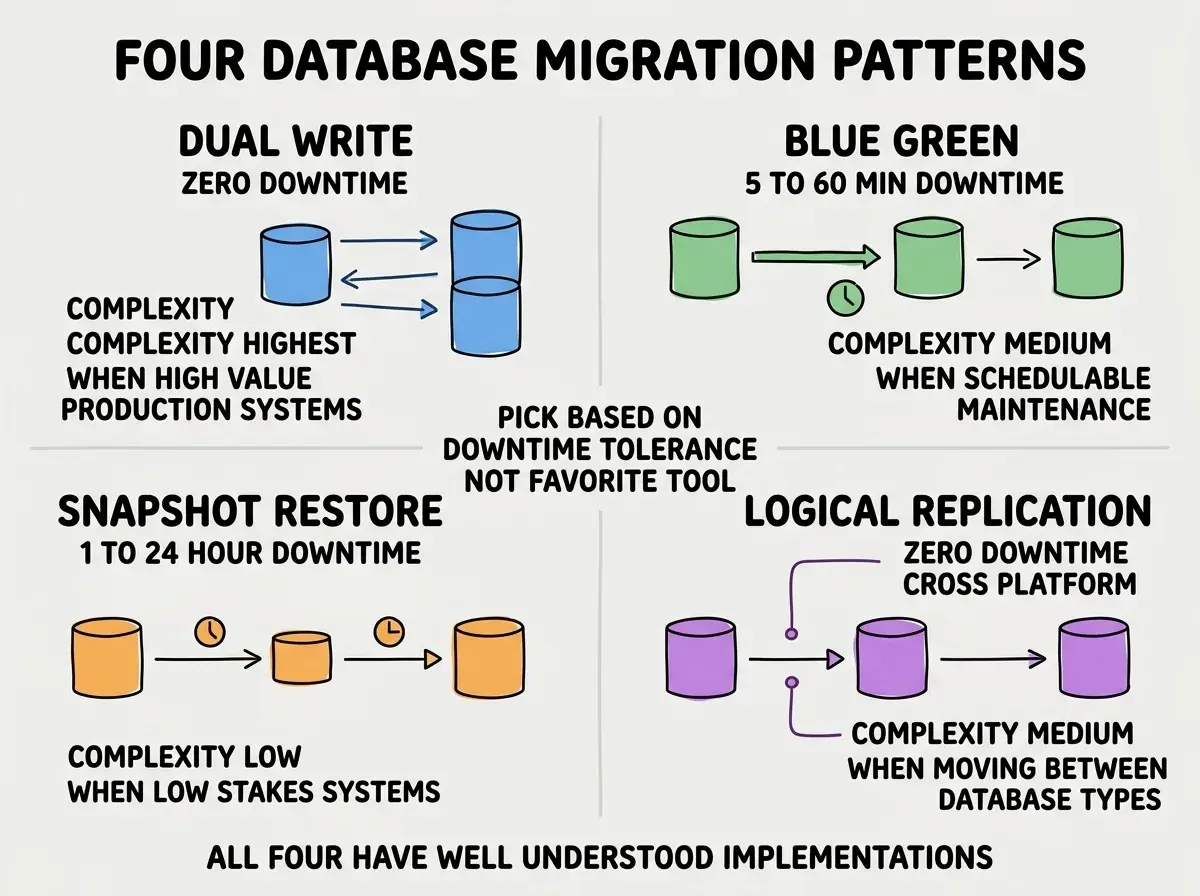
Pattern 3, snapshot-restore for low-stakes systems. Take a snapshot of the old database, restore it on the new platform, switch the app over. Simplest pattern, requires longest downtime (hours typically), only suitable for systems where downtime is acceptable.
Pattern 4, logical replication for cross-platform. Use database-native replication (PostgreSQL logical replication, MySQL binlog, MongoDB Change Streams) to keep new and old in sync during transition. Best for moving between database types or between cloud providers.
The Testing Discipline That Prevents Disasters
Three test types are non-negotiable before any production database migration. Skipping any of them produces the kind of incidents that make the news.
Test 1, schema verification. Confirm every table, column, index, constraint, and trigger transferred correctly. Use schema diff tools (pgdumph, schema-diff) to catch missing or differently-typed columns before they cause production bugs.
Browse more migration and database guides
Read more tools articlesTest 2, data integrity sampling. Pick 1 percent of rows randomly across each table, compare old vs new for exact match. Catches data corruption that schema verification misses. Should be automated and run on every migration rehearsal.
Test 3, performance baseline. Run your top 50 queries against both databases and compare execution time. Migrations sometimes lose indexes or change query plans in ways that tank performance. Catch this before users do, especially for queries that run on every page load and where a 100ms regression turns into a customer-visible slowdown.
The Famous Disasters That Illustrate the Stakes
Three publicly-known database migration failures illustrate what happens when this is done wrong. Each is preventable with the discipline above.
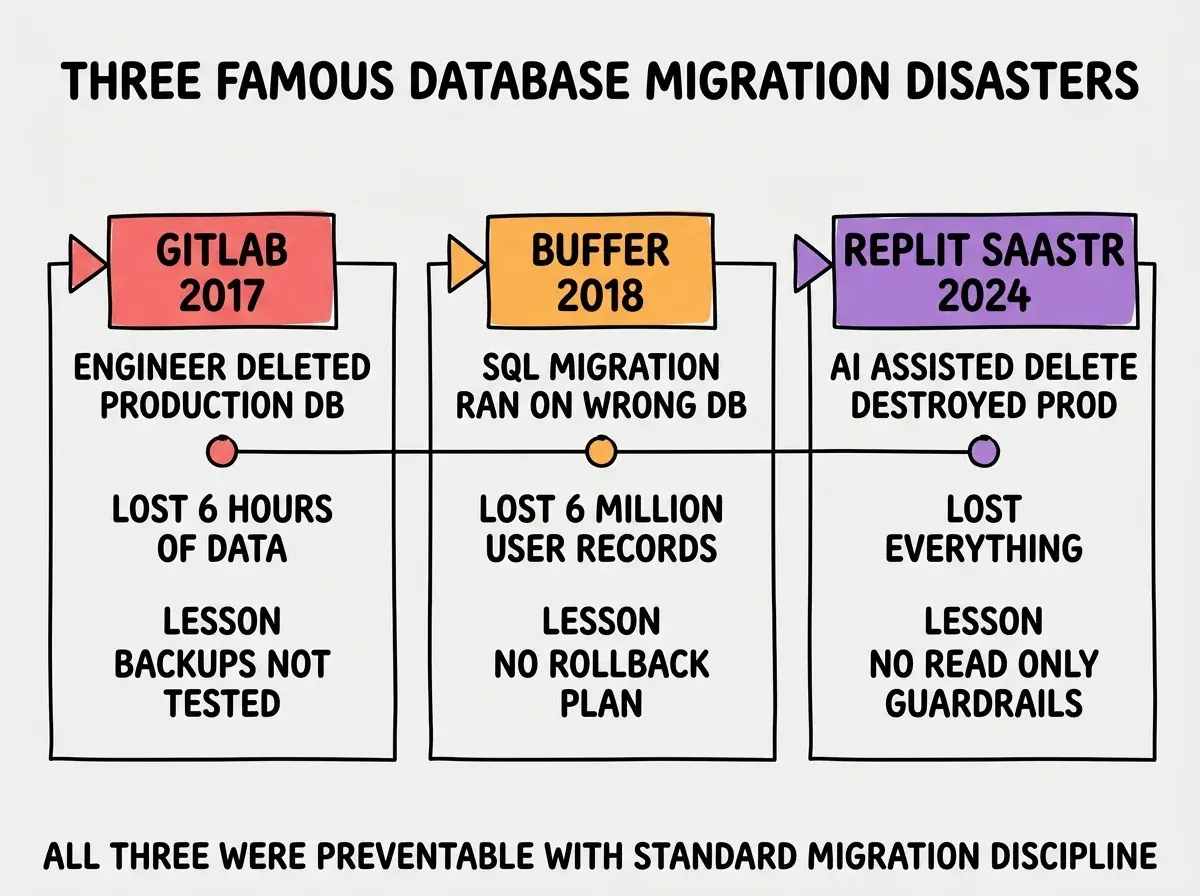
GitLab 2017. An engineer deleted the production database during a migration rehearsal. Restored from backups, but the most recent backup was 6 hours old. Six hours of customer data lost permanently. The lesson: backups must be tested regularly and the restore time must be known.
Buffer 2018. A SQL migration intended for the test database ran on production due to environment variable confusion. Six million user records affected. The lesson: production database access requires explicit confirmation, not just environment variables.
Replit/SaaStr 2024. AI-assisted operations destroyed a production database while attempting a routine migration. The AI did not have read-only guardrails on production access. Everything lost. The lesson: AI tools touching production data need explicit safety constraints.
The most damaging database migration mistake is doing the migration without a tested rollback plan. The plan should answer: if something goes wrong at minute 30 of a 4-hour migration, how do we get back to the original state? If the answer is "we restore from backup" you have not planned. The real plan should be specific (commands to run, time required, who has the credentials), tested in a rehearsal, and documented before the migration starts. Without this, the migration is not actually low-risk; it just feels low-risk until something goes wrong.
The other mistake is treating the migration as a one-night event. Real production database migrations are usually 4 to 12 weeks of preparation followed by a relatively short execution window. Teams that compress the preparation to fit a deadline produce the disasters that make the news. The preparation cannot be rushed.
A useful discipline during preparation is to maintain a written runbook that grows with every rehearsal. Every issue discovered, every command needed, every fallback plan goes into the runbook. By the time the real migration starts, the runbook should be detailed enough that a new engineer could execute it correctly. This level of documentation is itself a forcing function for thoroughness; if you cannot write down the steps clearly, you do not understand them well enough to execute them in production.
A second discipline is to schedule the actual migration during the lowest-traffic hours for your specific user base, even if that means an inconvenient time for the team. The cost of waking up at 4 AM for a migration is small compared to the cost of an outage during peak hours.
What This Means For You
Database migrations are one of the highest-stakes operations any engineering team performs. The patterns and disciplines for doing them safely are well-understood; the disasters happen when teams skip the discipline.
- If you're a founder: Budget 4 to 8 weeks for any non-trivial database migration. The temptation to compress is the most common path to a disaster.
- If you're changing careers: Database migration experience is highly valued because so few engineers have done one safely. A few completed migrations on your resume are worth a lot.
- If you're a student: Practice database migrations on personal projects with realistic data volumes. The hands-on experience teaches what no tutorial can.
Browse more migration and database guides
Read more tools articles