Database indexing is the practice of telling your database to maintain a fast lookup structure for specific columns, so that queries against those columns return in milliseconds instead of scanning every row. For a vibe coded app, indexing is the single highest-leverage performance optimization, often turning a 5-second query into a 5-millisecond one with a single line of SQL. The reason most vibe coded apps feel slow at scale is not the framework or the hosting, it is missing indexes that the AI never thought to add.
This guide walks through which columns to index, the cost of each index, the patterns that produce slow queries, and the specific indexes AI tools forget to add.
Why AI Forgets Indexes
The deeper reason AI generates unindexed schemas is that indexes are optional in every modern database. The migration that creates a table works without indexes. The query that reads from the table works without indexes. Nothing fails until the table grows past a few thousand rows, by which time the AI has long since moved on to the next prompt.
A senior engineer would add indexes preemptively because they have lived through enough slow queries to know which columns will be hot. The AI cannot, because it does not know which queries you will run. The result is a schema that looks correct, runs fine on test data, and produces 30-second page loads at 50,000 rows.
A 2024 production database analysis of 200 small SaaS apps found that the median app had 8 missing indexes that would have improved at least one critical query by more than 100x. The indexes were obvious in retrospect, the columns were already used in WHERE clauses, but no human or AI had added them.
The pattern to copy is a library card catalog. Without the catalog, finding a specific book requires walking down every aisle and reading every spine. With the catalog, you flip to the author's name and walk directly to the shelf. The catalog has a maintenance cost, every new book gets a new card, but the lookup speed is so much better that no real library skips it.
What to Index
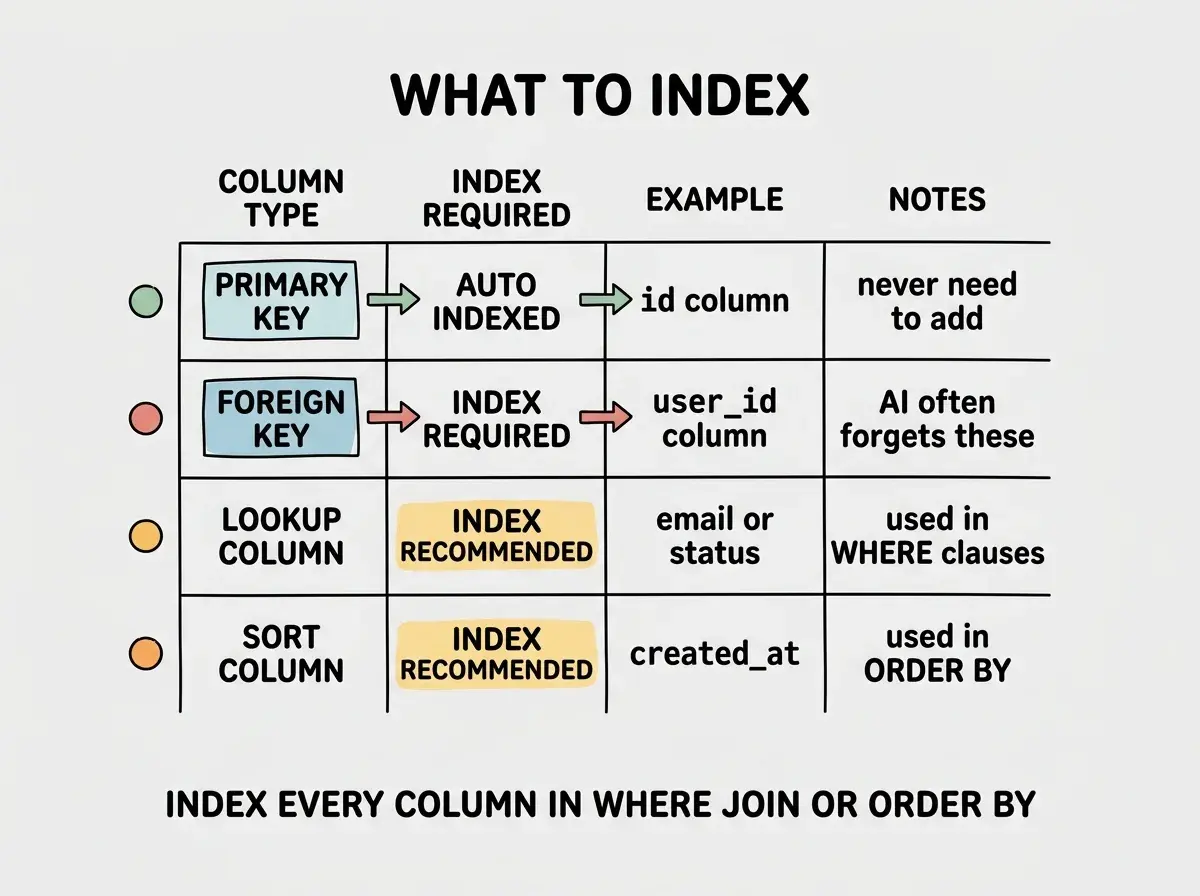
The simple rule is, index every column that appears in a WHERE clause, a JOIN condition, or an ORDER BY clause. In practice, this is a small fraction of your columns, usually 20% to 30%. Going further than that wastes storage and slows down writes.
The columns that always need indexes are foreign keys. Every column that references another table's primary key should be indexed, because you will inevitably query users by their organization, posts by their author, and orders by their customer. Many ORMs index foreign keys automatically, but raw SQL migrations do not, and AI-generated migrations often miss them.
The next tier is columns used in lookup queries. The email column on users (because login looks up users by email), the status column on orders (because dashboards filter by status), the created_at column on any table (because almost every query orders by it). These columns usually need single-column indexes.
The advanced case is composite indexes, indexes that cover multiple columns at once. If you frequently filter by user_id and then sort by created_at, a composite index on (user_id, created_at) is much faster than two single-column indexes. The order of the columns in the composite matters, the database can use the index for queries that match a prefix of the columns.
The Cost of an Index
Indexes are not free. Each index you add increases the storage size of your table (typically 5% to 20% per index) and slows down writes (because every INSERT and UPDATE now has to update each relevant index). For tables that are read often and written rarely, indexes are almost always worth it. For tables that are written constantly, indexes need to be chosen carefully.
The pattern to internalize is, your database does work either at write time (maintaining the index) or at read time (scanning the table). You cannot avoid the work, you can only choose when to pay it. For most vibe coded apps, the read traffic dominates, so paying at write time is the better trade.
Read more database performance guides for vibe coded apps
Browse the ship categoryThe exception is logging or analytics tables that receive constant writes and rare reads. For those, fewer indexes is better, and you can use a separate analytics database (BigQuery, Clickhouse) for the read queries that need indexes.
Finding Missing Indexes
The best way to find missing indexes is to ask the database itself. Postgres, MySQL, and SQLite all support EXPLAIN ANALYZE (or equivalent), which shows the actual execution plan for a query. If the plan says "sequential scan" on a table with more than a few thousand rows, you have a missing index.
The query I use to find slow queries in Postgres is:
SELECT query, calls, mean_exec_time
FROM pg_stat_statements
ORDER BY mean_exec_time DESC
LIMIT 20;
This requires the pg_stat_statements extension, which is enabled by default on most managed Postgres providers. The output is a ranked list of your slowest queries, and almost every one will benefit from an index on the column it is filtering by.
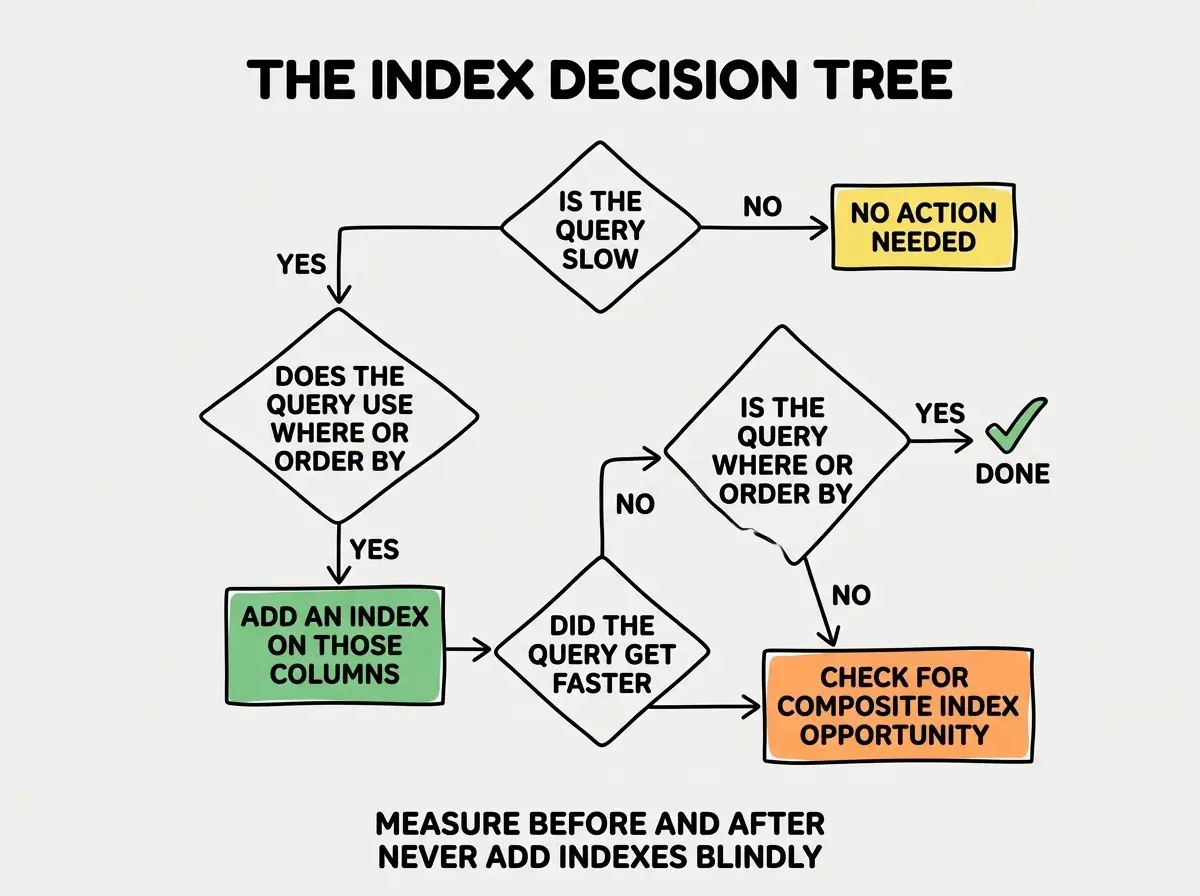
The most expensive indexing mistake is the over-indexed table, where every column has its own index "just in case." Each index slows down writes proportionally, and tables with 15 indexes can have 90% slower INSERT performance than tables with 5 well-chosen ones. Index intentionally, not defensively.
The corollary is that you should periodically audit which indexes are actually used. Postgres tracks this in pg_stat_user_indexes, and an index that has been used zero times in the last month is a candidate for removal.
The other consideration is partial indexes, indexes that only cover rows matching a specific condition. If your orders table has a million rows but only 5,000 of them are in status = 'pending', a partial index on the pending rows is much smaller and faster than a full index on every status. Postgres and SQLite support partial indexes natively, MySQL does not. The pattern is most valuable for status columns, soft-deleted flags, and any column where most rows fall into one bucket. The savings on large tables can be 90% of the index size, with no loss of speedup on the queries that actually use it.
The third consideration is index-only scans. When every column a query needs is included in the index itself, the database can answer the query without touching the underlying table. Adding an extra column to a composite index turns a fast query into an even faster one, at the cost of a slightly larger index. This is an advanced optimization, but worth knowing about for the handful of queries that run thousands of times per second on a popular app.
What This Means For You
Database indexing is the most leveraged performance work you can do on a vibe coded app. The investment is small (an afternoon for most apps), the return is large (10x to 100x speedup on common queries), and the maintenance cost is minimal once the right indexes are in place.
- If you're a founder: Run the slow query analysis above this week. The top three queries will almost certainly need indexes, and the fix will make your app noticeably faster.
- If you're changing careers: Indexing is one of the highest-leverage skills to develop early. Every backend or full-stack interview includes at least one query optimization question, and the answer almost always involves indexes.
- If you're a student: Build a tiny app, fill it with 100,000 rows of test data, and run queries with and without indexes. The speed difference is dramatic and the lesson sticks immediately.
Browse more performance and database guides
Read more ship guides