A database costs comparison in 2026 comes down to three options. Supabase starts free and jumps to $25/month. Neon starts free and jumps to $19/month. PlanetScale killed its free tier in January 2024 and starts at $39/month. The right choice depends on what your AI tool already picked for you, and how fast your data grows.
The Quick Numbers
Here is what each provider charges across their main tiers, as of early 2026.
| Supabase | PlanetScale | Neon | |
|---|---|---|---|
| Free tier | 500MB storage, shared CPU | None (discontinued Jan 2024) | 0.5 GiB storage, 1 project |
| Entry paid | $25/mo (Pro, 8GB) | $39/mo (Scaler, 10GB) | $19/mo (Launch, 10 GiB) |
| Included extras | Auth, storage, realtime, edge functions | Database only (MySQL via Vitess) | Database only (Postgres) |
| Scaling model | Compute add-ons from $25/mo | Row reads (1B included on Scaler) | Autoscaling compute |
| Postgres compatible | Yes (native Postgres) | No (MySQL-compatible via Vitess) | Yes (native Postgres) |
That table tells most of the story, but the details beneath each number are where real budgets get made or broken.
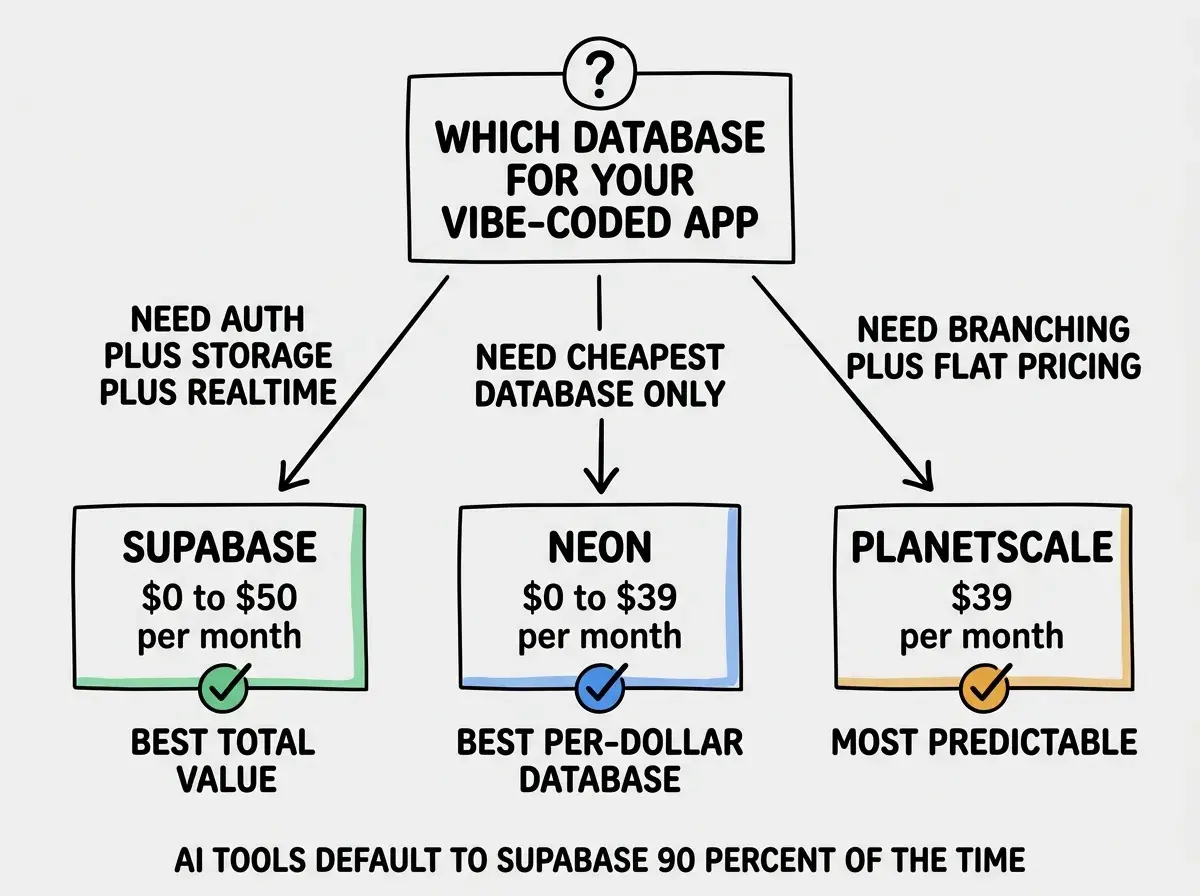
Supabase is the most expensive database per-dollar if you only need a database, but the cheapest total cost if you also need auth, file storage, and realtime subscriptions. Neon is the cheapest pure database. PlanetScale is the most expensive entry point with no free tier, but its branching and row-read model can save money at high scale. Your choice should depend on how many separate services you are willing to manage.
How Much Does Supabase Database Cost?
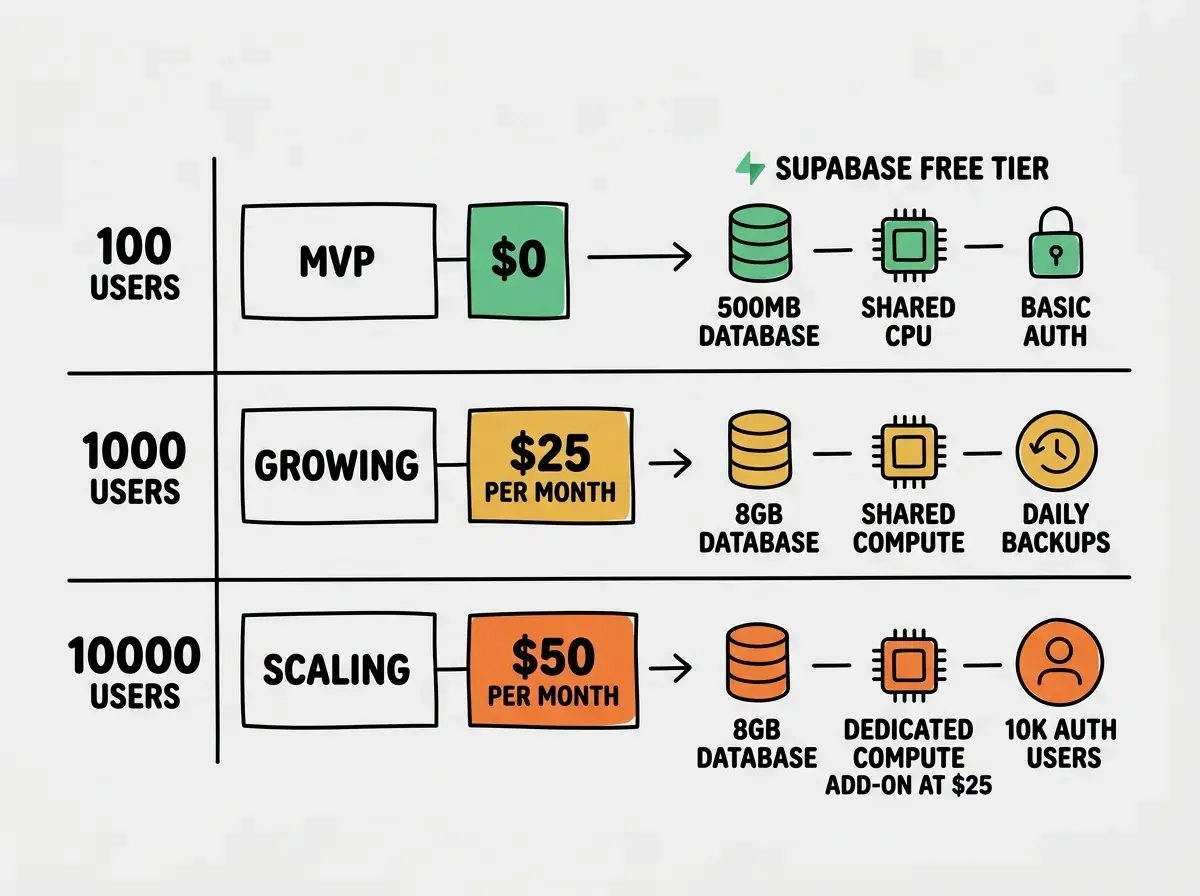
Supabase's free tier gives you 500MB of storage, a 2-core shared CPU, unlimited API requests, and 50,000 monthly active users for auth. For a side project or early MVP, this handles hundreds of users without spending a cent.
The Pro plan at $25/month bumps storage to 8GB, adds daily backups, and gives you 100,000 monthly active users for auth. But here is where Supabase pricing gets layered: compute is separate. The $25/month Pro plan runs on shared compute. If you need dedicated resources (and you will once you hit a few thousand concurrent users), dedicated compute add-ons start at $25/month for a small instance and go up from there.
A realistic Supabase bill for a growing app looks like this:
| Scale | Storage | Compute | Auth users | Monthly cost |
|---|---|---|---|---|
| MVP (100 users) | Free (500MB) | Shared (free) | ~100 | $0 |
| Growing (1,000 users) | Pro (8GB) | Shared (included) | ~1,000 | $25 |
| Scaling (10,000 users) | Pro (8GB) | Small dedicated ($25) | ~10,000 | $50 |
The hidden value in Supabase is everything bundled with it. Auth, file storage, realtime subscriptions, and edge functions are all included. If you are building a typical SaaS, you would otherwise pay separately for Clerk ($25/month for auth), Cloudflare R2 ($5-15/month for storage), and Pusher ($25+/month for realtime). Supabase replaces all of those in one $25 bill.
Is Neon Cheaper Than Supabase?
For the database alone, yes. Neon's free tier gives you 0.5 GiB of storage, one project, and autoscaling compute that scales to zero when nobody is using your app. The Launch plan at $19/month gives you 10 GiB of storage, and the compute scales automatically based on demand.
Here is how Neon's costs break down at the same user milestones:
| Scale | Storage | Compute | Monthly cost |
|---|---|---|---|
| MVP (100 users) | Free (0.5 GiB) | Autoscale to zero | $0 |
| Growing (1,000 users) | Launch (10 GiB) | Autoscale | $19 |
| Scaling (10,000 users) | Launch (10 GiB) | Autoscale | $19-39 |
Neon's autoscaling is the standout feature. Your database scales down to zero during off-hours, so you are not paying for idle compute at 3 AM. For apps with predictable usage patterns (business hours traffic, for example), this can save 30-50% compared to always-on compute.
But Neon is database-only. No auth, no file storage, no realtime, no edge functions. If you need those (and most SaaS apps do), you pay separately: Clerk ($0-25/month for auth), Cloudflare R2 ($0-15/month for storage), Pusher ($0-25/month for realtime). Neon plus extras can total $19-84/month.
So is Neon cheaper than Supabase? For the database alone, yes. Neon saves $6/month on the entry tier ($19 vs $25) and gives more storage (10 GiB vs 8GB). But if you need auth, storage, and realtime, Supabase's $25 bundle beats Neon plus three separate services.
Get the full breakdown of every service your vibe-coded app needs.
See all cost guidesWhat Is the Difference Between Supabase and PlanetScale?
The biggest difference is the database engine itself. Supabase runs native Postgres. PlanetScale runs MySQL-compatible Vitess, which was originally built by YouTube to handle planetary-scale workloads. If your AI coding tool generated Postgres queries (which is the default for most tools in 2026), PlanetScale requires rewriting them for MySQL.
PlanetScale killed its free tier in January 2024. The entry point is the Scaler plan at $39/month, which gives you 10GB of storage and 1 billion row reads per month. That row-read model is important to understand: instead of paying for compute time, you pay for how many times your app reads rows from the database.
| Scale | Storage | Row reads used | Monthly cost |
|---|---|---|---|
| MVP (100 users) | Scaler (10GB) | ~10M | $39 |
| Growing (1,000 users) | Scaler (10GB) | ~100M | $39 |
| Scaling (10,000 users) | Scaler (10GB) | ~500M | $39 |
PlanetScale's pricing stays flat up to 1 billion row reads, which is genuinely a lot. A typical SaaS with 10,000 active users doing normal CRUD operations might use 200-500 million row reads per month. You would need to hit serious scale before overages kick in.
PlanetScale's killer feature is database branching, similar to Git branches for code. Create a branch, test schema changes, merge when ready. This removes the scariest part of database changes for teams shipping fast with AI tools.
The tradeoff: no free tier means no zero-cost validation. And the MySQL requirement means your AI-generated Postgres code needs translation, adding friction and potential bugs.
Real Cost Projections Side by Side
Here is what each provider actually costs when you account for everything a typical vibe-coded SaaS needs:
| 100 users | 1,000 users | 10,000 users | |
|---|---|---|---|
| Supabase (database + auth + storage) | $0 | $25 | $50 |
| Neon (database only) | $0 | $19 | $19-39 |
| Neon + Clerk + R2 (full stack) | $0 | $44 | $69-89 |
| PlanetScale (database only) | $39 | $39 | $39 |
| PlanetScale + Clerk + R2 (full stack) | $64 | $64 | $64 |
The pattern is clear. Supabase wins on total cost for apps that need the full stack of services. Neon wins on pure database cost for apps that already have auth and storage solved. PlanetScale's flat pricing makes it the most predictable, but the $39/month floor means you are paying production prices from day one.
Comparing database costs in isolation when your app needs auth, storage, and realtime too. Neon at $19/month looks cheaper than Supabase at $25/month until you add Clerk ($25/month) and file storage ($5-15/month) on top. Always calculate total infrastructure cost, not just the database line item.
The AI Tool Factor
When you vibe code with Cursor, Claude Code, Bolt, or Lovable, the AI tool makes the database choice for you. Ask it to "add a database" and it reaches for Supabase almost every time. Supabase has the best-documented JavaScript SDK and the broadest set of tutorials in AI training data, with 92% of US developers now using AI tools daily.
If your AI tool already scaffolded your app with Supabase, switching means rewriting your database layer, auth integration, file uploads, and realtime subscriptions. That is hours of work to save $6/month. For most builders, stay with whatever the AI chose and optimize later if costs demand it.
Frequently Asked Questions
When to Switch Providers
Stay on your current provider if your monthly cost is under $100. Migration engineering time almost always exceeds the savings. Consider switching if:
Switch to Neon from Supabase if you are not using Supabase Auth, Storage, or Realtime. You are paying for bundled services you do not use.
Switch to Supabase from Neon if your separate auth, storage, and realtime bills exceed $25/month combined. Consolidation saves money.
Switch to PlanetScale if you need database branching and your read patterns are heavy but predictable. Flat pricing up to 1 billion reads is hard to beat.
Do not switch if you are under 1,000 users or the savings would be less than $20/month. Stability is worth more than marginal savings.
What This Means For You
Database costs are predictable if you choose the right provider for your specific needs, and unpredictable if you pick one based on a blog post headline.
- If you are a founder building a SaaS: Start with Supabase. The $0 to $25 to $50 cost curve maps perfectly to typical startup stages (validating, growing, scaling), and the bundled auth and storage save you from managing four separate vendor relationships. Your time is worth more than the $6/month you would save with Neon.
- If you are an indie hacker keeping costs under $20: Neon's free tier with autoscaling to zero is your best friend. You pay nothing while testing, $19/month when you need more storage, and the autoscaling means you never pay for idle compute. Pair it with Auth.js (free) and Cloudflare R2 (free tier) to keep your total stack under $20/month.
- If you are a student or career changer: Use Supabase's free tier. It teaches you Postgres, auth patterns, file storage, and realtime in one platform. The skills transfer directly to any job that uses these technologies.
Pick a database provider that matches your actual needs today, set a calendar reminder to review your bill monthly, and spend your energy on building something people want to use.
See the complete cost breakdown for every service in your stack.
Read the full guide