Custom domain setup is where your vibe-coded app stops looking like a school project and starts looking real. If your app lives at my-app-7xk2.vercel.app, nobody takes it seriously. A custom domain costs $10-15 per year, takes 20 minutes to configure, and involves DNS records, SSL certificates, and propagation delays that will confuse you without honest explanation first.
The Street Address Analogy That Actually Works
Your app needs three things to be reachable on the internet, and they map cleanly to how physical mail works.
Your domain is your street address. When you buy myapp.com, you are buying a human-readable name that people can type into a browser. Nobody memorizes 76.76.21.21 the same way nobody memorizes GPS coordinates. The domain is the address people remember and share.
DNS is the phone book. When someone types myapp.com, the browser asks the Domain Name System to look up the actual server address (an IP like 76.76.21.21). DNS translates human-readable names into machine-readable IP addresses. Every website visit starts with a DNS lookup.
SSL is the locked mailbox. Without SSL, anyone between your user's browser and your server can read data in transit. SSL encrypts that connection. HTTPS (the S stands for Secure) means the site has a valid SSL certificate. The padlock icon means the mailbox is locked.
When something breaks, it is almost always because the address is wrong, the phone book has not updated, or the lock was not installed.
Buying a Domain (Simpler Than You Think)
You can buy a domain from Namecheap, Cloudflare Registrar, Porkbun, or Squarespace Domains. Prices range from $8-15 per year for standard .com or .dev domains.
Pick a registrar that does not bury DNS settings behind upsells. Cloudflare Registrar charges at cost with no markup. Namecheap and Porkbun are consistently straightforward. You will need to edit DNS records, and you need that to be easy.
When you buy a domain, you control the domain name and its DNS records. The registrar hosts your DNS by default, though you can point DNS management to a different provider like Cloudflare.
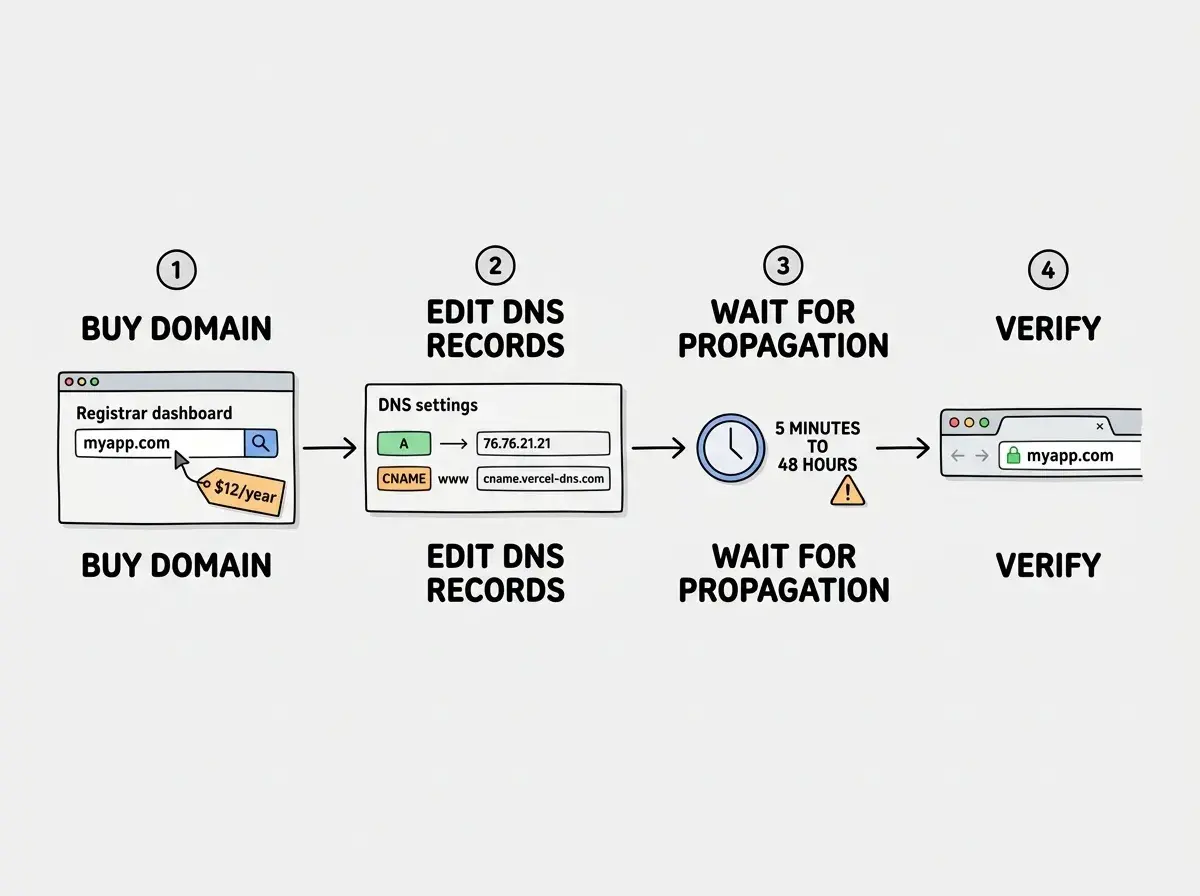
Do not buy premium domains, privacy add-ons (WHOIS privacy is free at most registrars), or multi-year plans for your first project. Buy one year. If the project succeeds, you renew.
What Are the 4 Types of DNS Records?
Four DNS record types matter for custom domain setup. The rest you can ignore until you are running email servers.
A Record (Address Record). Maps your domain directly to an IPv4 address. When you create an A record for myapp.com pointing to 76.76.21.21, you are telling the phone book "this name lives at this building." Simple but rigid: if the server's IP changes, you update it manually.
AAAA Record (IPv6 Address Record). Same as an A record but for IPv6 addresses (the longer format like 2606:4700:3030::6815:1234). Some hosting platforms ask you to add both A and AAAA records for full compatibility.
CNAME Record (Canonical Name Record). Maps one domain name to another domain name. Instead of pointing www.myapp.com to an IP, you point it to cname.vercel-dns.com, and Vercel resolves it to the right IP. This is like mail forwarding. If Vercel changes IPs, your site keeps working because the CNAME follows the name, not the number.
TXT Record (Text Record). Stores text for verification. When a hosting platform asks you to "verify domain ownership," they give you a TXT record to add. It proves you own the domain because only the owner can modify DNS records.
Should www Be CNAME or A?
CNAME. Always CNAME for www.
The www subdomain should point to your hosting provider's domain name, not an IP address. Providers like Vercel, Netlify, and Cloudflare Pages use load balancers that may change IPs without notice. A CNAME follows those changes automatically. An A record does not.
The typical setup: your root domain (myapp.com) gets an A record pointing to an IP. Your www subdomain gets a CNAME pointing to a hostname like cname.vercel-dns.com. Most platforms tell you exactly what records to add. Copy and paste them. Do not retype.
Your root domain (myapp.com) needs an A record pointing to an IP address. Your www subdomain needs a CNAME pointing to your hosting provider's hostname. The CNAME automatically follows IP changes, while the A record satisfies the technical requirement that root domains cannot use standard CNAME records.
Why Is CNAME Better Than A?
CNAME records are resilient to infrastructure changes. When you point www.myapp.com via CNAME to cname.vercel-dns.com, Vercel can move your site between data centers, change IPs, and optimize routing without you touching anything. Your DNS says "ask Vercel," and Vercel handles the rest.
A records are brittle. If Vercel retires an IP address, your site goes down until you manually update the record. With 92% of US developers now using AI tools daily, people are shipping faster than ever. You do not want to debug DNS issues when you could be building.
Root domains use A records instead of CNAME due to a DNS specification limitation. Some providers like Cloudflare work around this with CNAME flattening, which gives CNAME flexibility with A record compatibility. If your registrar supports it, use it.
Connecting Your Domain to Vercel, Netlify, or Cloudflare Pages
The process is nearly identical across all three platforms. Here is what you actually do.
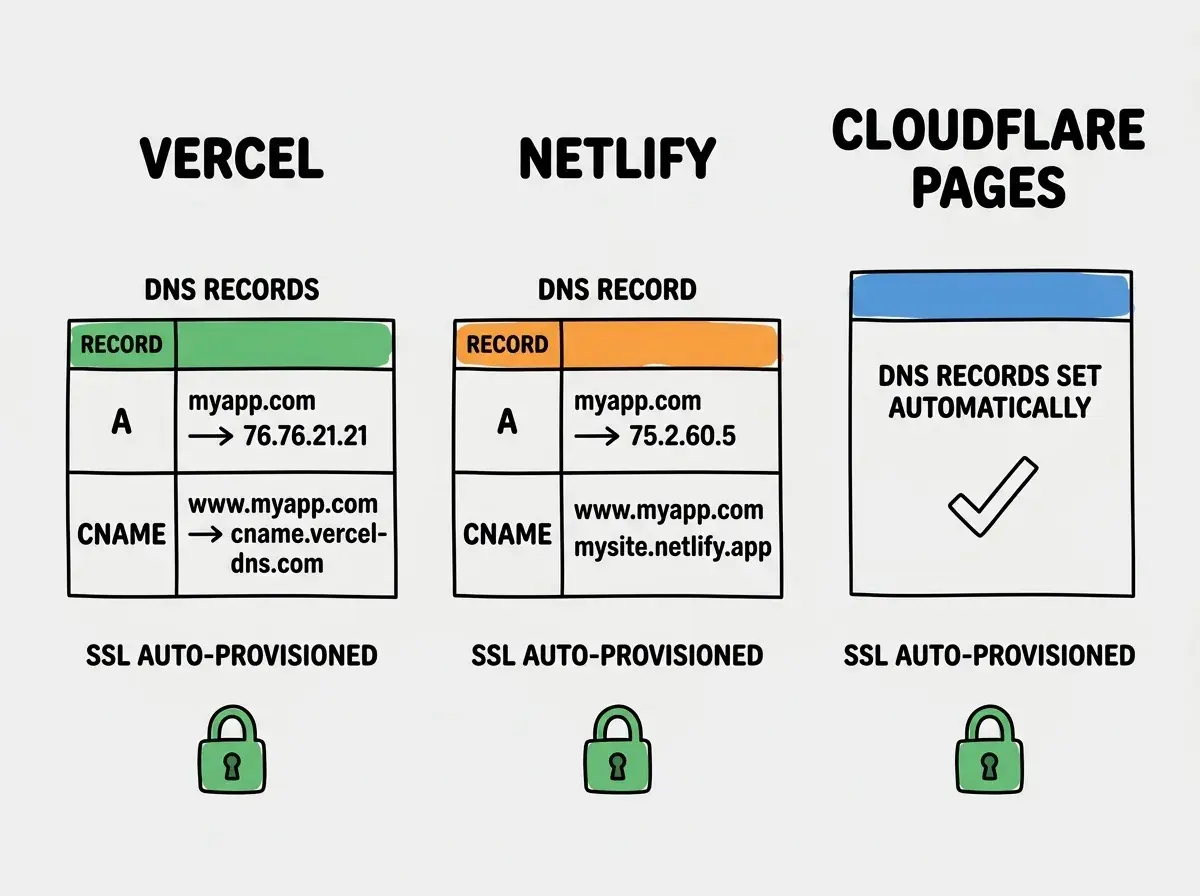
On Vercel: Go to your project settings, click Domains, type your domain name, and Vercel will tell you exactly which DNS records to add. It gives you an A record for the root domain and a CNAME for www. Add those in your registrar's DNS settings. Vercel automatically provisions an SSL certificate once DNS records propagate.
On Netlify: Go to Site Settings, then Domain Management, then add your custom domain. Netlify also tells you the DNS records to add. Same pattern: A record for root, CNAME for www.
On Cloudflare Pages: If your domain is already on Cloudflare DNS (which I recommend), it is even simpler. Go to your Pages project, click Custom Domains, add your domain, and Cloudflare configures the DNS records automatically. No manual record editing needed.
All three platforms handle SSL certificate provisioning automatically. You do not need to buy or configure SSL. The platform detects DNS pointing at their servers and issues a free certificate within minutes. This is a solved problem in 2026.
DNS Propagation (Why Nothing Works Immediately)
After you add DNS records, there is a delay before they take effect globally. This is DNS propagation, and it is the most anxiety-inducing part of custom domain setup.
The change starts at your registrar and ripples through the global network of DNS servers. Some servers pick it up in minutes. Others cache the old record for hours. In practice, most changes propagate within 30 minutes to 2 hours, though the theoretical max is 48 hours.
During this period, your site might work for you but not for a friend in another city. This is normal. It is not broken. It is propagating. Check status at dnschecker.org or run dig myapp.com in your terminal.
Changing DNS records multiple times because your site does not load immediately. Each modification resets the propagation timer. Set your records correctly once, verify them at dnschecker.org, and wait at least one hour before making changes. Propagation takes 30 minutes to 2 hours, not seconds.
The www vs. Non-www Decision
Pick one and redirect the other. It does not matter which, but you need to choose.
If someone types www.myapp.com and your site only works at myapp.com, they see an error. Most modern sites use non-www as primary because it is shorter. All major hosting platforms have built-in redirect settings for this.
This matters for SEO. Search engines treat www.myapp.com and myapp.com as separate sites. Without a redirect, your rankings split between them. One canonical version with a redirect prevents this.
Common Errors and How to Fix Them
ERR_NAME_NOT_RESOLVED. DNS records are missing, wrong, or have not propagated. Check your registrar dashboard and wait.
ERR_SSL_PROTOCOL_ERROR. SSL certificate has not provisioned yet, or DNS is not pointing to the right servers. Fix DNS first, then wait 10-15 minutes.
Redirect loop (ERR_TOO_MANY_REDIRECTS). Your Cloudflare SSL is set to "Flexible" while your origin also forces HTTPS. Set Cloudflare SSL mode to "Full (Strict)."
Site loads but shows wrong content. DNS is pointing to the wrong server. Check your A record and CNAME target against what your hosting platform expects.
Missing environment variables still cause 80% of first deploy failures, even after the domain works. Your custom domain is an additional layer on top of deployment fundamentals, not a replacement for them.
Get the full picture of what happens when you ship your app.
Read Deployment 101What HTTPS Actually Protects
SSL certificates encrypt all data between your user's browser and your server. Without HTTPS, login credentials and form submissions travel in plain text. Anyone on the same WiFi network can intercept that data.
In 2026, Chrome labels HTTP sites "Not Secure" and search engines penalize them in rankings. With 46% of code now AI-generated and more non-technical builders shipping apps than ever, the security baseline matters. Every major hosting platform provisions SSL for free. There is no reason to skip it.
What This Means For You
Custom domain setup is a one-time configuration that makes your app look professional. The DNS records, SSL certificates, and propagation delays are predictable once you understand them.
- If you are a founder: A custom domain is non-negotiable for any product you expect people to pay for. Nobody enters their credit card on a
.vercel.appsubdomain. Budget $12 per year, spend 20 minutes, and your app instantly looks legitimate. The 70% wall is real, but domain setup is on the easy side of it. - If you are a career changer: Understanding DNS and SSL puts you ahead of a surprising number of working developers who click buttons without understanding what they configure. Troubleshooting DNS issues makes you the person teams rely on during deployments.
- If you are a student: Buy a cheap domain for your portfolio. Having
yourname.devinstead ofyourname.github.iocosts almost nothing and signals you understand the full deployment stack.
Start with the fundamentals of getting code from your machine to the internet.
Read the deployment guide