CSRF protection is one of those security fundamentals that AI coding tools almost never implement on their own. When 92% of developers use AI tools daily and 45% of AI-generated code contains security vulnerabilities, that gap becomes a real problem. Your users are exposed, and most vibe-coded apps have zero defense against it.
Here is the thing about cross-site request forgery. It is not a new or exotic attack. It has been in the OWASP Top 10 for years. Frameworks have built-in defenses for it. But AI tools skip it because CSRF protection is not about making features work. It is about preventing abuse of features that already work. And AI optimizes for "working," not "safe."
What CSRF Actually Is
Think of CSRF like a forged check. You have a checking account at your bank. The bank recognizes your signature and processes any check that bears it. Now imagine someone steals one of your checks, forges your signature, and writes it out to themselves. The bank sees a valid-looking check with your account details and processes it. The money is gone before you notice.
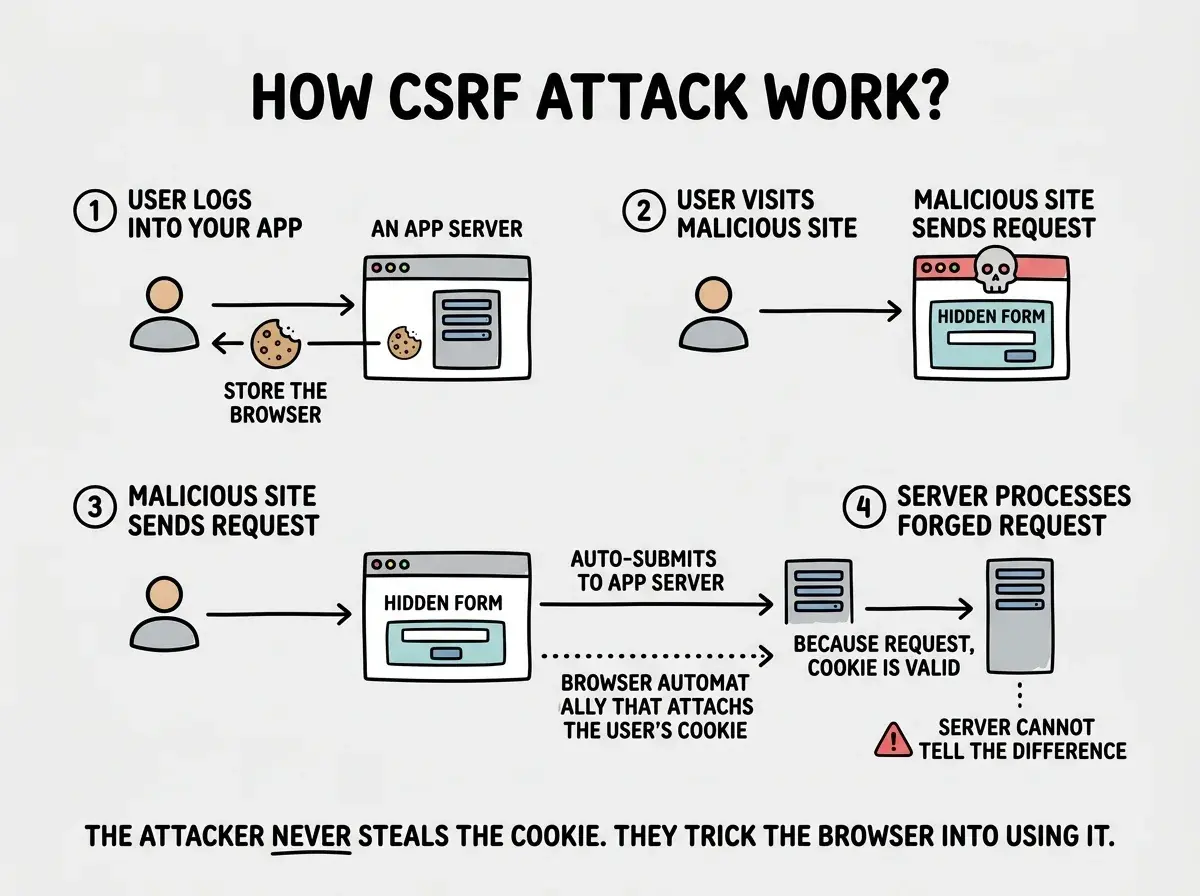
CSRF works the same way. Your browser stores authentication cookies for websites you are logged into. When you visit a malicious site, that site can send requests to your bank, your email, or your SaaS app. Your browser automatically attaches your cookies to those requests because they are going to a domain where you are authenticated. The target server sees a valid session cookie, assumes the request is legitimate, and processes it. The forged check clears.
The attacker never sees your password. They never steal your session. They trick your browser into making requests on their behalf while your valid credentials are automatically attached.
How the Attack Works Step by Step
The mechanics are simpler than most people expect. An attacker creates a page with a hidden form that submits to your application. The form might target your app's "change email" endpoint or "transfer funds" action. The attacker gets a logged-in user to visit their page, maybe through a link in a comment, a forum post, or a phishing email.
When the victim loads the attacker's page, JavaScript automatically submits the hidden form. The victim's browser sends the request to your application with the victim's cookies attached. Your server receives what looks like a normal, authenticated request. It changes the user's email to the attacker's address, or transfers funds, or updates account settings.
The victim never clicked a button in your app. They never saw a form. They just visited a page, and the damage was done.
This is why CSRF is so dangerous for apps that handle financial transactions, account settings, or any state-changing operation. The attack exploits the trust your server places in the browser's cookies.
SameSite Cookies as Your First Defense
Modern browsers have a built-in defense that stops most CSRF attacks before they reach your server. The SameSite cookie attribute tells the browser when to attach cookies to cross-origin requests.
SameSite=Strict means the cookie is never sent on cross-site requests. If a user clicks a link from an email to your site, the cookie is not attached, so they have to log in again. This is the most secure option but can be annoying for users.
SameSite=Lax is the browser default in Chrome, Edge, and Firefox. It sends cookies on top-level navigations (clicking a link) but blocks them on cross-origin form submissions and AJAX requests. This stops the classic CSRF attack where a hidden form auto-submits from a malicious page.
SameSite=None means cookies are sent on all cross-origin requests. This requires the Secure flag and is only appropriate when you intentionally need cross-site cookie access (like third-party auth widgets).
For most applications, SameSite=Lax provides strong baseline protection. But it is not bulletproof. It does not protect GET requests that trigger side effects (which you should not have, but AI tools create them). It does not cover all edge cases in older browsers. And it does not work if your authentication uses something other than cookies.
This is why SameSite cookies are your first line of defense, not your only one.
CSRF Tokens and How They Work
CSRF tokens are the gold standard defense that has been protecting web applications for over a decade. The concept is straightforward.
When your server renders a page with a form, it generates a unique, unpredictable token and embeds it in the form as a hidden field. The token is also stored on the server side, tied to the user's session. When the form is submitted, the server checks that the token in the request matches the token in the session. If they match, the request is legitimate. If they do not match or the token is missing, the request is rejected.
The key insight is that the attacker cannot read the token. Cross-origin requests cannot read the response from your server (that is the Same-Origin Policy). So even though the attacker can trigger a request to your app, they cannot include the correct CSRF token because they have no way to obtain it. The forged check is missing the watermark.
This is what AI tools consistently fail to implement. They build forms and API routes that accept any authenticated request without verifying that the request originated from your own application. The door has a lock (authentication), but no deadbolt (CSRF verification).
CSRF protection requires two things working together. SameSite cookies prevent the browser from sending credentials on most cross-origin requests. CSRF tokens verify that form submissions and state-changing requests actually came from your own application. Neither defense alone is sufficient. Use both. AI tools implement neither by default, so you need to add them yourself.
Next.js App Router Has Your Back (Mostly)
If you are building with Next.js App Router, you get significant CSRF protection out of the box through Server Actions. When you use the "use server" directive, Next.js automatically generates and validates CSRF tokens for those function calls. The framework handles the hidden token, the validation, and the rejection of forged requests.
This means that if your state-changing operations go through Server Actions, you are already protected. You do not need to add manual CSRF token handling for those endpoints.
But there are gaps AI tools create. If your AI coding tool builds custom API Route Handlers (files in app/api/) for state-changing operations instead of using Server Actions, those routes have no automatic CSRF protection. API routes are just endpoints. Any authenticated request from any origin gets processed.
For API routes that accept cookie-based authentication and perform state changes, you need to add CSRF protection manually. One approach is to check the Origin or Referer header against your known domain.
// app/api/account/update/route.ts
import { NextRequest, NextResponse } from 'next/server';

export async function POST(request: NextRequest) {
  const origin = request.headers.get('origin');
  const allowedOrigin = process.env.NEXT_PUBLIC_HOST;

  if (!origin || origin !== allowedOrigin) {
    return NextResponse.json(
      { error: 'Invalid origin' },
      { status: 403 }
    );
  }

  // Process the request...
}
This blocks the most common attack vectors. For higher security, add a double-submit cookie pattern.
Start with the survival guide that covers every security essential for AI-assisted builders.
Read the security survival guideExpress Middleware for CSRF Protection
If you are building with Express, CSRF protection requires explicit setup. The csrf-csrf package (which replaced the deprecated csurf) implements the double-submit cookie pattern and integrates cleanly with Express middleware.
import express from 'express';
import { doubleCsrf } from 'csrf-csrf';

const app = express();

const {
  generateToken,
  doubleCsrfProtection
} = doubleCsrf({
  getSecret: () => process.env.CSRF_SECRET!,
  cookieName: '__csrf',
  cookieOptions: {
    httpOnly: true,
    sameSite: 'lax',
    secure: process.env.NODE_ENV === 'production',
    path: '/',
  },
  getTokenFromRequest: (req) => req.headers['x-csrf-token'] as string,
});

// Apply to all state-changing routes
app.use(doubleCsrfProtection);

// Endpoint to get a token for client-side forms
app.get('/api/csrf-token', (req, res) => {
  const token = generateToken(req, res);
  res.json({ token });
});
On the client side, fetch the token before submitting forms and include it in the x-csrf-token header with every POST request.
The double-submit pattern works by setting a CSRF token in an httpOnly cookie and requiring the same value in a request header. An attacker can trigger requests with the cookie attached, but cannot read the cookie value to include it in the header. The server checks that both values match. If the header is missing or wrong, the request is rejected.

<Callout title="Common Mistake">
Applying CSRF protection only to form submissions and forgetting about AJAX endpoints. If your app uses `fetch()` or `axios` to make POST, PUT, or DELETE requests with cookie-based authentication, those endpoints need CSRF protection too. Any state-changing request that relies on cookies for authentication is a CSRF target, regardless of whether it comes from a form or a JavaScript call.
</Callout>

<BlogImage src="https://blog-images.vibecoder.me/csrf-protection-what-it-is-how-to-implement/58bde5c8-d66b-482d-9e24-cc5f82f7a18f.webp" alt="EXPLAINER DIAGRAM: A two-panel comparison showing legitimate request versus CSRF attack with token protection in place. Left panel labeled LEGITIMATE REQUEST shows a browser with a form containing a visible CSRF token field. An arrow from the form to the server carries both the session cookie and the CSRF token. The server has a checkmark icon with text COOKIE VALID plus TOKEN VALID equals REQUEST ACCEPTED. Right panel labeled CSRF ATTACK shows a malicious site with a hidden form. An arrow from the form to the server carries the session cookie but has a red X where the token should be, labeled ATTACKER CANNOT READ TOKEN. The server has a red X icon with text COOKIE VALID plus TOKEN MISSING equals REQUEST REJECTED. A footer reads THE CSRF TOKEN IS THE WATERMARK ON THE CHECK. WITHOUT IT, THE SERVER KNOWS THE REQUEST IS FORGED." caption="CSRF tokens work because attackers can trigger cross-origin requests with cookies attached but cannot read your application's token to include it." />

## What This Means For You

CSRF is invisible until it is catastrophic. A user visits a malicious page and their email gets changed, their password reset, their settings modified, all without clicking anything in your app.

If you are on Next.js App Router, use Server Actions. If you have API routes with cookie auth, add origin validation. If you are on Express, install `csrf-csrf`. Set cookies to `SameSite=Lax` at minimum.

These are not optional hardening steps. They are baseline requirements for any application that handles user accounts. The forged check analogy is not hypothetical. CSRF attacks happen every day against unprotected applications. Make sure yours is not one of them.

<CTA title="Security Is Not Optional" subtitle="CSRF is one vulnerability among many that AI tools leave unprotected. Get the full picture." buttonText="Read the full OWASP breakdown" buttonLink="/" />