Cloudflare R2 vs AWS S3 is the object storage decision that keeps showing up in architecture reviews. With 92% of developers using AI tools daily to ship faster, the storage layer you pick determines whether your bandwidth bill stays predictable or spirals with every successful product launch. Two services dominate this space, and they approach the economics of storing and serving files from fundamentally different directions.
Think of it this way. AWS S3 is a massive warehouse with incredible inventory management, security cameras on every aisle, and automated sorting systems. But every time a truck leaves the loading dock to deliver something, you pay a delivery fee. Cloudflare R2 is a warehouse that eliminated delivery fees entirely. The trucks roll out for free. The warehouse itself is simpler, with fewer bells and whistles, but for workloads where delivery costs dominate your bill, that difference changes everything.
Quick Verdict
| Cloudflare R2 | AWS S3 | |
|---|---|---|
| Best for | High-egress workloads, CDN-heavy apps | Complex data pipelines, enterprise compliance |
| Storage cost | $0.015/GB per month | $0.023/GB per month (Standard) |
| Egress cost | $0 | $0.09/GB (first 10TB) |
| S3-compatible API | Yes | Native |
| Lifecycle rules | Basic (expiration only) | Advanced (transitions, intelligent tiering) |
The right choice depends on whether your workload is egress-heavy or feature-heavy. For many applications, the answer is more obvious than you might expect.
Cloudflare R2 uses an S3-compatible API, which means most existing S3 code works with minimal changes. You swap the endpoint URL and credentials, and your existing SDK calls, CLI commands, and infrastructure-as-code templates carry over. The migration path is not a rewrite. It is a configuration change. This compatibility is what makes R2 a genuine alternative rather than a locked-in proprietary service.
Where R2 Wins on Economics
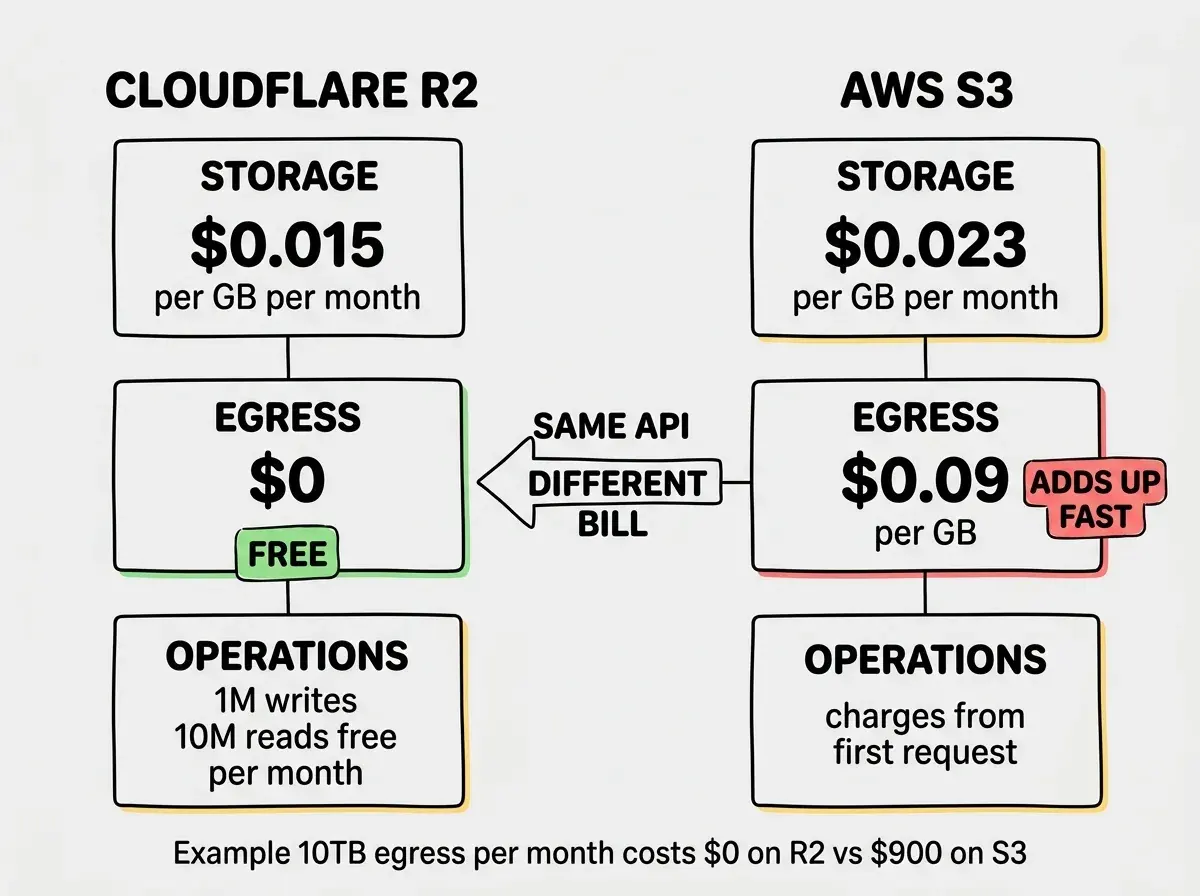
The headline feature of Cloudflare R2 is zero egress fees. Every byte that leaves your bucket costs nothing. For context, AWS S3 charges $0.09 per GB for the first 10TB of egress per month, dropping to $0.085 for the next 40TB. On a media-heavy application serving 10TB of images and video per month, that is $900/month in S3 egress alone. On R2, that same workload costs $0 in bandwidth.
This is not a marginal difference. It is the entire delivery fleet running for free.
Storage costs also favor R2 at $0.015/GB versus S3's $0.023/GB for Standard tier. On 1TB of stored data, that saves roughly $8/month. Not dramatic on its own, but combined with zero egress, the total cost picture shifts significantly for read-heavy workloads.
R2 also includes free operations for Class A (writes) up to 1 million per month and Class B (reads) up to 10 million per month. S3 charges for every operation from the first request. For applications with high request volumes (thumbnail serving, API responses, static assets), those free tiers eliminate another line item from your bill.
The warehouse analogy holds. R2's warehouse charges less rent per square foot, and every delivery truck leaves the dock without a toll. If your application is mostly about serving files to users, the math is straightforward.
Where S3 Wins on Features
AWS S3 has been around since 2006. Twenty years of feature development gives it capabilities that R2 simply does not match yet.
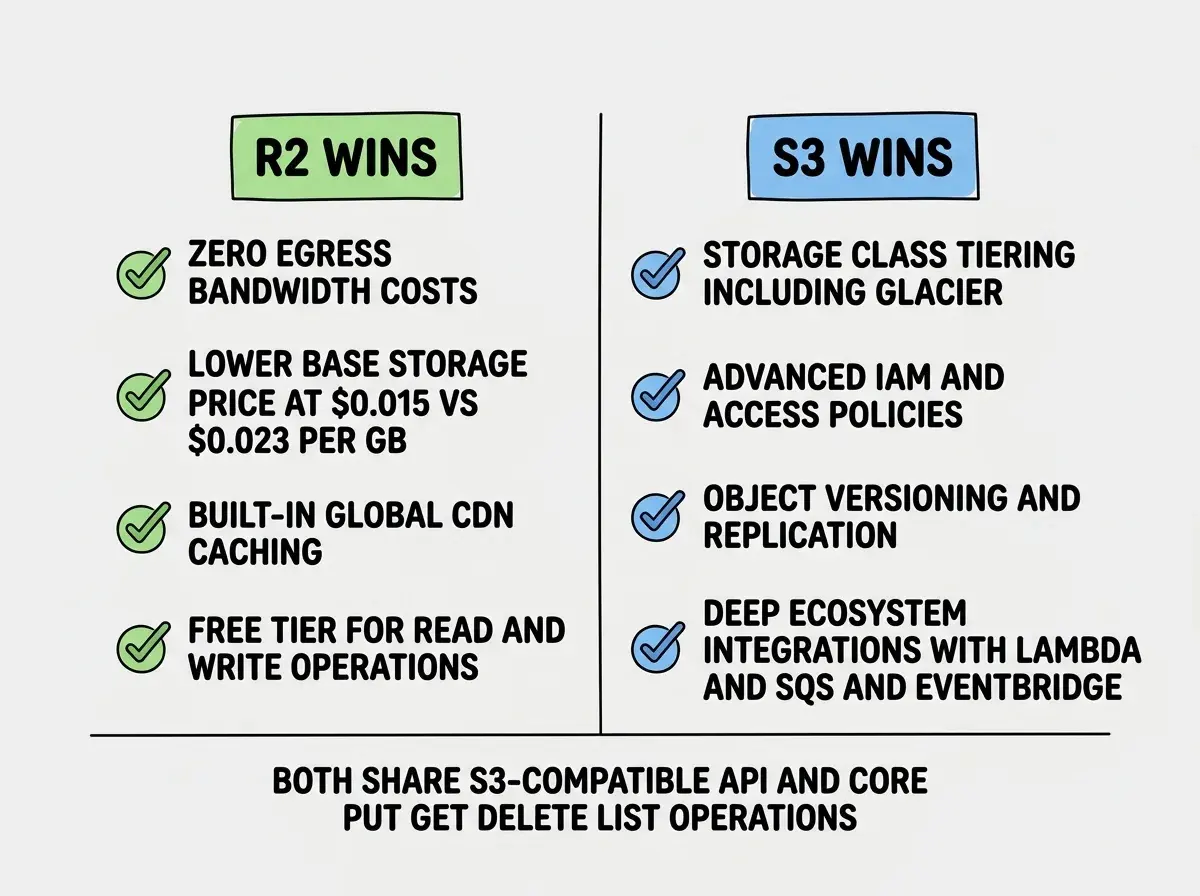
Storage classes and intelligent tiering. S3 offers Standard, Infrequent Access, One Zone-IA, Glacier Instant Retrieval, Glacier Flexible Retrieval, Glacier Deep Archive, and Intelligent Tiering that automatically moves objects between classes based on access patterns. R2 offers one storage class. If you have cold data that you rarely access but need to retain for compliance, S3's tiered pricing can actually undercut R2 on storage costs alone. Glacier Deep Archive runs $0.00099/GB per month, roughly 15x cheaper than R2's single tier.
Lifecycle policies. S3 lifecycle rules can transition objects between storage classes, expire old versions, clean up incomplete multipart uploads, and manage object lock retention. R2 supports basic expiration rules but lacks the granular transition policies that make S3's tiered storage useful.
IAM and access control. AWS Identity and Access Management is the most sophisticated cloud permissions system available. You can grant bucket access based on user identity, role assumption, IP range, time of day, MFA status, VPC endpoint, and dozens of other conditions. R2 uses API tokens with basic read/write permissions per bucket. For organizations with strict compliance requirements and auditors who want to see fine-grained access logs, S3's IAM integration is a hard requirement.
Event notifications and integrations. S3 triggers Lambda functions, SQS queues, SNS topics, and EventBridge rules when objects are created, deleted, or modified. R2 supports event notifications through Cloudflare Workers, but the ecosystem of downstream integrations is smaller.
Versioning and replication. S3 offers object versioning, cross-region replication, same-region replication, and batch operations for managing billions of objects. R2 does not currently support versioning or cross-region replication.
Back to the warehouse analogy. S3's warehouse has a sophisticated inventory management system, climate-controlled zones for different types of goods, automated forklifts, and security protocols that satisfy government auditors. R2's warehouse is clean and efficient, but it stores everything in one zone and the inventory system covers the basics.
S3-Compatible API in Practice
R2 implements the S3 API, which means the AWS SDK works with R2 by changing the endpoint configuration. Here is what that looks like in practice.
import { S3Client, PutObjectCommand } from '@aws-sdk/client-s3'

const r2 = new S3Client({
  region: 'auto',
  endpoint: 'https://<ACCOUNT_ID>.r2.cloudflarestorage.com',
  credentials: {
    accessKeyId: process.env.R2_ACCESS_KEY_ID,
    secretAccessKey: process.env.R2_SECRET_ACCESS_KEY,
  },
})

await r2.send(new PutObjectCommand({
  Bucket: 'my-bucket',
  Key: 'uploads/photo.webp',
  Body: fileBuffer,
  ContentType: 'image/webp',
}))
The core operations work as expected. PutObject, GetObject, DeleteObject, ListObjectsV2, HeadObject, multipart uploads, and presigned URLs all function correctly. Most applications that use S3 for file storage and serving can migrate by updating the client configuration.
However, some advanced S3 features are not supported. Object Lock, S3 Select (querying within objects), bucket policies with complex conditions, and some metadata operations behave differently or are absent. If your application relies on these, you will need to test thoroughly before migrating.
Assuming that S3 API compatibility means full feature parity. R2 covers the core storage and retrieval operations that most applications need, but it does not support every S3 feature. Before migrating a production workload, audit which S3 API calls your application actually makes. The common operations (put, get, delete, list, presigned URLs, multipart upload) all work. The edge cases around versioning, object lock, and complex bucket policies do not. Test your specific integration rather than assuming everything transfers cleanly.
Performance Differences
S3 operates from specific AWS regions. Your bucket lives in us-east-1 or eu-west-1, and latency depends on how far your users are from that region. You can add CloudFront as a CDN layer for global performance, but that adds configuration complexity and its own egress pricing.
R2 stores data on Cloudflare's global network. While primary storage lives in a specific location, R2 automatically caches frequently accessed objects closer to where they are requested. Combined with Cloudflare's CDN (which is essentially free for R2 objects served through a custom domain), the performance for globally distributed read-heavy workloads is competitive without additional CDN configuration.
For write-heavy workloads or applications that need guaranteed single-region consistency, S3's explicit region model gives you more control over data placement and latency characteristics.
When to Pick Each Service
R2 is the better choice when your workload is dominated by serving files to users. Image hosting, video delivery, static site assets, file downloads, API responses with binary payloads, and any scenario where egress costs would be a significant portion of your S3 bill. If you are building a media-heavy application, a CDN-backed website, or a SaaS product that serves user-uploaded files, R2's zero egress pricing eliminates the anxiety of going viral. Your storage bill stays flat regardless of traffic spikes.
S3 is the better choice when you need the broader AWS ecosystem. Data pipelines that trigger Lambda functions on upload, compliance workloads requiring object lock and Glacier archival, multi-region replication for disaster recovery, and enterprise environments where IAM policies are reviewed by security teams. If your storage is part of a larger AWS architecture with tight integrations between services, the operational overhead of splitting storage away from the rest of your infrastructure usually is not worth the egress savings.
The hybrid approach works too. Use S3 for your data pipeline and archival storage where the ecosystem integrations matter. Use R2 for your public-facing asset delivery where egress costs dominate. Many teams run both, routing internal data through S3 and user-facing content through R2. The S3-compatible API makes this straightforward since your application code uses the same SDK for both, just pointed at different endpoints.
Learn how to architect your storage layer for production workloads without surprise bandwidth bills.
See the full guideWhat This Means For You
The Cloudflare R2 vs AWS S3 decision comes down to a simple question. Is your primary cost driver storage or delivery?
If your application stores 100GB but serves 10TB per month (think image-heavy apps, media platforms, or CDN-backed sites), R2 saves you hundreds or thousands of dollars monthly with zero egress fees. The warehouse ships for free, and for delivery-heavy workloads, that is the only number that matters.
If your application stores 10TB but serves modestly, relying on Lambda triggers, lifecycle transitions to Glacier, cross-region replication, and fine-grained IAM policies, S3's feature depth justifies the higher per-GB cost. The warehouse management system matters more than the delivery fees when your architecture depends on it.
For most developers building modern web applications, SaaS products, or content platforms, R2 handles the common case at a lower price point. The S3-compatible API means you are not locked in. You can start with R2 and move specific workloads to S3 if you hit a feature gap, or start with S3 and migrate your egress-heavy buckets to R2 when the bandwidth bill gets uncomfortable. The API compatibility gives you that flexibility without rewriting application code.
Get practical guidance on choosing the right tools for each layer of your stack.
Explore the toolkitPick based on your actual cost structure and feature requirements, not brand familiarity. The best storage service is the one where your bill reflects what you store, not what you serve.