Claude Code shipped two releases in 24 hours that fix persistent session pain. Version 2.1.191, released June 24, brings the /rewind slash command for recovering conversations lost after /clear. Version 2.1.193, released June 25, adds autoMode.classifyAllShell to run every shell command through the safety classifier. Both are available now by running npm update -g @anthropic-ai/claude-code.
What does /rewind actually do when you run it
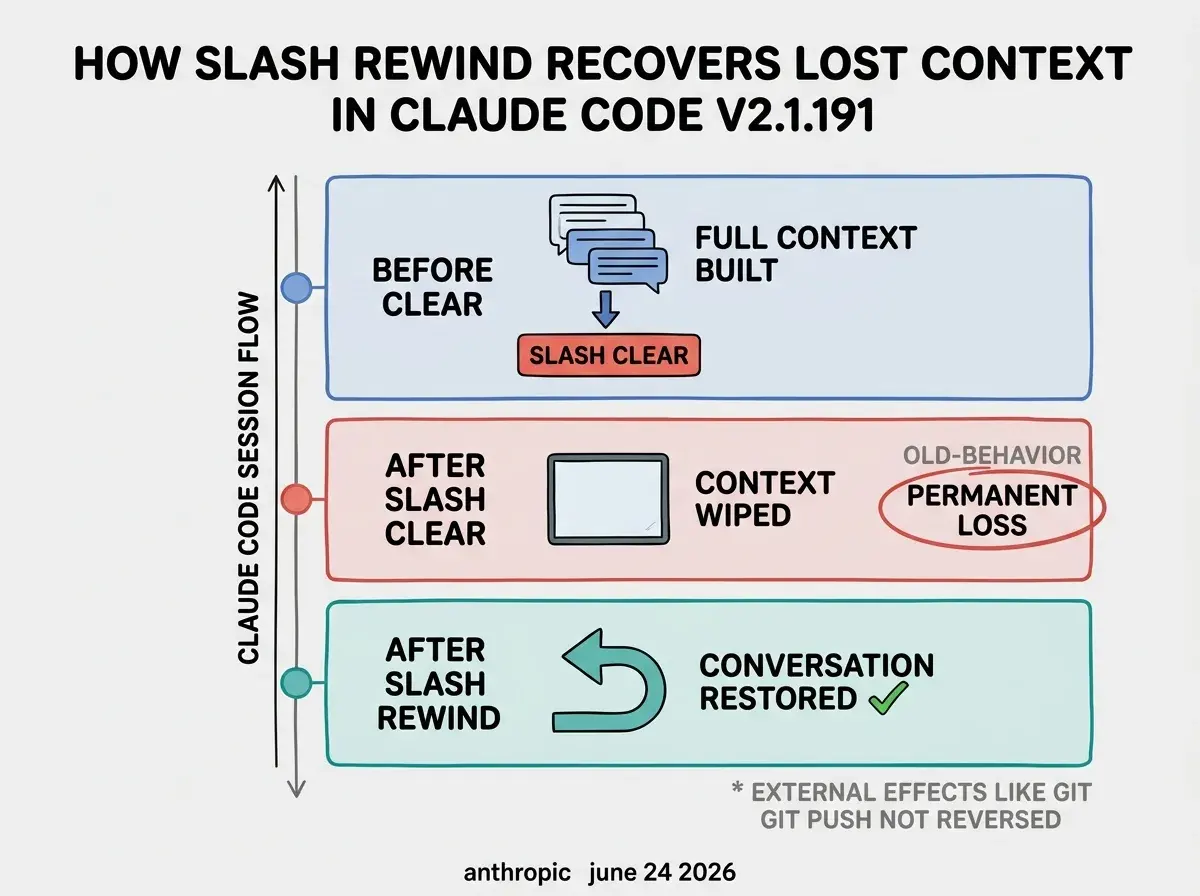
/rewind restores your Claude Code session to the state it was in before you ran /clear. Instead of permanently losing conversation history when context becomes too large or tangled, you now have a way back. The command also works as /undo and /checkpoint to return to earlier checkpoints within the session, not only the pre-clear state.
When you use /clear in a Claude Code session, the entire conversation history is wiped to free up context for a fresh start. The tradeoff is that any context built during that session disappears immediately: what the codebase looked like, what constraints you asked Claude to hold in mind, the reasoning behind earlier decisions. Before v2.1.191, that loss was permanent the moment the clear ran.
/rewind works by storing a snapshot of the conversation state before the clear executes. After upgrading, if you clear a session and realize you needed something from it, running /rewind brings the conversation back to the point just before you cleared. The broader checkpoint behavior lets you return to earlier points in a long session too, not just the most recent clear.
One detail matters for teams using Claude Code with external tools: /rewind restores conversation history and code file snapshots. Terminal commands with external effects (git pushes, API calls, package installs) remain as they ran. If an agent pushed a commit before you cleared, /rewind brings back the conversation but not the pre-commit state of the files. The undo is scoped to the session, not to the broader environment.
/rewind is available in Claude Code v2.1.191. Run npm update -g @anthropic-ai/claude-code to get it. After clearing a session and regretting it, type /rewind to restore the conversation to its pre-clear state. The command also aliases as /undo and /checkpoint for returning to earlier points in a long session before any clear was run.
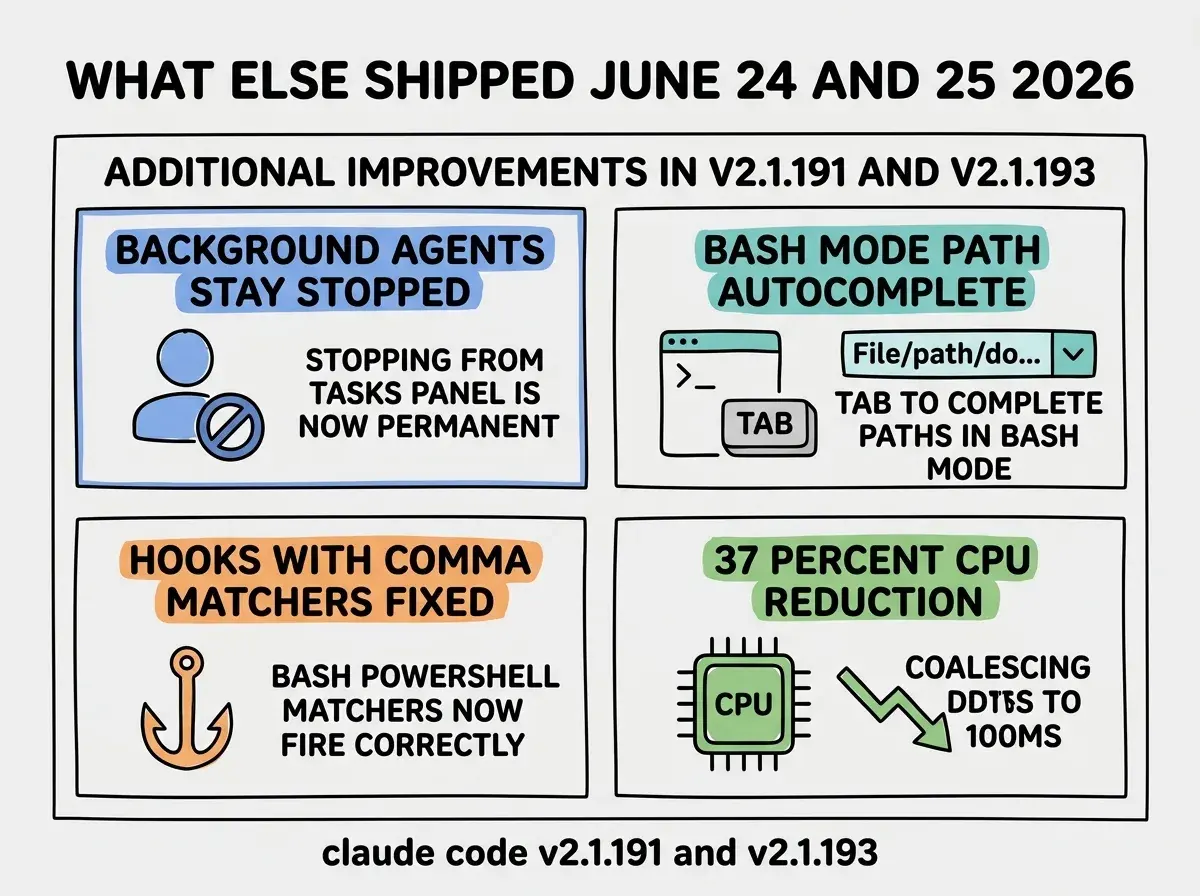
The 37% CPU reduction that shipped in v2.1.191 alongside /rewind is worth noting for vibecoder teams running extended agentic sessions. Claude Code was previously re-rendering terminal text on every update; it now coalesces updates to 100ms intervals. For hour-long sessions with continuous streaming output, the difference is measurable in both machine responsiveness and battery life.
Why does losing context after /clear cause real workflow damage
Without a recovery path, /clear forces a binary choice: keep degraded context that causes hallucinations, or lose everything and rebuild from scratch. The pain compounds during multi-hour sessions where the conversation holds irreplaceable reasoning that would take twenty or thirty minutes to re-establish with a fresh session.
Teams using Claude Code for long agentic runs commonly hit the context window ceiling after a few hours of work. The conversation fills with tool call results, file reads, and intermediate reasoning that Claude needs but that also slows responses and reduces precision. /clear is the standard fix. The cost is that any accumulated decisions, agreed constraints, and project-specific context vanish instantly.
The teams that feel this most acutely are those using Claude Code for large refactoring or architecture sessions. When Claude is working through a multi-file change and has built an internal model of the codebase across dozens of turns, losing that model mid-session means reorienting from scratch: re-reading files, re-establishing which patterns are intentional versus accidental, re-explaining goals. /rewind removes that cost from the /clear tradeoff entirely. You can clear and recover without penalty.
How does autoMode.classifyAllShell close the auto-mode coverage gap
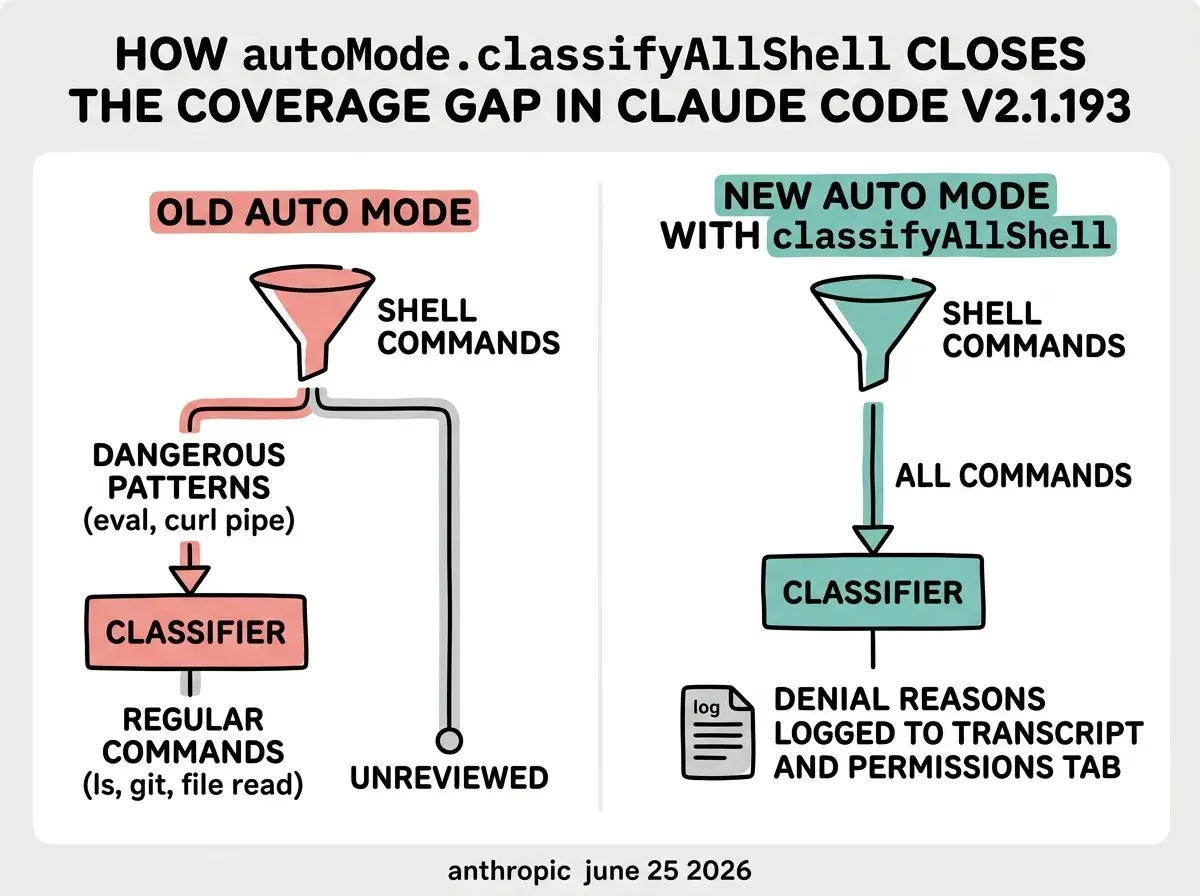
autoMode.classifyAllShell routes every Bash and PowerShell command through the auto-mode safety classifier, closing a gap that existed since auto-mode shipped: shell commands that did not match known dangerous patterns were running without classifier review. Enabling it gives complete shell coverage at the cost of added latency per command.
Prior to v2.1.193, auto-mode's classifier was scoped to arbitrary code execution patterns: piped curl commands, eval constructs, and similar high-risk shell constructs. Standard shell operations, including file reads, directory navigation, and some write operations, bypassed the classifier entirely. This was intentional for performance, but it meant auto-mode's actual safety boundary was narrower than most users assumed.
With classifyAllShell: true, every shell command the agent attempts goes through the same classifier pipeline. You get complete coverage instead of partial coverage. The tradeoff is real: classifying all commands adds classifier latency to every shell call. For interactive sessions where Claude makes many small shell calls, this is noticeable. For agentic background sessions where correctness matters more than speed, the added latency is usually acceptable.
The second related change in v2.1.193 is that auto-mode denial reasons now appear in three places: the live denial toast shown during the session, the session transcript, and the /permissions recent denials tab. Before this change, a denial gave a generic message and disappeared. Now each denial is a logged event you can review after the session ends, which makes it practical to audit what auto-mode blocked and adjust your rules accordingly.
To enable classifyAllShell, add "autoMode": { "classifyAllShell": true } to your .claude/settings.json. It is off by default. The best starting point is to enable it for sessions where your agent interacts with codebases that handle credentials, external API keys, or other sensitive data, then evaluate whether the latency tradeoff is acceptable for your session type before making it the default.
The Vibe Coder Blog covers Claude Code and the broader AI coding ecosystem, focused on what changes your workflow today.
Browse All PostsThe denial audit trail from v2.1.193 pairs well with classifyAllShell for teams building repeatable workflows in auto-mode. After a session, you can open /permissions and see exactly what the classifier blocked. If legitimate commands are being denied, you can add targeted allow rules. If something was correctly blocked, you have a record. Neither capability was possible before this release in a production-audit-friendly way.
Treating autoMode.classifyAllShell as a replacement for environment isolation. The classifier decides whether to allow or deny shell commands based on learned patterns, but it is not a hard security boundary the way a sandboxed environment is. Use classifyAllShell for broader coverage within auto-mode, but pair it with appropriate environment controls (restricted network access, read-only mounts, no production credentials in the session) for any work that touches sensitive systems. The classifier adds coverage; it does not replace containment.
What else shipped across these two releases
The two releases also address several persistent annoyances that vibecoder teams have reported for months, most notably background agents restarting after being stopped and hooks with comma-separated matchers silently failing.
Background agents resurrecting after being stopped is fixed in v2.1.191. Stopping an agent from the tasks panel previously would sometimes cause it to respawn on session start. The fix makes the stop permanent. Separately, hooks with comma-separated tool matchers (for example, "Bash,PowerShell") were silently never firing due to a parsing bug. That is fixed in v2.1.191 as well. If you have hooks configured with comma-separated matchers that seemed to do nothing, upgrade and test them again.
Version 2.1.193 adds live file path autocomplete when typing ! to enter bash mode, so you can tab-complete paths rather than typing long directory strings from memory. For agents working in deeply nested project structures, this reduces a common class of agent errors where a slightly wrong path causes silent failures. The same release adds automatic memory-pressure reaping for idle background shell commands, reducing long-session memory growth without requiring manual session management.
How should vibecoders act on these updates right now
Upgrade first (npm update -g @anthropic-ai/claude-code), then establish one habit change: use /rewind before starting a completely fresh session after clearing context. The command now exists, but the reflex to reach for it only develops with deliberate practice. Most vibecoders will not use /rewind the first time they need it because they will not remember it is there.
For teams running auto-mode in production, treat classifyAllShell as a configuration decision rather than a set-and-forget upgrade. Enable it in a staging or dev environment first, run your typical session workloads, and inspect the /permissions denial tab to see what the classifier flags. If the latency is acceptable and denials look correct, roll it to production. If legitimate commands are being blocked, use the denial reasons to write targeted allow rules before enabling it broadly.
The denial audit trail from v2.1.193 is immediately useful even without classifyAllShell. Enable it and run a few sessions; see what auto-mode is blocking in your standard workflow. The existing classifier coverage, even before classifyAllShell, may be flagging things you did not know about.
These two releases continue the pattern visible in recent Claude Code development: the failure modes that compound over long agentic sessions are getting systematic fixes. /rewind addresses irreversible context loss. classifyAllShell addresses incomplete safety coverage in auto-mode. The 37% CPU reduction addresses responsiveness degradation during extended streaming. None of these are headline features, but together they make Claude Code meaningfully more reliable for the vibecoder workflows that depend on it most.
The Vibe Coder Blog covers what shifts how vibecoders build, from Claude Code releases to tool ecosystem updates.
Read More Posts