Builder.io visual development sits in a category that barely existed two years ago. It is not a website builder. It is not a traditional CMS. Think of it as a CMS on steroids, one that lets non-developers edit live pages visually while giving engineering teams full control over the underlying codebase. With 92% of developers using AI tools daily, Builder.io has leaned hard into AI-powered generation, letting product managers and designers create and modify pages without filing a single Jira ticket.
This review breaks down what Builder.io actually does, who it works best for, and whether the platform delivers enough value to justify its enterprise-focused pricing. If you have been evaluating visual development tools for a cross-functional team, this is the deep dive you need.
What Builder.io Actually Is
Builder.io is a headless visual development platform. That sounds like marketing jargon, so let me unpack it.
Traditional CMS platforms like WordPress couple your content with your frontend. Headless CMS platforms like Contentful or Sanity separate content from presentation, giving developers freedom to build any frontend. But they strip away the visual editing experience. Content editors work in form fields, never seeing what the final page looks like until it is deployed.
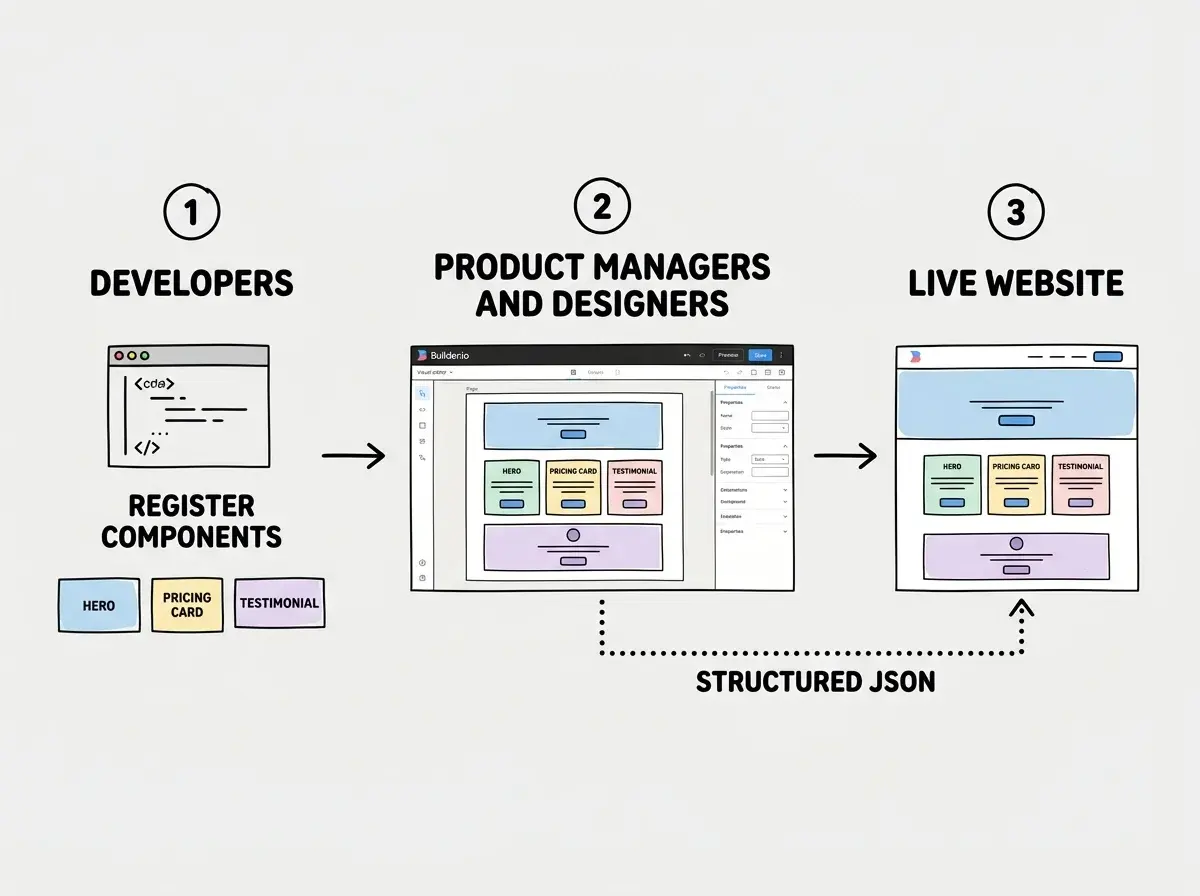
Builder.io bridges that gap. It gives you headless architecture (your React, Next.js, Angular, or Vue codebase stays untouched) while layering a visual drag-and-drop editor on top. Product managers and designers see the actual page. They drag components, edit text, rearrange sections, and publish changes. Developers define the component library and set guardrails.
The CMS-on-steroids analogy holds up because Builder.io does everything a headless CMS does (structured content, APIs, localization, scheduling) but adds a visual editing layer that makes the content team self-sufficient. They are not filling in form fields. They are building actual pages using real components from your design system.
Builder.io visual development is not a replacement for your engineering team. It is a multiplier. Developers define the component library and set permissions. Product managers and designers use those components to build and edit pages visually. The result is fewer bottlenecks, faster iterations, and engineering time freed up for the work that actually requires engineers.
The Visual Editor Experience
The centerpiece of Builder.io is its visual editor. You see your actual website rendered in the editor canvas. Not a wireframe. Not a preview approximation. The real page, with your real components, your real styles, and your real data.
Dragging a hero section onto a landing page works the way you would expect from Figma, not from a CMS. You grab a component, drop it where you want it, and adjust properties through a sidebar panel. Text editing is inline. Images swap with a click.
What separates this from Webflow or Squarespace is that the components you are dragging are the same React (or Angular, or Vue) components your developers wrote. A designer rearranging a pricing card is using the exact same <PricingCard> component from the engineering team's codebase. No translation layer. No "export to code" step. The visual editor writes structured JSON that your frontend framework renders using your own components.
This matters for design consistency. Content editors cannot accidentally break the design system because they can only use components that engineering has registered. The guardrails are architectural, not policy-based.
AI Features That Actually Work
Builder.io introduced AI-powered generation in 2024 and has been iterating aggressively. The standout feature is the ability to describe a section or page in natural language and have the AI generate it using your registered components.
Tell it "create a testimonial section with three cards and a headline" and it assembles the layout using your actual design system components. It is not generating generic HTML. It is composing your <TestimonialCard> and <SectionHeading> components into a layout that matches your brand.
The AI also handles copy variations and A/B test setup. You can generate three versions of a landing page hero and run them as experiments with built-in analytics. For product managers who run conversion optimization, this collapses what used to be a multi-week process into something you can do in an afternoon.
There is also a Figma-to-code pipeline. Import a Figma design and Builder.io maps it to your registered components, generating a page that uses your actual codebase rather than unmaintainable HTML. The mapping is not always perfect, but it is a dramatically better starting point than rebuilding from scratch.
Team Collaboration and Permissions
This is where Builder.io earns its enterprise positioning. The platform has granular role-based access that makes sense for organizations where multiple teams touch the website.
You can set up roles where developers manage the component registry, designers edit visual layouts, content writers update copy and images, and product managers publish pages and run experiments. Each role sees only what they need. A content writer cannot accidentally delete a registered component. A designer cannot push changes live without PM approval if you configure the workflow that way.
Publishing workflows support drafts, scheduled publishing, and approval chains. The audit log tracks every change, who made it, and when. You can also create page variants for different audiences (returning visitors vs. new visitors, US vs. EU, mobile vs. desktop) and manage all variants within the same visual editor.
Teams often give every user full admin access during the trial period, then wonder why the production site has unauthorized changes after launch. Set up role-based permissions from day one, even during evaluation. Builder.io's permission model is one of its strongest features, but it only works if you actually configure it. Treating it like a single-user tool defeats the purpose of using a team-oriented platform.
How It Compares to Webflow and Lovable
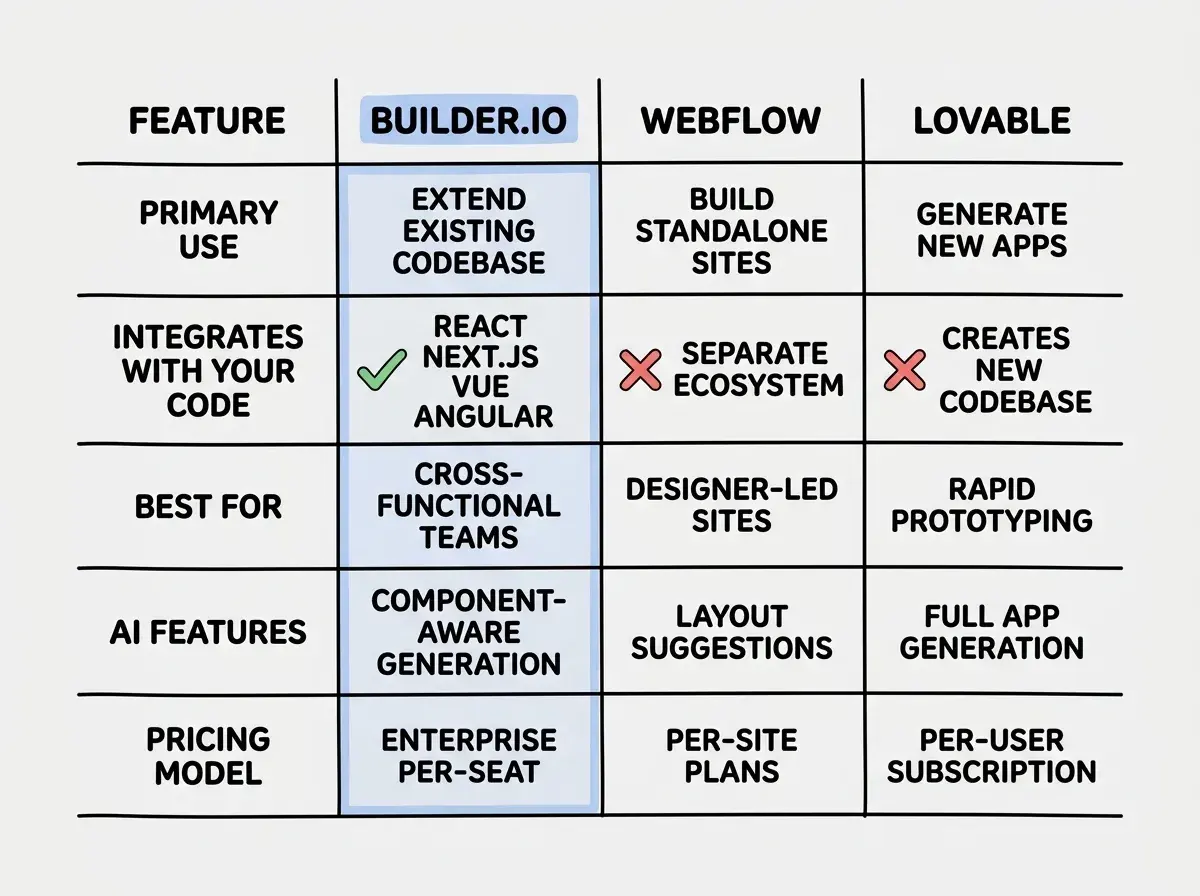
Builder.io occupies a different niche than both Webflow and Lovable, even though all three get lumped into "visual development."
Webflow is a standalone website builder. It generates and hosts your site. Designers love it because the visual tools are best-in-class for pixel-perfect layouts. But developers often resist it because the generated code is not part of their stack. You cannot use your React components inside Webflow or integrate it into a Next.js app without workarounds. Excellent for independent marketing sites, less useful when the marketing site and product share a codebase.
Lovable is an AI app builder that generates full applications from prompts. It creates new codebases from scratch and does not integrate with existing ones. It is a creation tool, not an editing or management tool.
Builder.io is the integration play. It plugs into your existing codebase, design system, and deployment pipeline. If Webflow is a self-contained design tool and Lovable is a code generator, Builder.io is a collaboration layer that sits on top of whatever you have already built.
For product managers evaluating these options: if you need a standalone marketing site, Webflow is hard to beat. If you need a quick prototype, Lovable gets you there fastest. If you need non-developers to edit pages within an existing application, Builder.io is the right tool.
Enterprise Focus and Pricing
Builder.io does not hide its enterprise ambitions. The pricing reflects that. There is a free tier that lets you explore the visual editor and basic CMS features, but the capabilities that make Builder.io genuinely valuable for teams (role-based access, A/B testing, personalization, scheduling, and custom component registration) live behind paid plans.
The Growth plan starts at $49 per month and covers small teams with basic visual editing needs. The Enterprise plan is custom-priced and includes everything: advanced targeting, personalization, custom roles, SLA guarantees, and dedicated support. Most organizations evaluating Builder.io for a real production use case will end up on Enterprise pricing after a conversation with their sales team.
This means Builder.io is not the right choice for solo developers. The platform's value proposition is team-based. If you do not have a content or marketing team that needs to make website changes independently from engineering, you are paying for collaboration features you will never use.
For organizations where engineering is the bottleneck for every landing page update, the ROI calculation is different. If a product manager can ship a landing page variant in an hour instead of waiting two weeks for a sprint slot, the platform pays for itself quickly.
Understanding AI-assisted development fundamentals helps you pick the right platform for your team.
Explore AI dev toolsWho Should Use Builder.io
Builder.io visual development works best for a specific type of organization. You need at least two of these three conditions to get real value from the platform.
A cross-functional team. Product managers, designers, and developers who all touch the website but have different skill sets. Builder.io's value is in handoff elimination. If one person does everything, there is no handoff to eliminate.
An existing codebase. Builder.io shines when it integrates with your React, Next.js, or Vue application. If you are starting from scratch, Webflow or Lovable will get you to a working site faster.
A content velocity problem. If your team needs to ship landing pages and content updates faster than engineering can deliver, Builder.io removes the bottleneck. If you ship one page a month, the platform is overkill.
The teams that get the most from Builder.io are mid-to-large organizations running content-heavy products on modern JavaScript frameworks. They have a design system, a component library, and a marketing team constantly waiting for engineering to make page updates. Builder.io turns those two-week engineering tickets into same-day self-service tasks.
What This Means for Your Team
Builder.io is not trying to replace developers. It is trying to stop them from being the bottleneck for every page change. That distinction is what separates it from simpler visual builders.
The visual editor is genuinely good. The AI features are useful rather than gimmicky. The headless architecture means it integrates rather than replaces. And the team collaboration features are the most mature in the visual development space.
The catch is pricing and complexity. Getting Builder.io properly integrated with your codebase and team workflow takes real effort. It is not a weekend project. But if your team has the right conditions, Builder.io visual development is one of the strongest options available in 2026. If you are a solo builder without those bottlenecks, your budget is better spent elsewhere.
Start with the fundamentals before adding team collaboration tools to your workflow.
Start building