When 92% of developers use AI tools daily, a real-time chat application is no longer a multi-month engineering project. You can build a chat app with AI coding tools in a single session, complete with WebSocket connections, message persistence, and presence tracking. This tutorial walks you through the prompt sequence using Supabase Realtime.
Real-time chat sits at the intersection of several technical challenges. Messages need to appear instantly. Users need to know who is online. Typing indicators need to feel responsive. And everything needs to persist so conversations survive a page refresh. Supabase handles all of this through its Realtime engine, built on Phoenix Channels and WebSockets. You do not need to understand those internals, but you do need to prompt the AI in the right order.
Why Supabase Realtime for Chat
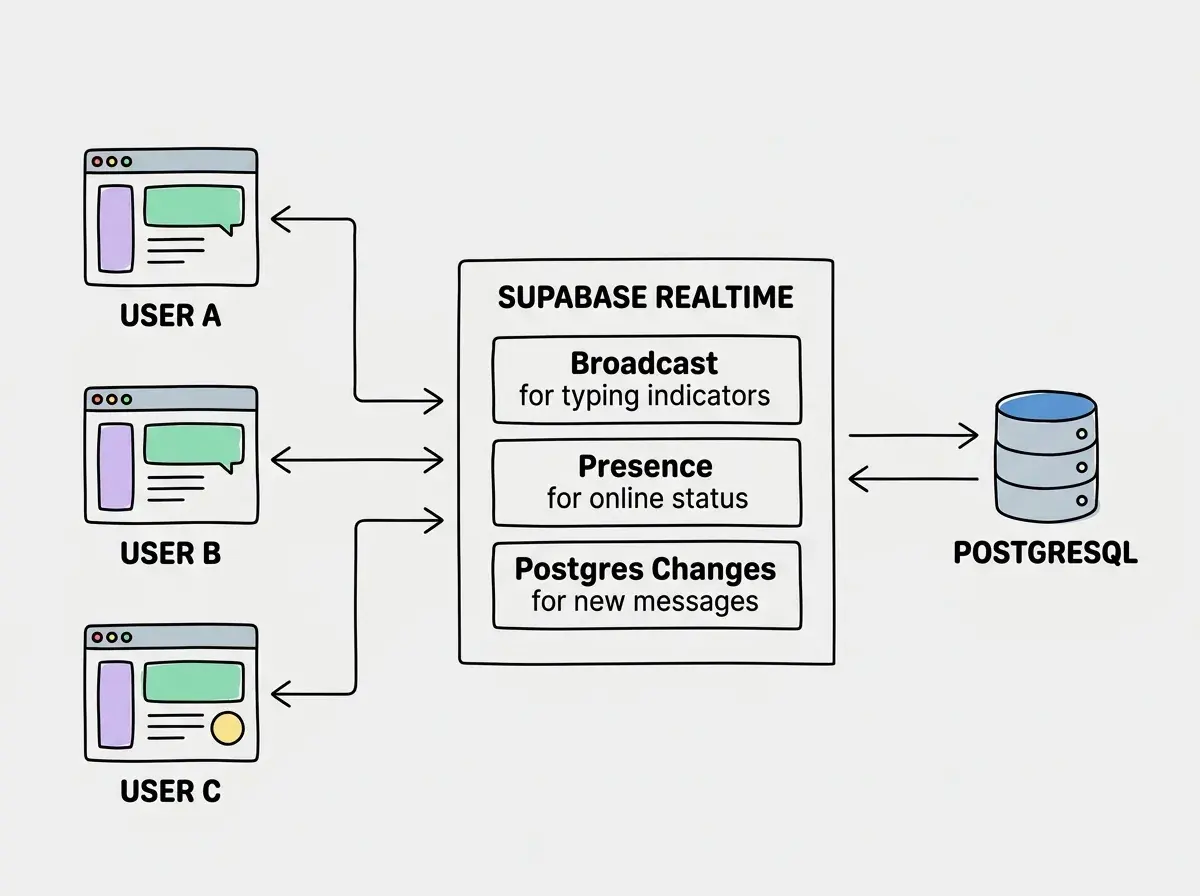
Supabase Realtime gives you three capabilities that map directly to chat features. Broadcast sends ephemeral messages to all connected clients, perfect for typing indicators. Presence tracks who is online or offline in real time. Postgres Changes streams database inserts, updates, and deletes to connected clients the moment they happen. Together, these three features cover every real-time need a chat app requires.
The alternative would be rolling your own WebSocket server with Socket.io or Ably. That adds a separate deployment surface, scaling concern, and authentication plumbing that Supabase handles out of the box. Since your messages already live in Supabase's PostgreSQL database, streaming changes through the same service simplifies everything.
Setting Up the Database Schema
Before writing any frontend code, you need a solid message schema. This is where most AI-generated chat apps go wrong. They create a single messages table and call it done. That works for a toy demo but falls apart the moment you want channels, threads, or message editing.
Start with this prompt to your AI coding tool:
"Create a Supabase database schema for a chat application. I need three tables. First, a channels table with id (uuid, primary key), name (text, unique), description (text, nullable), created_by (uuid, references auth.users), and created_at (timestamptz, default now). Second, a messages table with id (uuid, primary key), channel_id (uuid, references channels), user_id (uuid, references auth.users), content (text, not null), edited_at (timestamptz, nullable), and created_at (timestamptz, default now). Third, a channel_members table with channel_id and user_id as a composite primary key, joined_at (timestamptz, default now). Enable Row Level Security on all three tables. Create policies so users can only read messages in channels they are members of, and can only insert messages into channels they have joined."
This prompt gives the AI everything it needs in a single pass. The schema supports channels, membership-based access control, and message editing. The RLS policies ensure that users cannot read or write to channels they have not joined.
Building the Message Feed
With the schema in place, prompt the AI to build the message UI:
"Build a React component called MessageFeed that connects to a Supabase channel using Realtime Postgres Changes. It should listen for INSERT events on the messages table filtered by channel_id. When a new message arrives, append it to the existing list without refetching. On mount, fetch the last 50 messages for the current channel ordered by created_at ascending. Display each message with the sender's display name, the message content, and a relative timestamp like '2 min ago'. Use a useRef to auto-scroll to the bottom when new messages arrive."
The key detail here is "without refetching." A common mistake in AI-generated real-time code is to refetch the entire message list every time a new message arrives. That defeats the purpose of real-time subscriptions. The subscription gives you the new row directly; you just append it to your local state.
Always prompt the AI to append incoming real-time messages to existing state rather than refetching the full list. Refetching on every new message creates unnecessary database load and causes visual flickering as the entire list re-renders. The Supabase Realtime subscription already delivers the complete row, so appending is both simpler and more performant.
Adding Typing Indicators With Presence
Typing indicators are the feature that makes a chat app feel alive. Supabase's Broadcast channel handles this elegantly because typing events are ephemeral. You do not need to store them in the database.
"Add a typing indicator to the chat. When the current user types in the message input, broadcast a 'typing' event to the channel using Supabase Realtime Broadcast with a payload containing the user's display name. Debounce the broadcast to fire at most once every two seconds. Listen for 'typing' events from other users and display 'Alex is typing...' below the message feed. If multiple users are typing, show 'Alex and 3 others are typing...' Clear the indicator three seconds after the last typing event from that user."
The debounce is critical. Without it, every keystroke fires a broadcast event, which floods the channel with traffic and makes the indicator flicker. Two seconds is the sweet spot: responsive enough to feel instant, infrequent enough to avoid noise.
Tracking Online and Offline Status
Presence is what turns a message list into a social experience. Users want to know who is available before they send a message. Supabase Presence tracks this automatically through the channel subscription lifecycle.
"Add online/offline presence tracking. When a user opens the chat, sync their presence to the channel with their user_id and display_name. Display a sidebar showing all online members with a green dot next to their name. When a user closes the tab or disconnects, Supabase should automatically remove them from the presence list. Sort online members alphabetically."
Supabase handles the hard part here. When a WebSocket connection drops (tab close, network loss, browser crash), the server automatically fires a leave event after a timeout. You do not need to implement heartbeats or cleanup logic. The AI might try to add manual cleanup; if it does, remove it. Supabase's built-in presence management is more reliable than any custom implementation.
Chat apps handle user data, which means Row Level Security is not optional.
Learn RLS basicsIntegrating Authentication
A chat app without authentication is just a public bulletin board. Supabase Auth integrates directly with Realtime, so authenticated users can subscribe to channels and their user_id flows automatically into RLS policies.
"Add Supabase Auth with email and password. Create a login page and a signup page. After authentication, redirect to the main chat view. Use the Supabase auth session to set the user_id on new messages automatically. Show the user's email as their display name until they set a custom one. Add a sign-out button in the header."
The important phrase is "set the user_id on new messages automatically." This tells the AI to use Supabase's auth.uid() function in the database rather than passing the user ID from the client. Client-supplied user IDs can be spoofed. Database-level authentication cannot.
Never pass the user ID from the client when inserting messages. AI coding tools sometimes generate code that includes user_id: currentUser.id in the insert payload. This is a security hole because anyone can modify client-side JavaScript to impersonate another user. Instead, use a database default of auth.uid() on the user_id column and omit it from the insert entirely. The database fills it in automatically from the authenticated session.
Message Persistence and Loading History
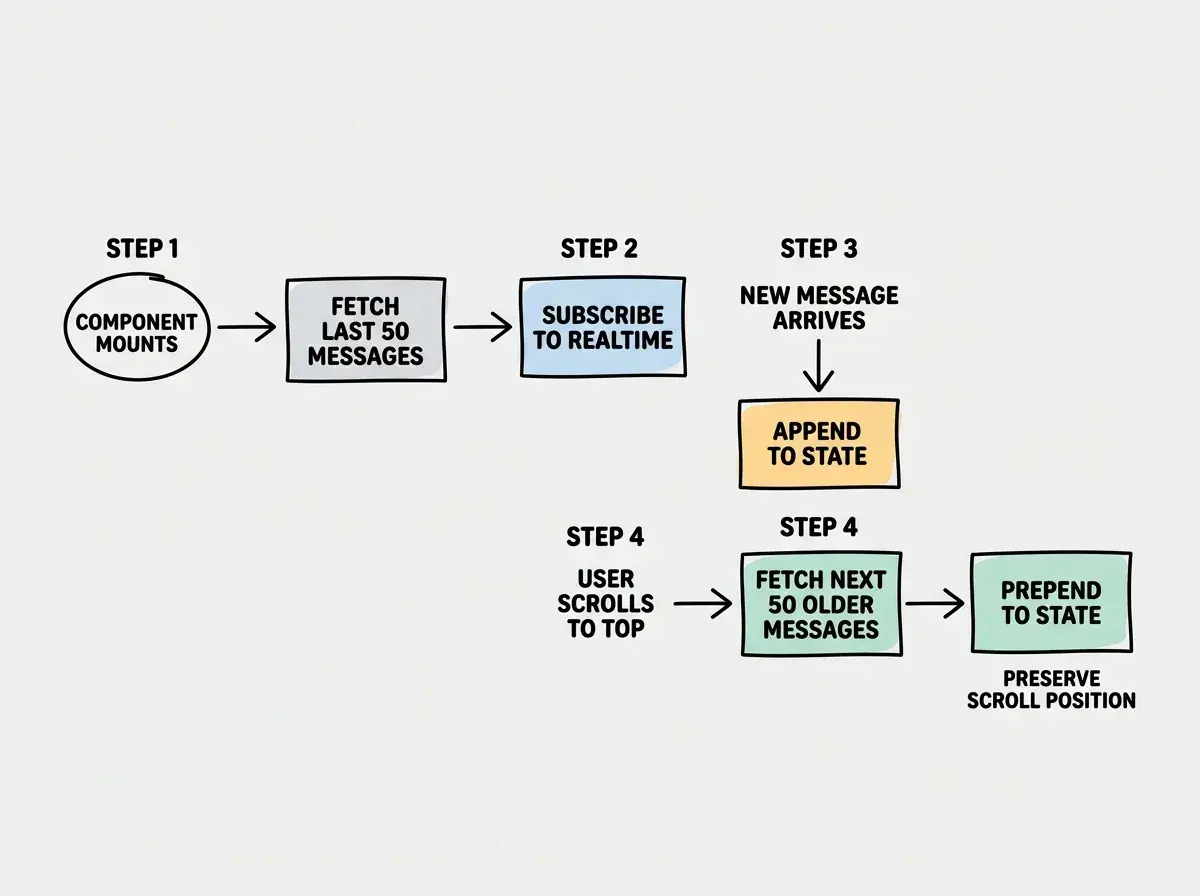
Real-time subscriptions only deliver messages that arrive after the client connects. Everything before that needs to come from a database query. The pattern is: fetch history on mount, then subscribe for new messages.
"When the MessageFeed component mounts, fetch the 50 most recent messages from the messages table where channel_id matches the current channel. Order by created_at descending, then reverse the array so the oldest message appears at the top. After the initial fetch completes, subscribe to Postgres Changes for new inserts. When the user scrolls to the top of the message list, fetch the next 50 older messages and prepend them without changing the scroll position."
That last detail, "without changing the scroll position," is where most AI-generated chat apps stumble. When you prepend older messages to the top of the list, the browser wants to maintain the scroll offset from the top, which means the viewport jumps. The fix is to save the scroll height before prepending, then restore the scroll position after the DOM updates. Include this requirement in your prompt so the AI handles it correctly the first time.
The Complete Prompt Sequence
Here is the full sequence of prompts, in order, that builds a functional real-time chat application:
- Database schema with channels, messages, and members tables plus RLS policies
- Authentication with email/password login and signup
- Channel list sidebar with the ability to create and join channels
- Message feed with initial history load and real-time subscription
- Message input with send functionality
- Typing indicators using Broadcast with debouncing
- Online presence tracking in the channel sidebar
- Infinite scroll for loading message history
- Message editing and deletion with proper RLS policies
Each prompt builds on the one before it. Resist the temptation to combine multiple features into a single prompt. AI coding tools produce cleaner, more testable code when they focus on one feature at a time. After each prompt, verify that the feature works before moving on. If something breaks, fix it before adding the next layer.
This tutorial is one of many practical guides for shipping real applications with AI coding tools.
Explore more tutorialsWhat This Means For You
Real-time chat used to be the kind of project that separated junior developers from senior ones. WebSocket management, connection recovery, presence tracking, and message ordering were genuinely hard problems. Supabase Realtime and AI coding tools have compressed that complexity into a series of well-structured prompts.
The skill that matters now is knowing what to ask for, in what order, and how to verify each piece works before building the next. The nine-prompt sequence above gives you a repeatable pattern for building any real-time feature, not just chat. Collaborative editing, live dashboards, multiplayer games all use the same Supabase Realtime primitives of Broadcast, Presence, and Postgres Changes.
Start with the schema. Get the data model right. Then layer on real-time features one at a time.