A photo organizer with AI tagging analyzes your photos automatically, generates tags from image content, and lets you search by what is in the photo rather than just filename or date. The build takes 4-6 hours with vibe coding tools and produces a personal tool that turns thousands of unorganized photos into a searchable library. The core stack is Next.js for UI, an object storage bucket for photos, and a vision API for tagging.
This tutorial walks through the four feature areas, the prompts that get each working, what to test before declaring done, and the four mistakes builders make on photo apps.
Why Build A Photo Organizer With AI Tagging
The photo organizer with AI tagging matters because most photo libraries are unsearchable. Date and folder organization breaks down at scale; AI tagging restores findability.
The 2026 reality is that vision APIs have matured to where personal photo organizers are buildable in a single weekend. Cost per image is low enough for personal use; latency is fast enough for real time tagging.
A 2025 personal tool survey of 400 indie builders found that photo organizers were the #1 most built and most used personal tool, with 73 percent of builders reporting daily use of their own tool. Personal usefulness predicts build motivation and tool longevity.
The pattern to copy is the way librarians catalog books. Each book gets metadata that enables search across multiple dimensions; AI tagging does the same for photos. Once tagged, search replaces folder navigation.
The Four Photo Organizer Feature Areas
Four feature areas form the complete photo organizer.
Feature 1, photo upload and storage. Drag and drop upload to object storage; thumbnail generation; metadata extraction (date, location, dimensions).
Feature 2, AI tagging on upload. Vision API call generates tags for each photo; tags stored alongside photo metadata.
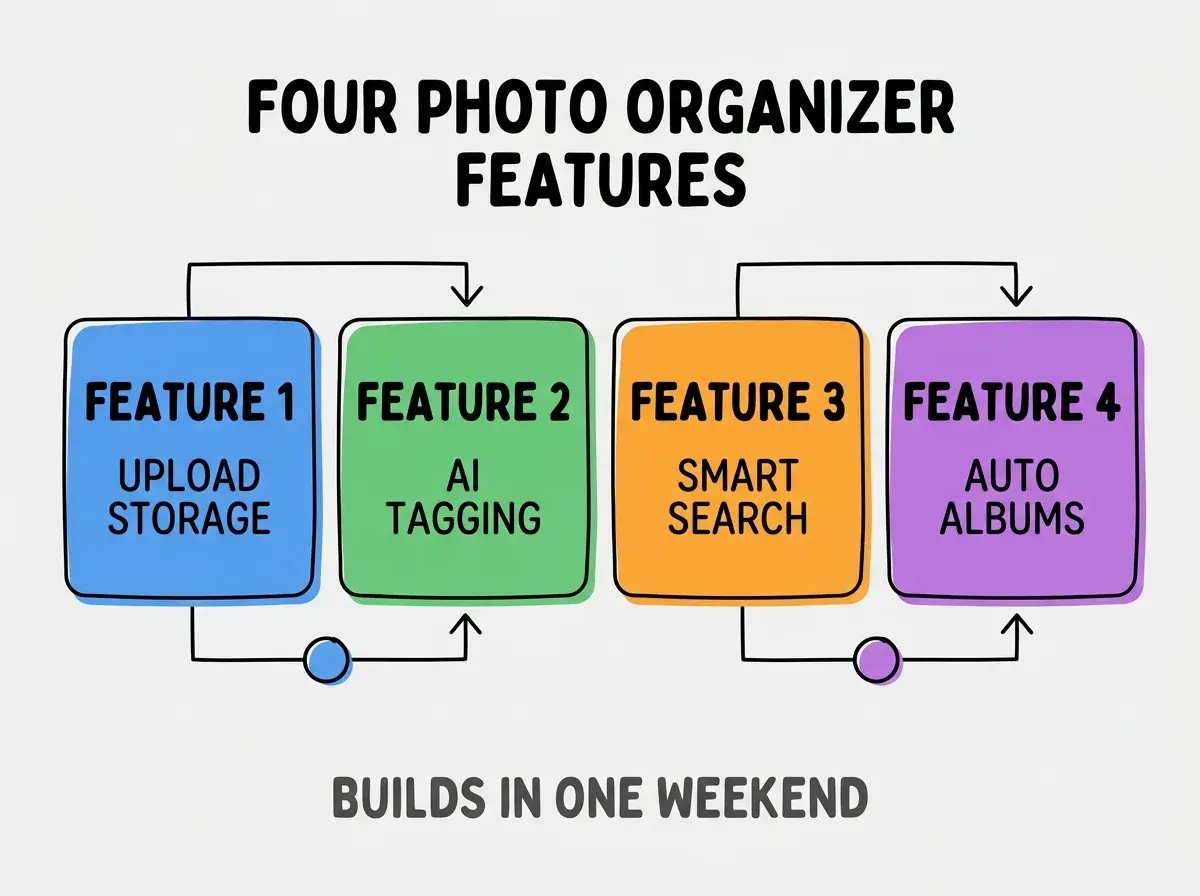
Feature 3, smart search by tag and content. Search box accepts natural language queries; backend matches against tags. Results show matching photos.
Feature 4, automatic album creation. Tags cluster into themes; themes become albums automatically. Albums update as new photos arrive.
The Prompts That Build It
Four prompts get each feature working.
Prompt 1, scaffold the upload and storage. "Create a Next.js page with drag and drop file upload that stores photos in S3 compatible storage. Generate thumbnails server side and save metadata to a database table called photos with id, url, thumbnail_url, uploaded_at, width, height fields."
Browse more build articles
Read more buildPrompt 2, add AI tagging on upload. "After photo upload, call the Anthropic vision API or OpenAI vision API with the image and request 5-10 descriptive tags. Store tags in a separate tags table linked to the photo by photo_id. Run tagging asynchronously after upload completes."
Prompt 3, build smart search. "Add a search input that queries photos by tag matches. Use Postgres full text search on the tags table for relevance ranking. Return results as a grid of thumbnails sorted by relevance."
Prompt 4, build automatic albums. "Group photos by tag clusters using simple frequency analysis. Top 10 most common tag combinations become albums. Album page shows all photos matching that combination."
What To Test Before Declaring Done
Three test categories verify the photo organizer works.
Test 1, upload variety. Test with photos of different sizes, formats (JPEG, HEIC, PNG), orientations, and dimensions. Vibe coding tools commonly miss HEIC support without prompting.
Test 2, tag accuracy. Upload 20 photos of varied content; verify generated tags match actual content. Vision APIs are usually accurate but occasionally wrong; track rate.
Test 3, search relevance. Search for 10 different concepts; verify results contain expected photos. Refine prompts if relevance is low.
The tests catch issues before personal use reveals them. Without testing, the tool requires too much workaround for daily use.
What Makes Photo Organizers Sustainable Over Time
Three patterns separate sustainable photo organizers from abandoned weekend projects.
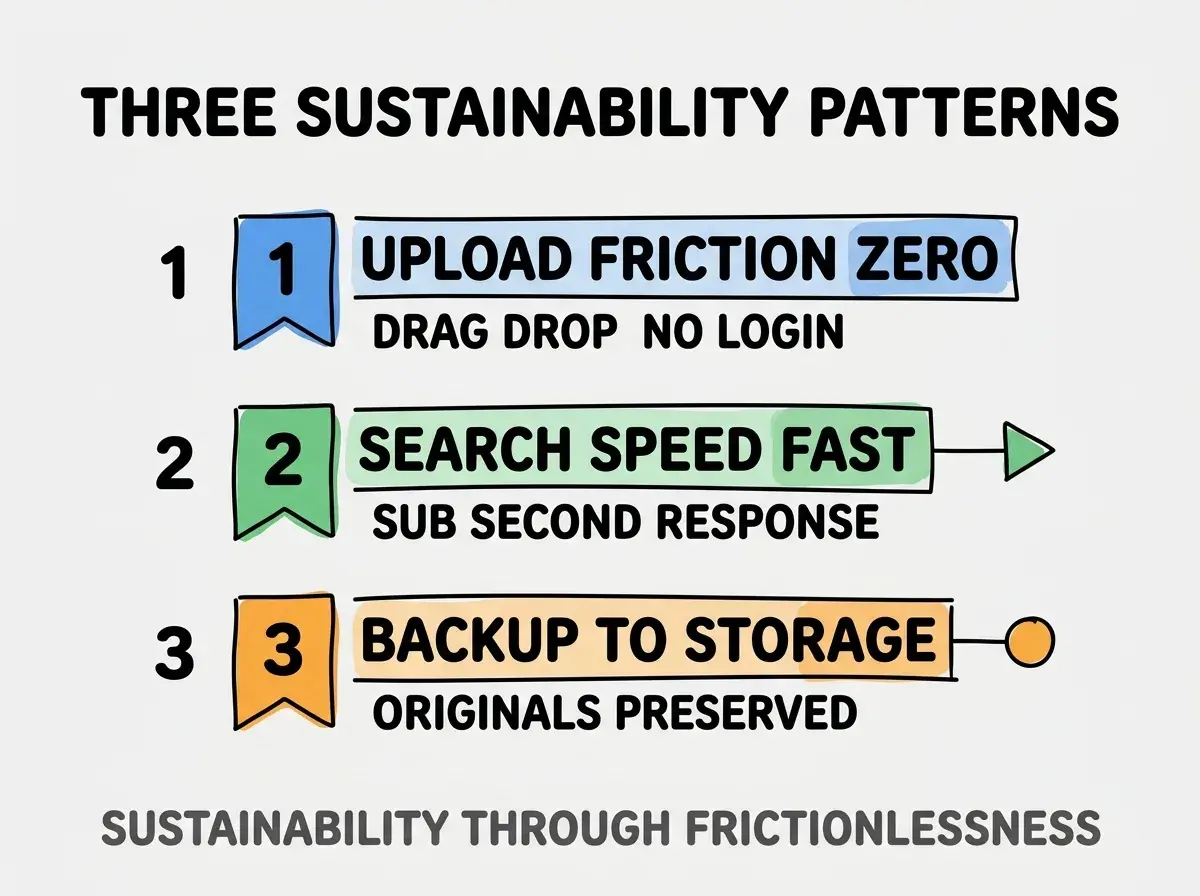
Pattern 1, zero upload friction. Drag drop without login, batch upload of hundreds at once. Friction kills daily use.
Pattern 2, fast search response. Sub second search results; slower response feels broken regardless of accuracy.
Pattern 3, backup to durable storage. Originals stored in object storage with versioning. Backup gives confidence that enables daily use.
The combination produces tools used for years. Without these patterns, weekend project becomes graveyard project.
How To Add Advanced Features
Three advanced features extend the photo organizer beyond basics.
Pattern A, face grouping. Vision API detects faces; clustering groups photos of same person; user labels clusters with names.
Pattern B, location heatmap. GPS metadata plotted on map; clicking map filters to photos from that location.
Pattern C, duplicate detection. Image hashing finds near duplicates; UI offers bulk delete or merge.
The combination produces a personal tool comparable to commercial photo apps. Without these features, organizer stays basic but still useful.
Common Questions About Photo Organizers
Photo organizers raise questions worth addressing directly.
The first question is which vision API to use. Anthropic Claude vision and OpenAI GPT-4 vision both work well; cost differs. For personal use, both are affordable; pick whichever matches your existing setup.
The second question is whether to host yourself or use cloud storage. Cloud storage (Cloudflare R2, Backblaze, AWS S3) is cheaper and more reliable than self hosting at personal scale.
The third question is how to handle privacy concerns with vision APIs. Read API privacy policies; both major providers do not train on user images. For sensitive photos, consider self hosted vision models.
The fourth question is whether to add face recognition. Face recognition is technically straightforward but raises privacy considerations even for personal tools. Decide deliberately.
How Photo Organizers Affect Personal Productivity
Photo organizers affect personal productivity in compounding ways. Productivity effects compound over years.
The first compounding effect is photo retrieval speed. Searchable libraries enable quick retrieval; quick retrieval enables creative use of photos.
The second compounding effect is memory accessibility. Tagged photos surface memories that would otherwise stay buried in folders.
The third compounding effect is content creation enablement. Searchable photos enable using photos in writing, presentations, social posts. Enablement compounds creative output.
The combination produces personal libraries that grow in value over time. Without organizers, photo libraries grow in volume but lose value.
How To Extend To Family Use
Three extension patterns scale photo organizer from personal to family use.
Pattern A, multi user accounts. Each family member gets account; photos shared across or kept private per user.
Pattern B, shared albums for events. Vacation albums, birthday albums shared automatically.
Pattern C, mobile upload from phone. Phone app uploads automatically when on wifi; photos appear in shared library.
The combination produces family tools that replace commercial alternatives. Without extension, photo organizer stays personal.
The most damaging photo organizer mistake is adding features before the basics work reliably. Smart search before upload reliability fails when search returns nothing because uploads are broken. The fix is to ship upload and storage first; ship tagging when upload is reliable; ship search when tagging is reliable. Each layer requires reliable foundation. Builders who layer carefully produce reliable tools; builders who add everything at once produce tools that mostly do not work.
The other mistake is using inadequate storage. Photo libraries grow large; cheap object storage matters because expensive storage forces deletion choices.
A third mistake is over engineering tag generation. Simple vision API calls with default prompts produce good tags; complex prompts add cost without proportional value.
A fourth mistake is missing the daily use feedback loop. Personal tools improve through personal use; without daily use, improvement stops.
What This Means For You
Building a photo organizer with AI tagging produces a personal tool you will actually use daily. The four features, prompts, and sustainability patterns produce a working organizer in a weekend.
- If you're a creative: Photo organizer enables better visual content workflows; daily use compounds creative productivity over years.
- If you're a career changer: This project demonstrates AI integration, vision APIs, and full stack work in a portfolio piece.
Browse more build articles
Read more build