If you want to build a booking system with AI, you are in good company. 92% of developers now use AI coding tools daily, and scheduling apps are one of the most common projects people attempt. The logic is deceptively complex. Calendar math, timezone conversions, conflict detection, email confirmations. This tutorial breaks it all down into concrete steps that AI tools handle well, so you can ship a working booking system without drowning in edge cases.
Think of a booking system like a restaurant reservation book, but smarter. The old-school version was a paper calendar at the front desk where someone manually penciled in names and crossed out time slots. Your digital version does the same thing, except the "pencil" is code, the "calendar" is a database, and nobody accidentally double-books because a page got smudged.
Why Booking Systems Are Perfect AI Projects
Booking and scheduling apps sit in a sweet spot for AI-assisted development. The core logic is well-understood. Millions of booking systems exist, which means AI models have seen every variation of appointment scheduling, calendar rendering, and time slot management in their training data. When you describe what you want, the AI does not have to guess. It has patterns to draw from.
At the same time, booking systems are complex enough that building one from scratch without AI would take weeks. You need a calendar view, available time slots, conflict detection, user authentication, email notifications, and timezone support. Each of those features interacts with the others. AI tools collapse that timeline dramatically because they can generate the boilerplate, the database schema, and the API routes in one pass while you focus on the business rules that make your system unique.
The best approach is to build in layers. Start with the data model and work outward toward the interface. This tutorial follows that pattern because it matches how AI tools think. Give the AI a clear data structure first, and everything else flows from it.
Step 1, Design Your Data Model
Every booking system revolves around three core objects: providers (the people or resources being booked), availability (when those providers are open), and bookings (the actual appointments). Get this right and the rest of the build becomes significantly easier.
Open your AI coding tool and start with this prompt:
Create a database schema for a booking system with these tables:

1. providers - id, name, email, timezone, created_at
2. availability - id, provider_id, day_of_week (0-6), start_time, end_time
3. bookings - id, provider_id, customer_name, customer_email, start_time, end_time, status (pending/confirmed/cancelled), created_at

Add proper foreign keys and indexes on provider_id and start_time.
This schema handles the fundamental question every booking system must answer: "Is this time slot available?" To check availability, you query the availability table for the provider's open hours on that day, then subtract any existing bookings. The result is the list of open slots.
One decision you need to make early is your slot duration. Most booking systems use fixed slots (30 minutes, 60 minutes) rather than letting customers pick arbitrary times. Fixed slots simplify conflict detection enormously. Instead of checking whether two time ranges overlap, you just check whether a specific slot already has a booking.
Design your data model before touching the UI. When you give AI tools a clear schema with defined relationships, they generate dramatically better code for every layer that follows. The schema is the blueprint. Skip it, and the AI will make assumptions that create contradictions later. Spend ten minutes here to save two hours of debugging.
Step 2, Build the Calendar View
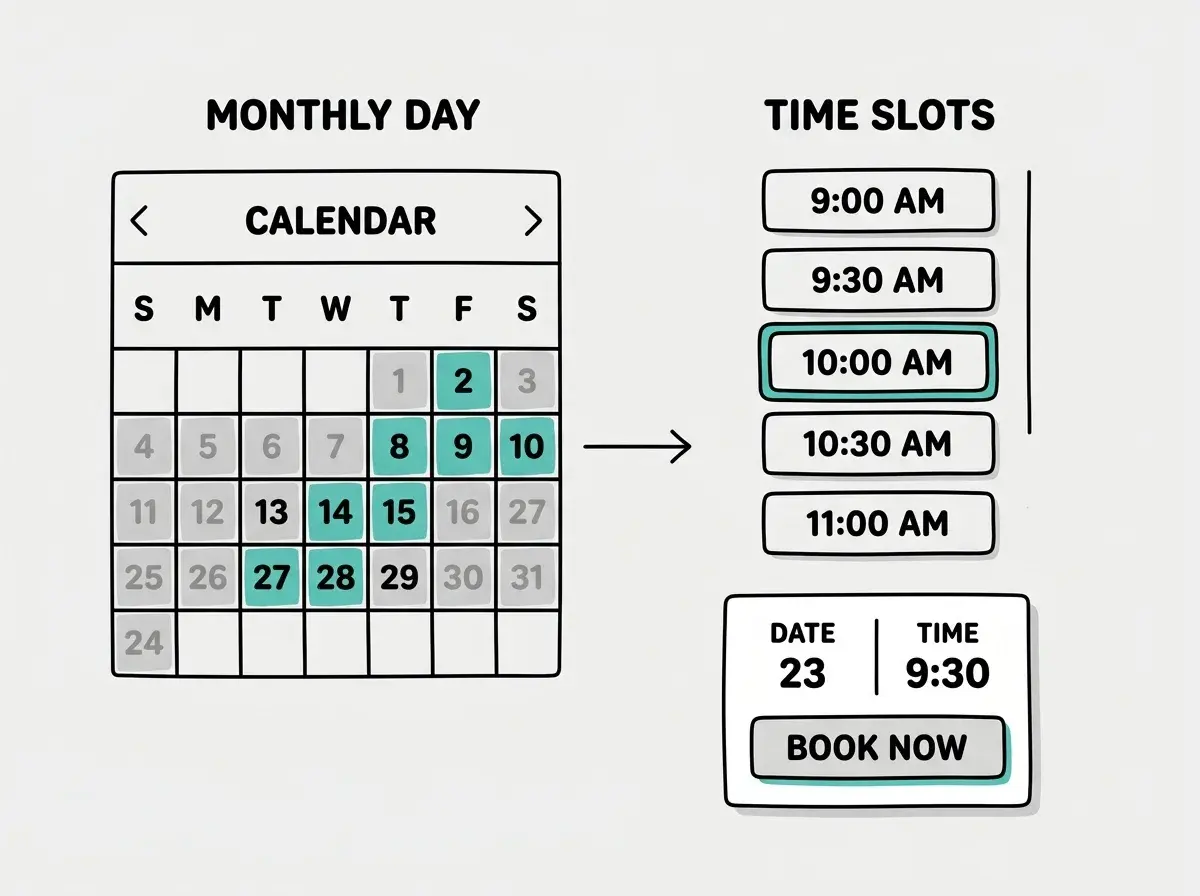
The calendar is the centerpiece of your booking system. Customers need to see available dates, pick one, and then see available time slots for that day. This is a two-step selection process: date first, then time.
Prompt your AI tool:
Build a booking calendar component that:
- Shows a monthly calendar grid with navigation arrows
- Highlights dates that have available slots in teal
- Grays out past dates and fully booked dates
- When a date is clicked, shows available time slots below the calendar
- Each time slot is a clickable button showing the time in the user's local timezone
The AI will generate a calendar using date-fns or dayjs for date math. The calendar queries your availability endpoint for each visible month and visually distinguishes available from unavailable dates.
A common question is whether to load all availability upfront or fetch it per month. For most booking systems with a small number of providers, loading the current month plus the next month on initial render works well. The data is small (just arrays of time ranges) and the user experience feels instant. If you are building a marketplace with hundreds of providers, you will want to fetch per-provider and per-month, but that optimization can wait.
Step 3, Handle Time Slots and Conflict Detection
This is where booking systems get tricky. You need to generate available time slots from the provider's availability, subtract existing bookings, and present what remains. All while accounting for the fact that the provider might be in New York and the customer might be in Tokyo.
Here is the prompt:
Create an API endpoint GET /api/availability/:providerId?date=2026-04-10 that:
1. Looks up the provider's availability for that day of the week
2. Generates 30-minute time slots within the available window
3. Removes any slots that overlap with existing bookings
4. Returns the remaining slots with times in UTC
The API returns times in UTC. The frontend converts them to the customer's local timezone for display. This separation is critical. If you store times in local timezone, you will eventually have a bug where someone books a 2pm slot and it shows up as 2pm for a person three time zones away. UTC in the database, local timezone in the browser. Always.
For conflict detection, the query is straightforward: find any booking for this provider where the existing booking's start time is before the new booking's end time AND the existing booking's end time is after the new booking's start time. If that query returns any rows, the slot is taken.
SELECT id FROM bookings
WHERE provider_id = $1
  AND status != 'cancelled'
  AND start_time < $2  -- new booking end time
  AND end_time > $3    -- new booking start time
If this query returns results, the slot is not available. This overlap detection works regardless of slot duration and handles edge cases like back-to-back bookings correctly.
Step 4, Build the Booking Confirmation Flow
When a customer selects a time slot, you need three things to happen: create the booking record, send a confirmation email to the customer, and send a notification to the provider. Prompt your AI:
Create a POST /api/bookings endpoint that:
1. Validates the selected time slot is still available (re-check for race conditions)
2. Creates a booking record with status "confirmed"
3. Sends a confirmation email to the customer with date, time (in their timezone), and a cancel link
4. Sends a notification email to the provider
5. Returns the booking details
The re-check in step one is essential. Between viewing slots and clicking "Book Now," another customer might grab the same slot. The re-check runs inside a database transaction, so only one booking can win.
Do not trust the availability shown in the browser. Always re-verify slot availability on the server at booking time. Two customers can view the same slot simultaneously, and both will see it as available. Without a server-side re-check inside a transaction, you will get double bookings. This is the single most common bug in vibe-coded scheduling apps.
For email, use Resend or SendGrid. Make sure confirmations include the date/time in the customer's timezone, the provider's name, and a one-click cancellation link.
Step 5, Add Email Reminders
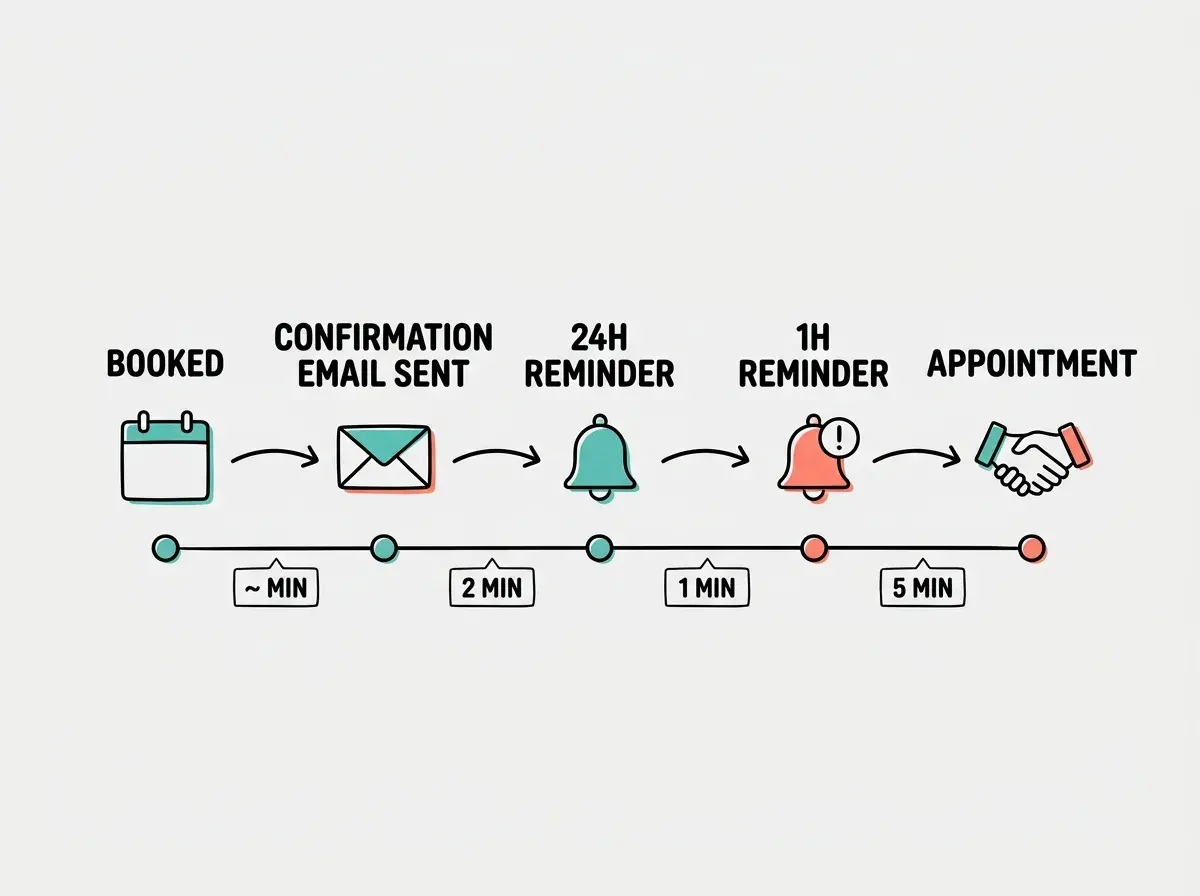
A booking system without reminders is a booking system with no-shows. Most services send a reminder 24 hours before and another one hour before the appointment. You need a scheduled job for this.
Create a cron job or scheduled function that:
1. Runs every 15 minutes
2. Finds confirmed bookings starting in 23-24 hours that haven't had a 24h reminder sent
3. Finds confirmed bookings starting in 55-60 minutes that haven't had a 1h reminder sent
4. Sends reminder emails and marks them as sent in the database
Add reminder_24h_sent and reminder_1h_sent boolean columns to prevent duplicate reminders. For hosting, use Vercel Cron Jobs, Supabase pg_cron, or Cloudflare Workers Cron Triggers depending on your platform.
Step 6, Handle Edge Cases That Break Booking Systems
The core flow is done, but real booking systems need to handle situations that your initial build will miss. Here are the three that cause the most support tickets.
Cancellations and rescheduling. Update booking status to "cancelled" but never delete the record. For rescheduling, create a new booking and cancel the old one.
Buffer time. Add 10-15 minutes of configurable buffer between slots. Expand each booking by the buffer amount before checking overlaps.
Booking limits. Add minimum_notice (e.g., 2 hours) and maximum_advance_days (e.g., 30 days) fields to prevent last-minute and far-future bookings.
Ready to build your booking system? Start with our beginner walkthrough and get your first AI project live in 30 minutes.
Start Building TodayTesting Your Booking System
Before you share your booking system with anyone, run through these scenarios manually:
- Book a slot, then try to book the same slot in a different browser. The second attempt should fail gracefully.
- Book a slot, cancel it, then verify the slot reappears as available.
- Change your computer's timezone and confirm that displayed times adjust correctly.
- Book a slot near midnight and verify it appears on the correct date for both customer and provider.
- Check that confirmation and reminder emails arrive with the correct times in the recipient's timezone.
If all five pass, your booking system handles the cases that trip up most builders. The midnight timezone test catches almost everyone.
Want to build more with AI? Browse our full library of practical build tutorials for founders and indie hackers.
Explore More TutorialsWhat This Means For You
You now have a blueprint for a complete booking system. Each piece is a focused prompt that AI tools handle well.
The key insight is building in layers. Schema first, then API, then interface, then automations. This matches how AI coding tools work best. They generate better code when the foundation is already defined and they can build on top of it.
Start with the data model today. Even if you only get through step one, you will have the hardest part done. The calendar and the emails are implementation details. The schema is where the real decisions live, and once those decisions are made, AI can handle the rest fast.