To build an AI writing assistant for your platform in 2026, focus on four feature modes that users actually want: improve (rewrite for clarity), continue (extend from where they stopped), summarize (compress to a shorter version), and translate (convert to another language). Each mode uses the same underlying LLM call with a different system prompt, ships in roughly half a day each, and produces a feature that genuinely helps users write rather than annoying them with suggestions they did not ask for. The hard part is not the AI integration; it is the UI design that makes the assistant feel like a tool rather than a distraction.
This piece walks through the four feature modes, the architecture that scales to many users, the UI patterns that work, and the four mistakes that turn AI writing assistants into the feature users disable first within the first week of trying it.
Why Most AI Writing Assistants Are Bad
The default AI writing assistant in 2024 and 2025 was an inline suggestion system that surfaced suggestions as the user typed. The data on these is bad: most users disable them within a week, and the few who keep them on report mixed feelings. The reason is that unrequested suggestions interrupt the writing flow more than they help.
The 2026 pattern that works is the opposite: assistants that activate only when explicitly invoked by the user. The user selects text or clicks a button, the assistant does its work, and the result appears. No surprise suggestions, no interruptions, no context-shifting. This pattern produces assistants that users actually use and recommend.
A 2025 Notion survey of 10,000 power users found that AI writing features with explicit user invocation had a 67 percent retention rate at 90 days. Inline suggestion systems had a 12 percent retention rate. Same underlying capability, dramatically different user experience based on when the AI runs. The lesson is that writing assistants should be tools the user picks up, not bots that watch over their shoulder.
The pattern to copy is the way professional kitchens use sous chefs. The sous chef does not stand next to the chef and suggest improvements; they wait until called and then execute the specific task. This is what makes them helpful rather than annoying. AI writing assistants in 2026 follow the same model.
The Four Feature Modes That Work
Each mode is a distinct user intent, has a clear UI affordance, and uses the same underlying LLM call with a different system prompt.
Mode 1, improve. User selects text, clicks "Improve." The assistant rewrites for clarity, brevity, or specific style preferences. Returns the improved version with a diff so the user can accept or reject specific changes.
Mode 2, continue. User puts cursor at end of paragraph, clicks "Continue." The assistant generates the next sentence or paragraph in the same voice and on the same topic. Useful for breaking through writer's block.
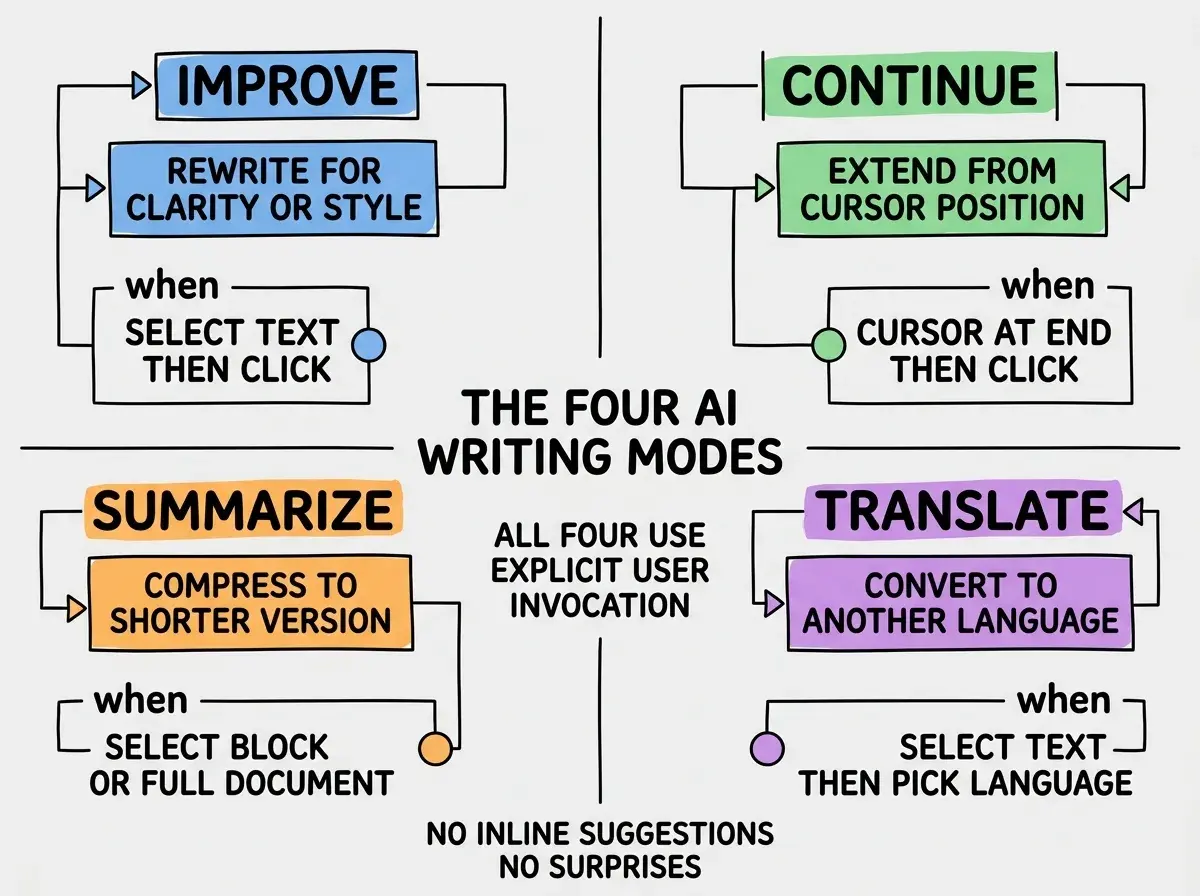
Mode 3, summarize. User selects a long block (or hits a "Summarize document" button). The assistant returns a shorter version preserving the key points. Useful for executive summaries or for shortening verbose drafts.
Mode 4, translate. User selects text and picks a target language. Assistant returns the translation. Surprisingly useful even in monolingual products because users often want to share content with non-English speakers.
The Architecture That Scales
Each feature mode is a thin wrapper around an LLM call. The architecture is straightforward.
Frontend. A small React component with the four buttons (or a single dropdown). When clicked, it sends the selected text and mode to your API. Shows a loading state, then the result.
API route. A single endpoint that accepts text and mode, looks up the system prompt for that mode, calls the LLM, returns the result. About 30 lines of code.
Browse more AI feature build guides
Read more build articlesSystem prompts per mode. Each mode has a specific system prompt tuned for the task. "Improve" might say "Rewrite the following text for clarity and brevity, preserving the original meaning. Return only the improved version." Tuning these prompts is most of the quality work and is where a few hours of A/B testing produces noticeably better output than the default Anthropic or OpenAI behavior.
Cost optimization. Use Haiku 4.5 for short tasks (under 500 tokens) and Sonnet 4.6 for longer ones. Most writing improvements are short enough for Haiku, which dramatically reduces per-user costs and lets you offer the feature to free-tier users without bleeding margin.
The UI Patterns That Make It Useful
The implementation is the easy part. The UI patterns determine whether users adopt the feature or ignore it.
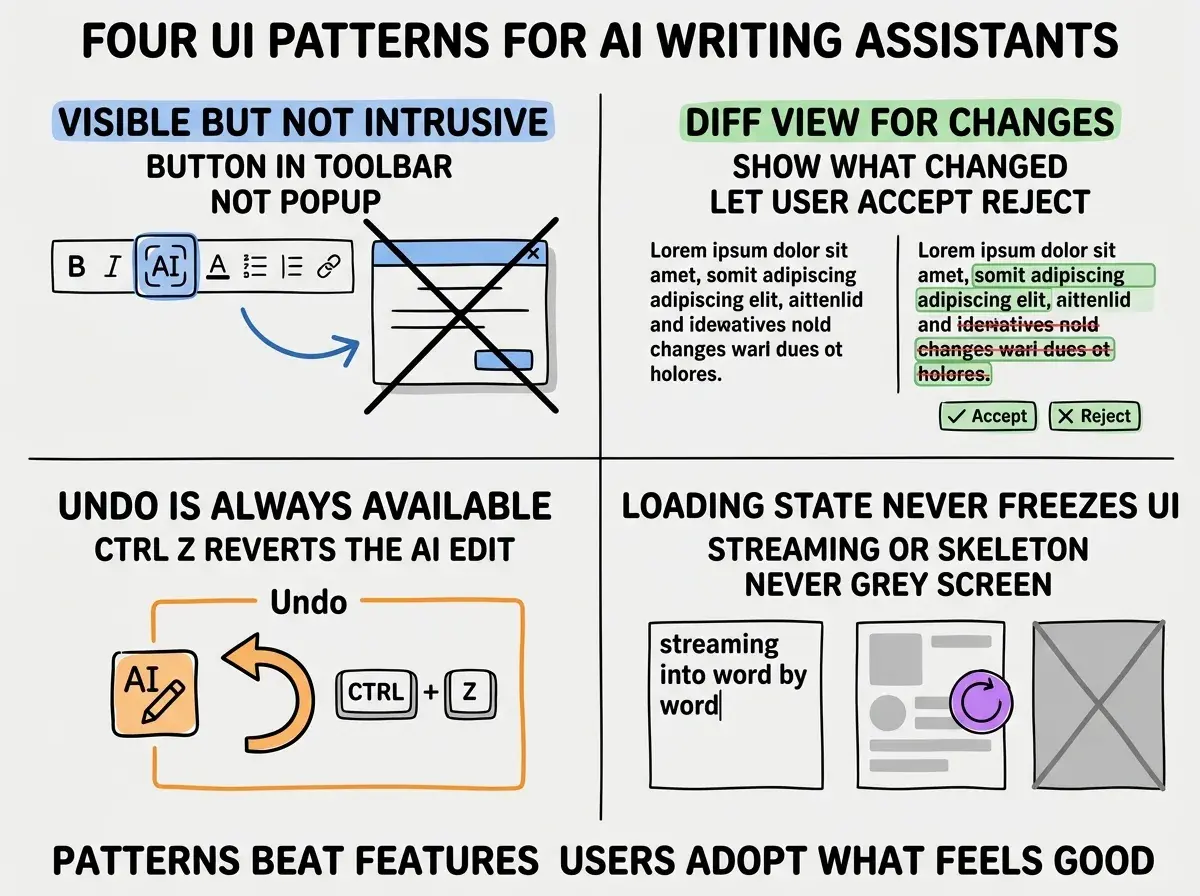
Pattern 1, visible but not intrusive. Buttons in the toolbar, not popups that appear over text. Always available, never demanding attention.
Pattern 2, diff view for changes. When the assistant rewrites text, show what changed (additions in green, deletions in red). Let the user accept all, reject all, or accept individual changes. Treating the AI as a suggestion source rather than as a final authority builds trust.
Pattern 3, undo is always available. Ctrl+Z reverts the AI edit just like a manual edit. This is non-negotiable. Without easy undo, users hesitate to try the assistant at all.
Pattern 4, loading state never freezes UI. While the assistant runs, show a streaming indicator or skeleton. Never freeze the editor or block input. Modern users expect responsive UI even during async operations.
The single most common AI writing assistant mistake is making it too eager. Writing assistants that suggest changes to almost every sentence, that auto-apply improvements without asking, or that interrupt the user with popups produce the same outcome: users disable the feature and never re-enable it. The successful pattern is to be a tool that waits until called, executes the requested task, and gets out of the way. Restraint is itself a feature, and the assistants that respect the user's flow are the ones users keep enabled.
The other mistake is shipping all four modes at once. Start with one (usually "Improve"), see how users engage, refine based on feedback, then add the next mode. Shipping all four in v1 makes it harder to learn what is working and produces a more confused UI than a focused one.
A practical tuning loop is to instrument each mode with simple metrics: how often is it invoked, how often is the result accepted, how often is it undone within a minute. After a few weeks of data, you can see which modes deserve more polish and which can be deprioritized. Most products find that "Improve" gets the most use, "Continue" is a strong second, and the other modes have niche but loyal use cases.
What This Means For You
AI writing assistants are one of the highest-leverage features for any content-heavy product in 2026. The implementation is small, the impact is real, and the patterns are well-understood enough to follow without inventing.
- If you're a founder: Add an AI writing assistant if your product involves any meaningful writing. Start with one mode and expand based on engagement data.
- If you're changing careers: Building writing assistants is a great portfolio project. The UI design challenges teach product thinking alongside AI integration.
- If you're a student: Add an AI writing feature to a personal blog or note-taking app. The hands-on experience teaches what no tutorial can.
Browse more AI feature build guides
Read more build articles