The Stack Overflow developer survey found that 41% of AI-generated code gets reverted. Nearly half. That statistic alone should reshape how teams think about AI code in production. But the number is only useful if you understand why AI code gets reverted, not just how often. These five real examples show exactly where things break down.
The Gap Between Feeling Fast and Being Fast
Before looking at the examples, it is worth understanding the psychological backdrop. The METR study found that developers using AI tools were 19% slower on average, but believed they were 20% faster. That is a 39-point perception gap. Roughly 95% of developers surveyed report feeling more productive while measurably producing lower-quality output.
This perception gap is the engine behind the 41% revert rate. When you feel fast, you review less. When you review less, problems reach production. When problems reach production, code gets reverted. The feeling of productivity creates the conditions for its opposite.
The pattern has a name in some engineering circles: functionality flickering. AI generates code that works, then a small change prompt causes the AI to regenerate something slightly different that breaks the previous functionality. The developer, moving quickly and trusting the tool, does not notice the regression until it is deployed. The code appeared to work at every step. It only failed when the full picture came together.
Example 1, The Authentication Bypass That Passed Every Test
A startup building a SaaS dashboard used an AI coding tool to generate their authentication middleware. The generated code looked clean. It checked for valid JWT tokens, verified expiration dates, and returned appropriate error codes. Every unit test passed. The code review felt like a formality.
The problem was subtle. The middleware validated the token's signature against the wrong key in certain edge cases involving token refresh. During normal testing, the primary key was always used. But when a user's session token was refreshed near the expiration boundary, the middleware accepted a token signed with the previous rotation's key without re-validating permissions. In production, this created a window where revoked users could still access the application.
The revert happened three weeks after deployment, after a customer reported seeing another user's data. The root cause was not a logic error that testing should have caught. It was an architectural assumption the AI made about key rotation that happened to match the test environment but not the production configuration.
AI-generated code often works perfectly in the environment where it was tested and fails in production because the AI made assumptions about infrastructure, configuration, or timing that differ between environments. The code is not wrong in isolation. It is wrong in context, and context is what AI lacks.
Example 2, The Database Query That Scaled to Zero
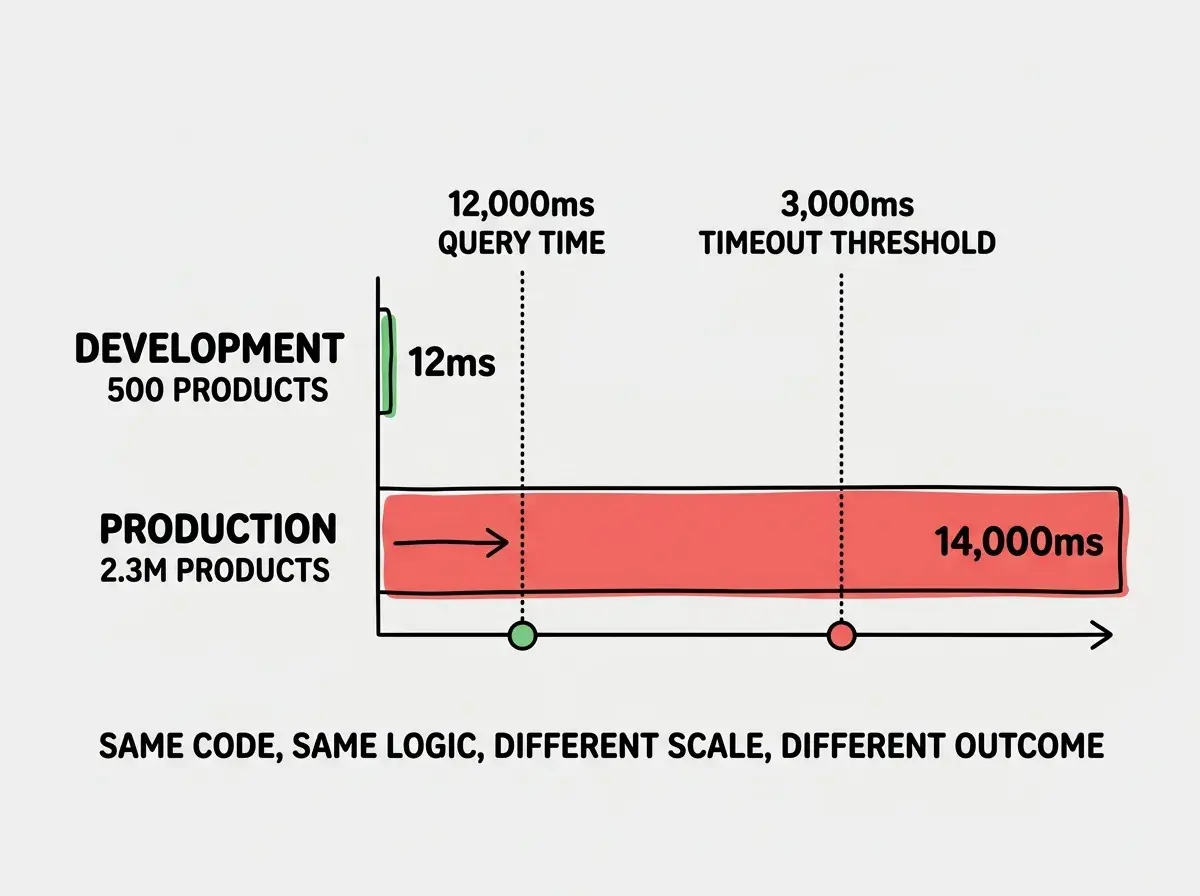
An e-commerce team used AI to generate product search queries. The AI produced a query that joined three tables, applied filters correctly, and returned accurate results. In development with 500 sample products, the query ran in 12 milliseconds. The team shipped it.
In production with 2.3 million products, the same query took 14 seconds. The AI had written a query that performed a sequential scan instead of using the available indexes. It also included a subquery that recalculated aggregates on every row rather than using a materialized view. Functionally perfect. Performantly catastrophic.
The revert happened on launch day after the product search page started timing out. The fix required restructuring the query entirely, not patching the existing one. The AI's approach was conceptually valid for small datasets but fundamentally wrong for production scale.
Example 3, The Security Vulnerability Hidden in Clean Code
A fintech application used AI to generate an API endpoint that processed webhook notifications from a payment provider. The generated code parsed the webhook payload, verified the event type, and updated the database accordingly. The code was well-structured, with clear variable names and appropriate error handling.
What the AI omitted was webhook signature verification. The payment provider sends a cryptographic signature with every webhook that proves the request actually came from them. Without verifying this signature, anyone who knew the endpoint URL could send fake payment confirmations and credit accounts with money that was never paid. The AI generated code that handled the happy path flawlessly while leaving the front door unlocked.
The team discovered this during a security audit two months after deployment. No exploit had occurred, but the vulnerability was severe enough to require an immediate revert and redesign. The original AI-generated code could not be patched because the signature verification needed to happen at the middleware level, not as an afterthought bolted onto the existing handler.
Example 4, The State Management Spaghetti
A team building a React application used AI to generate components for a multi-step form wizard. Each step was generated independently, and each worked perfectly in isolation. The AI created local state management for each component, with clean prop interfaces and appropriate validation.
The problem emerged when the steps needed to share state. Step three needed to know what the user selected in step one. Step five needed to validate against constraints set in step two. The AI had generated five independent components that each managed their own state, with no shared state layer, no context provider, and no centralized validation logic.
Understanding why AI code fails helps you catch problems before they ship.
Learn the fundamentalsWhen the team tried to connect the components, they discovered that integrating them required rewriting the state management for all five steps. The AI had made reasonable architectural decisions for each component in isolation, but the combined architecture was unmaintainable. Three developers spent a week refactoring what the AI had generated in an afternoon.
This is a pattern that repeats across AI-generated codebases. Each piece works. The pieces do not work together. The AI optimizes locally because it generates code one prompt at a time, and it cannot reason about how today's generation fits into the system it generated yesterday.
Example 5, The Dependency Time Bomb
A developer used AI to build a Node.js microservice that processed image uploads. The AI selected a popular image processing library, wrote clean wrapper functions, and included proper error handling for malformed files. The code worked in development and passed integration tests.
Six weeks later, the image processing library disclosed a critical vulnerability that allowed remote code execution through specially crafted image files. The AI had selected a library version with a known (at the time of disclosure) CVE. More importantly, the AI had written the code in a way that was tightly coupled to that specific library's API, making a quick version upgrade impossible without rewriting the processing pipeline.
Trusting AI-generated dependency choices without reviewing the dependency's maintenance status, security history, and coupling implications. AI selects libraries based on popularity in training data, not current security posture. A library that was safe when the training data was collected may have disclosed vulnerabilities since then.
The revert and rewrite cost the team two sprints. The original AI code had no abstraction layer between the application logic and the library. Swapping to a patched alternative meant changing every file that touched image processing. A human developer would likely have added an abstraction layer instinctively, knowing that libraries change. The AI had no reason to anticipate that future.
The Compulsive Accept Trap
Running through all five examples is a common thread: the compulsive accept trap. Developers stop reviewing AI suggestions because the code looks right. It compiles. It passes tests. The formatting is clean. The variable names make sense. Every surface-level signal says "this is good code," and over time, developers internalize that signal and stop looking deeper.
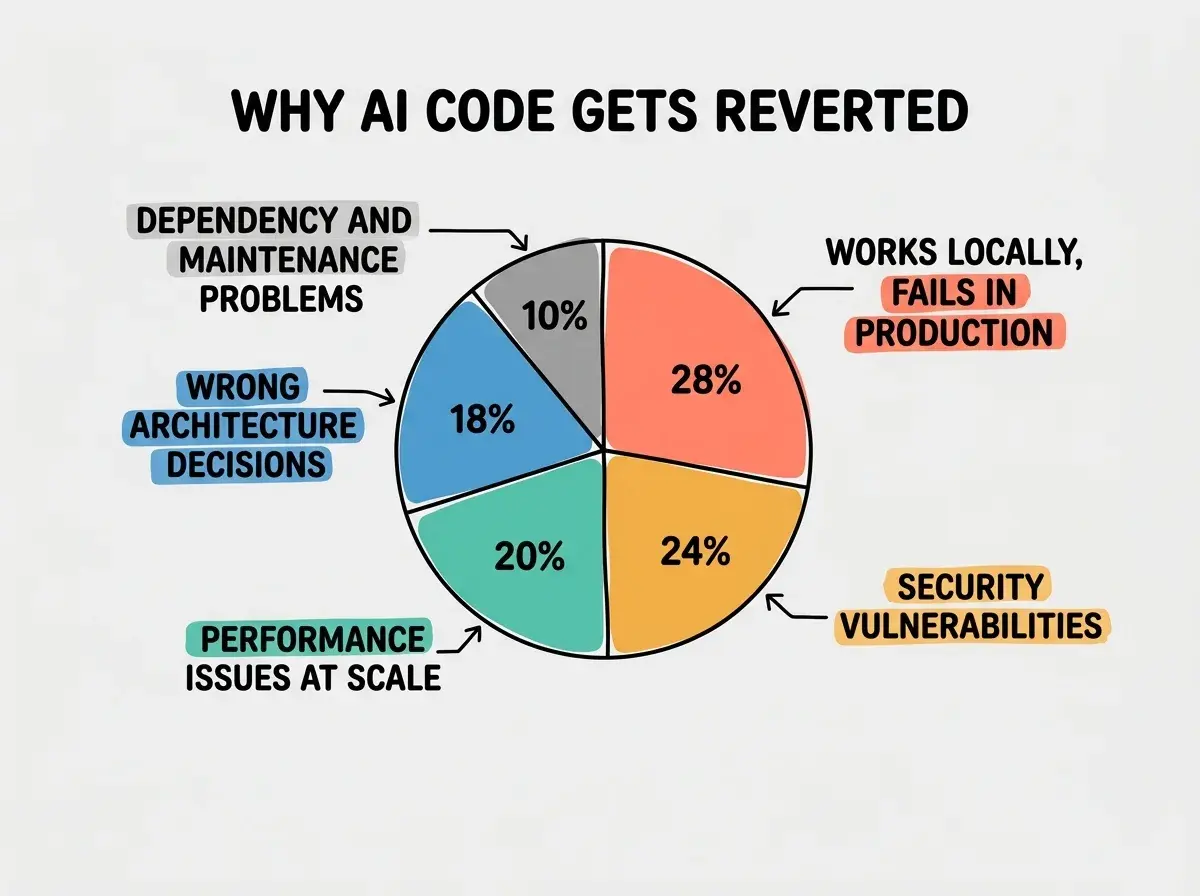
The 41% revert rate is not a fixed property of AI tools. It is a measurement of how much human attention the code received before merging. Teams that maintain rigorous review practices see significantly lower revert rates. Teams where developers have slipped into compulsive acceptance see rates that are likely much higher than 41%.
Review Patterns That Actually Work
The data points toward specific review practices that catch the categories of failure described above.
Environment parity checks. Before shipping AI-generated code, list the assumptions it makes about the runtime environment. Check configuration values, service dependencies, and infrastructure differences between development and production. Example one would have been caught by asking: "Does this code behave the same way with rotated keys?"
Scale stress testing. Run AI-generated queries and endpoints against production-scale datasets before deployment. Example two would have been caught with a basic load test against realistic data volumes.
Security boundary auditing. For every external integration, verify that the AI included authentication, authorization, and input validation at the boundary. Example three would have been caught by checking whether the webhook endpoint verified the sender's identity.
Architecture review across components. Review AI-generated components as a system, not in isolation. Ask how state flows between them and whether the overall architecture would make sense to a new developer. Example four would have been caught by reviewing the form wizard as a whole.
Dependency auditing. Check the security history and maintenance status of every dependency the AI selects. Verify that an abstraction layer separates application logic from third-party libraries. Example five would have been caught by a basic dependency audit.
Build the review habits that separate production-ready code from demo-ready code.
Get startedDig deeper
A few hand-picked sources if you want to go further.
What This Means For You
The 41% revert rate tells a clear story. AI coding tools generate code that works in the moment and fails in the wild, at a rate that should concern anyone shipping to production.
This is not an argument against using AI for coding. It is an argument for treating AI-generated code with the same skepticism you would apply to code from a new hire who is brilliant but has never seen your production environment. The code might be excellent. It also might be making assumptions that will cost you weeks of debugging.
The five examples above share a common structure: the AI generated code that was locally correct but globally wrong. It worked in the test environment but not production. It handled the happy path but not the edge cases. It solved each piece of the puzzle but could not see the whole picture. These are not random failures. They are predictable categories of failure that predictable review patterns can catch.
The developers and teams who bring the 41% down to single digits are not avoiding AI tools. They are using them with open eyes, reviewing with discipline, and testing against reality instead of assumptions. That combination, AI speed with human judgment, is where the actual productivity gain lives.