SaaS infrastructure cost is the number that decides whether your product becomes a business or a money pit. The $4.7 billion vibe coding market has made building software almost trivially fast. Plinq reached $456K ARR, built entirely by a non-coder. 92% of US developers now use AI tools daily. But the question nobody answers clearly is this: what does it actually cost to keep a SaaS running once users show up?
The answer, for a surprising range of products, is less than fifty dollars per month. Not on toy projects with three beta testers. Real SaaS apps serving 5,000+ active users, processing payments, sending emails, and storing files. This guide walks through the exact stack, the exact prices, and the exact moment each service forces you to upgrade.
The Fifty Dollar Stack
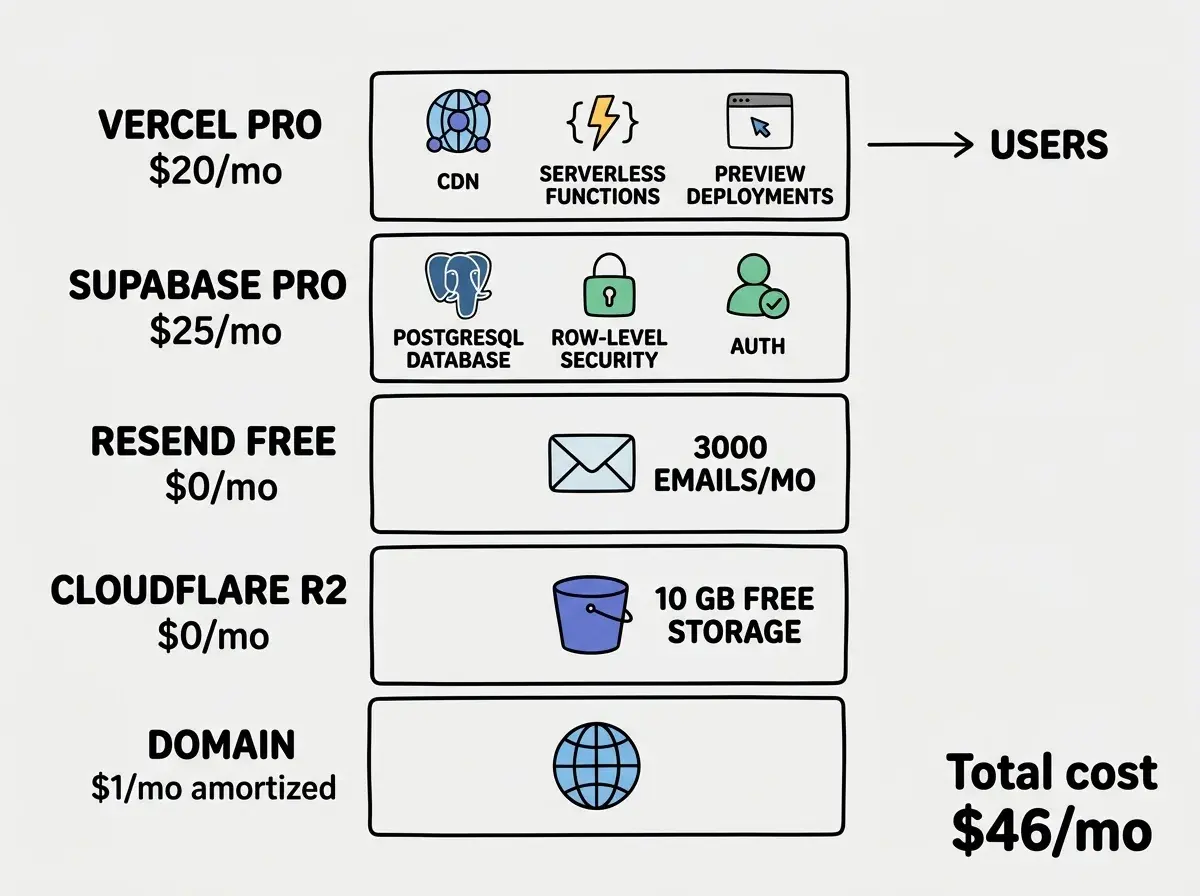
Here is the complete infrastructure for a production SaaS that handles thousands of users.
| Service | What It Handles | Monthly Cost |
|---|---|---|
| Vercel Pro | Hosting, serverless functions, CDN | $20 |
| Supabase Pro | Database, auth, real-time | $25 |
| Resend | Transactional email (up to 3,000/mo) | $0 |
| Cloudflare R2 | File and image storage (10 GB free) | $0 |
| Domain (amortized) | Your .com or .app | ~$1 |
| Total | $46 |
That is the real number. Not a theoretical minimum. Not a "well, if you only have five users" disclaimer. This stack handles authentication, database queries, file storage, email delivery, and global CDN distribution for under fifty dollars.
Each service earns its spot. There are no redundancies and no services included "just in case." Every dollar goes toward something your users directly experience.
What Each Service Actually Does
Vercel Pro ($20/month) serves your Next.js application through a global CDN. Your users in Tokyo and Toronto both get sub-100ms page loads. The Pro plan includes 1 TB of bandwidth, 1,000 hours of serverless function execution, and 300-second function timeouts. That last number matters because AI API calls and complex database queries regularly exceed the 10-second limit on the free tier.
Supabase Pro ($25/month) gives you a dedicated PostgreSQL database with 8 GB of storage, built-in authentication for unlimited users, row-level security, and real-time subscriptions. The database alone would cost $25 to $50 on any managed provider. Getting auth and real-time bundled into the same price is what makes this stack possible.
Resend (free tier) handles transactional emails: welcome messages, password resets, payment receipts, and notifications. The free tier includes 3,000 emails per month. For a SaaS with 5,000 users, most of whom are not receiving emails every single day, 3,000 is plenty.
Cloudflare R2 (free tier) stores user uploads, profile images, generated files, or any binary data your app produces. The free tier includes 10 GB of storage and 10 million read requests per month. R2 has zero egress fees, which is the critical difference from AWS S3. You will never get a surprise bandwidth bill from R2.
Domain ($1/month amortized) is a .com at $12 per year. Some registrars charge more. Cloudflare Registrar sells domains at wholesale cost with no markup.
Revenue-to-Cost Ratios That Actually Work
The goal is not to spend as little as possible. The goal is to maintain a healthy ratio between what you earn and what you spend on infrastructure. The target is a minimum 10:1 ratio.
At $46 per month in infrastructure, you need $460 in monthly recurring revenue to hit that ratio. Here is what that looks like across different pricing models.
| Pricing | Customers Needed | Revenue | Ratio |
|---|---|---|---|
| $9/month | 52 | $468 | 10:1 |
| $19/month | 25 | $475 | 10:1 |
| $29/month | 16 | $464 | 10:1 |
| $49/month | 10 | $490 | 10:1 |
Ten customers at $49 per month. That is all it takes to hit a healthy infrastructure ratio on this stack. Twenty-five customers at $19 per month. Fifty-two at $9. These are not unrealistic numbers for any SaaS that solves a real problem.
The 10:1 ratio is a floor, not a ceiling. Successful SaaS companies often run at 20:1 or higher. Basecamp famously runs a multi-million-dollar business on infrastructure costs that represent a tiny fraction of revenue. Your $46 stack puts you in the same structural position from day one.
You need just 10 to 52 paying customers to hit a healthy 10:1 revenue-to-cost ratio on the $46 stack. Infrastructure should never be the reason a SaaS fails. If your product solves a real problem, the hosting costs are rounding errors compared to the value you deliver.
Real Examples of Sub-Fifty-Dollar SaaS Apps
These are not hypothetical. Real products run on stacks that cost less than fifty dollars per month.
Feedback collection tools. A simple widget that embeds on customer sites, collects responses, and displays them in a dashboard. The database stores text. The hosting serves a lightweight dashboard. Email sends weekly summaries. Total infrastructure: well under $46.
Invoice generators. Users input client details, line items, and payment terms. The app generates a PDF, stores it on R2, and emails it. No complex compute. No heavy file processing. The entire product runs on the free tiers of most services, with Vercel Pro as the only paid component.
Booking and scheduling platforms. A calendar interface, availability management, email confirmations, and Stripe for payments. Supabase handles the data model and real-time updates when bookings change. This is a $25/month Supabase bill and a $20/month Vercel bill.
Internal tools for small teams. Dashboards, trackers, reporting tools. Five to fifty users who pay $29 to $99 per month each. The usage is light per user, the value per user is high, and the infrastructure costs are negligible relative to revenue.
The pattern is consistent. Products that rely on smart data modeling and clean UI rather than heavy compute stay comfortably under $50 per month in infrastructure.
Understand the full cost picture before you start building.
See all guidesScaling Triggers That Push You Past Fifty Dollars
The $46 stack is not infinite. Here are the specific triggers that force upgrades, and the approximate user counts where they hit.
Supabase storage (8 GB limit). If your SaaS stores large files in the database or has high data volume, you will approach this limit with 10,000 to 20,000 active users. The fix is upgrading to a larger Supabase plan or moving large files to R2 (which you should be doing anyway).
Vercel bandwidth (1 TB limit). A typical SaaS page weighs 200 KB to 500 KB. At 500 KB per page load, 1 TB supports roughly 2 million page loads per month. If each user loads 10 pages per session, that is 200,000 sessions. You will not hit this limit until your product is generating serious revenue.
Email volume (3,000/month on Resend free). If you send daily emails to all users, 3,000 emails supports about 100 daily active users. The fix is Resend's $20/month plan for 50,000 emails, which bumps your total to $66. Only upgrade when your email volume demands it.
Database connections. Supabase Pro supports a generous connection pool, but real-time-heavy apps can exhaust it. If you are building a collaborative tool where every user maintains an open connection, you may need connection pooling adjustments around 2,000 to 3,000 concurrent users.
AI API costs. This is the wild card. If your SaaS includes AI features that call Claude or GPT, API costs can dwarf everything else. A single AI call costs $0.003 to $0.01. If every user triggers 10 calls per session, 5,000 monthly active users could add $150 to $500 in API costs. AI costs deserve their own line item and their own budget.
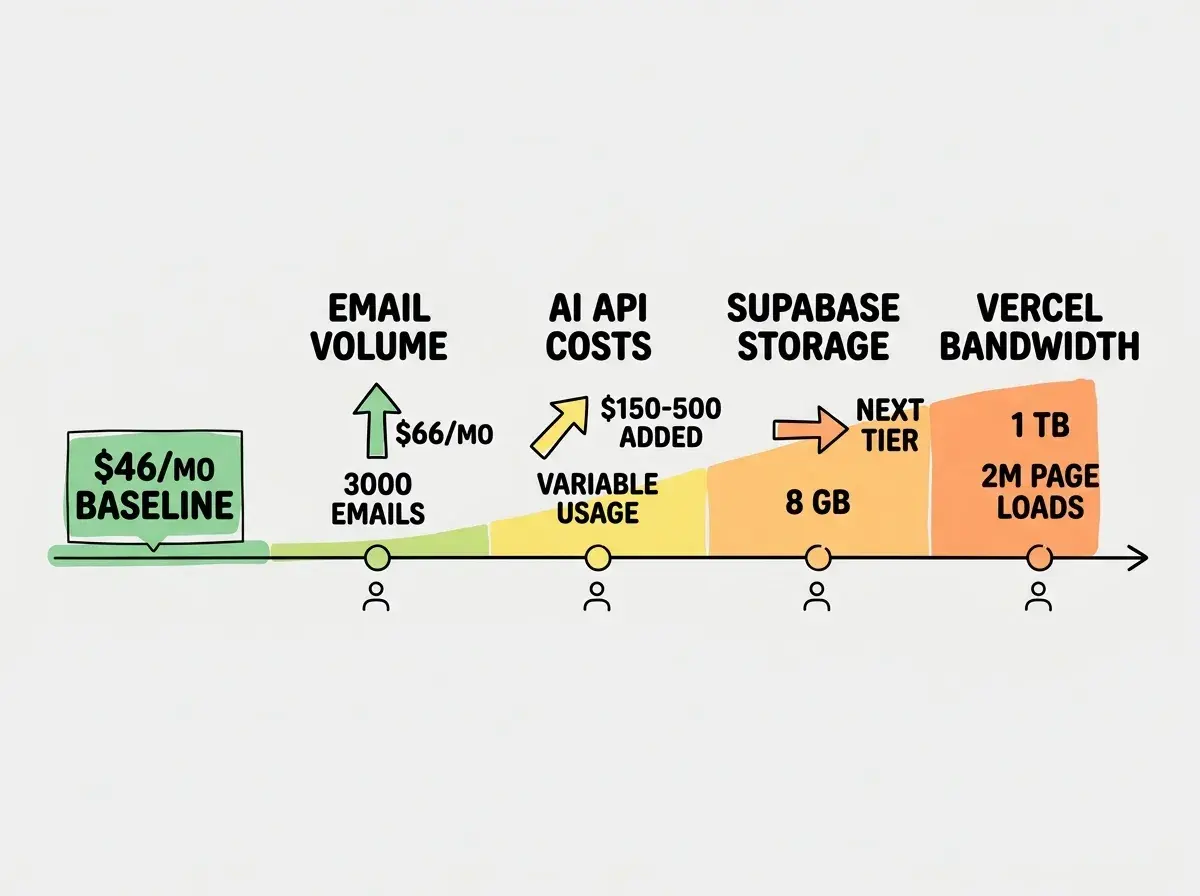
Adding AI features without a separate cost model is the fastest way to blow past $50 per month. AI API costs scale with every user interaction. Treat them as a variable cost line item from day one, not an infrastructure expense bundled into your hosting budget.
Setting Up the Stack Step by Step
The order matters. Set up services in this sequence to avoid backtracking.
Step 1: Supabase first. Create your project, define your database schema, and configure row-level security policies. The database is the foundation. Everything else connects to it.
Step 2: Vercel second. Connect your GitHub repository and deploy. Set environment variables for your Supabase URL and keys. Vercel's preview deployments give you a URL for every pull request, which means you can test changes before they touch production.
Step 3: Cloudflare R2 third. Create a bucket for user uploads. Configure a custom domain or use R2's default URL. Set up a presigned URL endpoint in your Vercel API routes so users can upload files directly to R2 without going through your server.
Step 4: Resend fourth. Set up your sending domain with DNS records. Connect Resend to your app for transactional emails. Start with the free tier and monitor your monthly send volume.
Step 5: Domain last. Point your domain to Vercel. Configure SSL (automatic on Vercel). Set up email sending domain records for Resend.
Total setup time for someone comfortable with these tools: two to four hours. Total setup time for a first-timer following documentation: one day.
Dig deeper
A few hand-picked sources if you want to go further.
What This Means For You
The infrastructure cost of running a SaaS has collapsed. Five years ago, the minimum viable stack for a production SaaS was $200 to $500 per month. Today it is $46. That change is not incremental. It is structural.
You do not need venture funding to cover server costs. You do not need a technical co-founder to manage infrastructure. You do not need to spend weeks optimizing a deployment pipeline. Vercel, Supabase, Resend, and R2 handle the hard operational work. Your job is to build something people want to pay for.
The math is simple. Ten customers at $49 per month covers your infrastructure ten times over. Fifty customers and your revenue-to-cost ratio hits 50:1. At that point, infrastructure cost is not even a line item worth thinking about. It is a rounding error.
Start with the $46 stack. Get your first paying customer. Then worry about scaling.
Start with the right foundation and keep your costs under control from day one.
Explore all tutorials