Web app cost is the question every vibe coder asks too late. You build the thing, push it live, and then the bills arrive. This guide breaks down exactly what a vibe-coded app costs to run at four real budget levels, with specific services and dollar amounts at each tier.
The vibe coding market hit $4.7 billion in 2025, and 92% of US developers now use AI tools daily. Plinq reached $456K in annual recurring revenue, built entirely by a non-coder. But building is only half the equation. Running the thing every month is where the real numbers live. The stacks below are the exact services and plans I use at each stage.
How Much Does It Cost to Run a Web App
The honest answer ranges from $0 to $500+ per month depending on three things: how many users you have, what your app does, and whether you optimize your stack. A static marketing site costs nothing. A SaaS with AI features, a database, email sending, and file storage costs real money.
Here is the short version before we break down each tier.
| Budget | Users Supported | Best For |
|---|---|---|
| $10/mo | Under 100 | Side projects, MVPs, portfolio pieces |
| $50/mo | Under 1,000 | Early startups, beta products |
| $100/mo | Under 10,000 | Growing products with paying users |
| $500/mo | Under 100,000 | Scaling SaaS with real revenue |
The jump from $10 to $50 buys you a real database and email. The jump from $50 to $100 buys you reliability. The jump from $100 to $500 buys you scale. Each tier unlocks specific capabilities that the previous one cannot deliver.
The $10 Per Month Stack (Under 100 Users)
This is your side project, your MVP, your "I built this over the weekend" app. At $10 per month, you are running almost entirely on free tiers with one or two paid services.
| Service | Purpose | Monthly Cost |
|---|---|---|
| Vercel (Hobby) | Hosting + serverless | $0 |
| Supabase (Free) | Database + auth | $0 |
| Cloudflare (Free) | DNS + CDN | $0 |
| Resend (Free) | Transactional email (100/day) | $0 |
| Vercel Blob (Free) | File storage (limited) | $0 |
| Domain name | .com or .me | $1/mo (annual) |
| AI API (Gemini Flash) | AI features | $1-5/mo |
| Total | $2-6/mo |
At this level, everything runs on free tiers. You get a Postgres database, authentication, serverless functions, edge CDN, and email sending for $0. The catch is capacity. Vercel Hobby limits you to non-commercial use, and Supabase Free caps you at 500MB of storage. If your project takes off, you hit walls fast.
At the $10 budget, free tiers cover 90% of what you need. The most important thing is picking services that have generous free tiers AND reasonable paid plans. Supabase Free to Pro is $25/mo. Vercel Hobby to Pro is $20/mo. Know your upgrade path before you build, not after you hit the limit at 2 AM.
The $50 Per Month Stack (Under 1,000 Users)
This is where your app becomes a real product. You have either paying users or serious conviction that they are coming.
| Service | Purpose | Monthly Cost |
|---|---|---|
| Vercel (Pro) | Hosting + serverless | $20 |
| Supabase (Free) | Database + auth | $0 |
| Cloudflare (Free) | DNS + CDN + security | $0 |
| Resend (Pro) | Email (50K/mo) | $20 |
| Cloudflare R2 | File/image storage | $0-3 |
| AI API (mixed models) | AI features | $5-10 |
| Domain + DNS | Custom domain | $1/mo |
| Total | $46-54/mo |
The biggest upgrade is Vercel Pro at $20 per month. You get commercial use rights, 1TB of bandwidth, and serverless limits that handle real traffic. This is the minimum viable production stack.
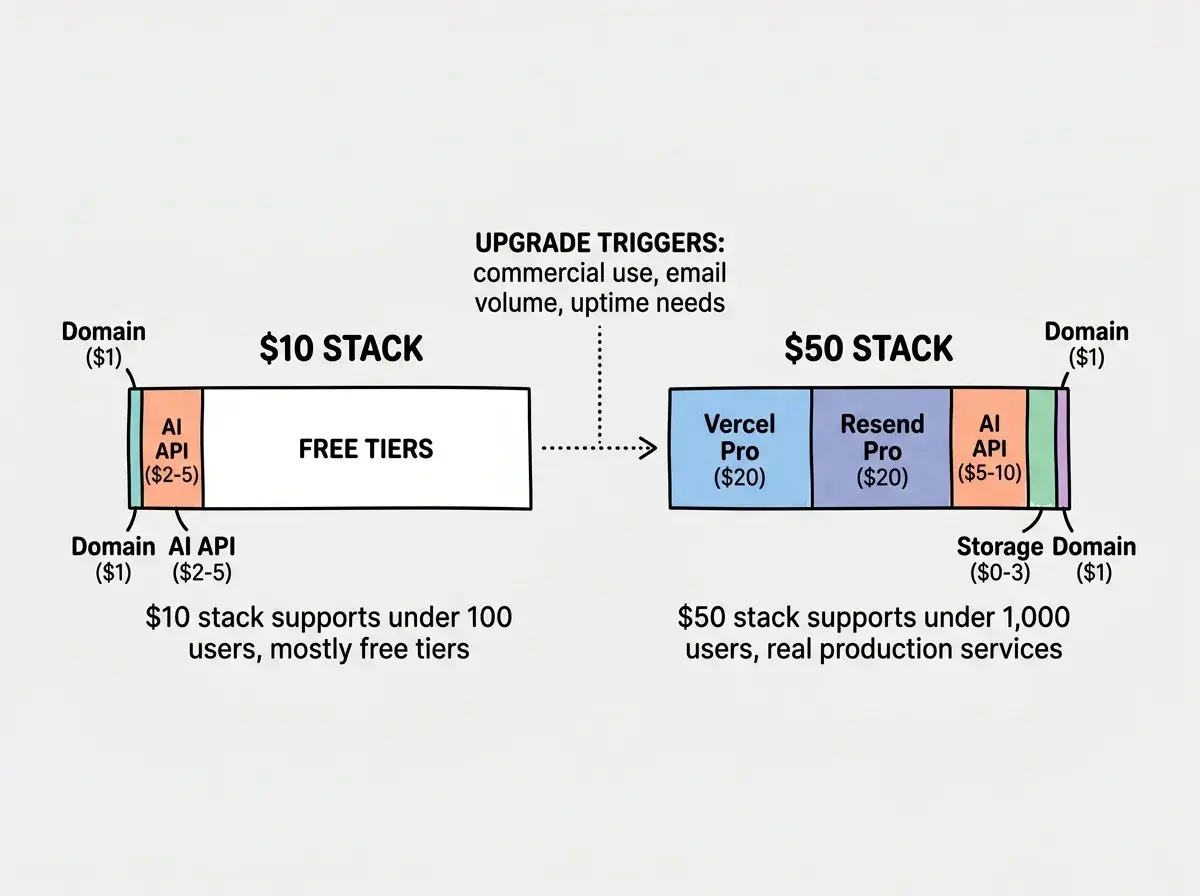
Supabase stays on free. At under 1,000 users, you will not exceed 500MB of storage or the auth limits. Upgrade only what is actually bottlenecked. Email becomes a real line item here. Resend Pro at $20 per month gives you 50,000 emails, roughly 50 per user per month.
How Much Should a Website Cost Each Month
A blog or marketing site should cost under $10. A web app with auth and a database should cost $20 to $100. A SaaS with AI features and email should cost $50 to $500. The $607 Replit bill that went viral happened because of zero budgeting and no spending caps. Budget for the tier above where you think you will be.
The $100 Per Month Stack (Under 10,000 Users)
At $100 per month, you are running a product with real users and (hopefully) real revenue. This stack adds database scaling, monitoring, and better error handling.
| Service | Purpose | Monthly Cost |
|---|---|---|
| Vercel (Pro) | Hosting + serverless | $20 |
| Supabase (Pro) | Database + auth + realtime | $25 |
| Cloudflare (Free) | DNS + CDN + security | $0 |
| Resend (Pro) | Email (50K/mo) | $20 |
| Cloudflare R2 | File/image storage | $3-5 |
| AI API (model routing) | AI features | $15-25 |
| Sentry (Developer) | Error monitoring | $0 |
| BetterStack (Free) | Uptime monitoring | $0 |
| Domain + DNS | Custom domain | $1/mo |
| Total | $84-96/mo |
The big upgrade is Supabase Pro at $25 per month. You get 8GB of database storage, daily backups, and 100,000 monthly active users on auth. If your database is the heart of your app (and it usually is), this is where you stop worrying about it.
At 10,000 users, AI API costs start mattering. Model routing becomes essential. Route simple requests to Gemini Flash ($0.15 per million input tokens) and reserve Claude or GPT-4o for complex tasks. Without routing, your AI bill at 10,000 users could easily hit $50 to $100 per month. With routing, it stays under $25.
Upgrading every service to its paid tier the moment you get your first paying user. Supabase Free handles far more than most developers think. Cloudflare Free includes DDoS protection, SSL, and global CDN. Only upgrade the specific service that is actually hitting its limits. Check your dashboards before opening your wallet.
Error monitoring is free at this scale through Sentry's developer plan. Uptime monitoring is free through BetterStack. These cost nothing but save you from the worst outcome: your app being down while users churn and you do not even know about it.
How Much Does It Cost to Run an App With 10,000 Users
With 10,000 monthly active users, expect $80 to $150 per month. The per-user cost is roughly $0.01. If each user pays you $10 per month, infrastructure is 0.1% of revenue. Software margins are excellent at this scale. The hidden cost is not infrastructure; it is your time on support, bugs, and outages.
The $500 Per Month Stack (Under 100,000 Users)
This is a real business. At $500 per month, you are optimizing for reliability, performance, and the ability to handle traffic spikes without waking up at 3 AM.
| Service | Purpose | Monthly Cost |
|---|---|---|
| Vercel (Pro + usage) | Hosting + serverless + bandwidth | $40-60 |
| Supabase (Pro + compute) | Database + auth + edge functions | $50-75 |
| Cloudflare (Pro) | Advanced CDN + WAF + analytics | $20 |
| Resend (Business) | Email (100K+/mo) | $40 |
| Cloudflare R2 | File/image storage (scaled) | $10-20 |
| AI API (routed + cached) | AI features | $50-100 |
| Sentry (Team) | Error monitoring + performance | $26 |
| BetterStack (Pro) | Uptime + incident management | $20 |
| PostHog (Free) | Product analytics | $0 |
| Domain + DNS | Custom domain | $1/mo |
| Total | $257-362/mo |
Vercel Pro's base $20 is just the starting point here. Bandwidth and serverless overages add $20 to $40. Supabase Pro's $25 base gets supplemented with compute add-ons. These are predictable if you plan for them.
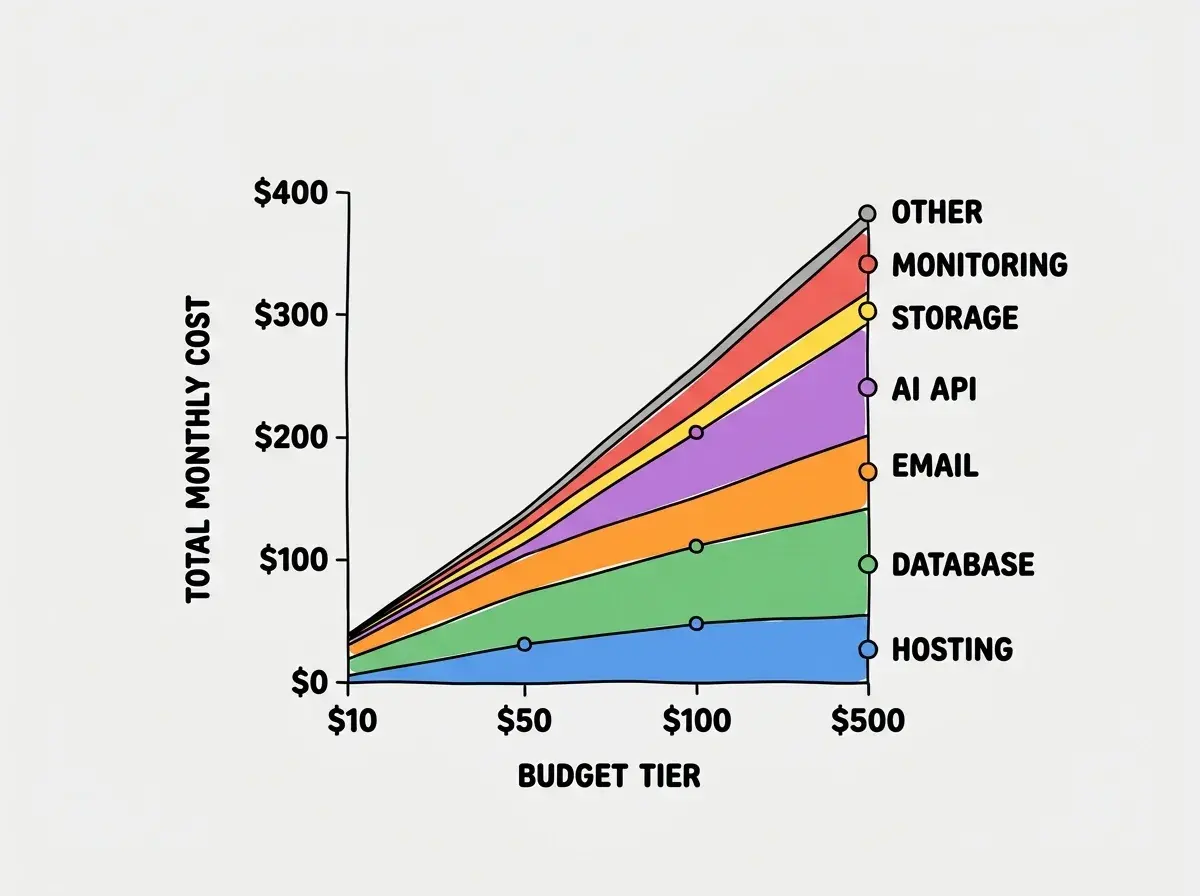
Cloudflare Pro adds WAF rules and image optimization. At 100,000 users, you need actual security beyond free-tier DDoS protection.
The AI API line is the most variable. Without optimization, AI features for 100,000 users could cost $300 to $500 per month. With model routing (70% cheap, 30% expensive) and response caching, that drops to $50 to $100. The total lands at $257 to $362, well under $500. The remaining budget is your buffer for traffic spikes and the inevitable surprise when something goes viral.
Dig deeper
A few hand-picked sources if you want to go further.
What This Means For You
- If you are just starting out: Build on free tiers. Vercel, Supabase, Cloudflare, and Resend handle your first 100 users for $0. Your only costs are a domain and AI API calls. Focus on building, not bills.
- If you have early traction: Move to the $50 stack and budget $100 as your ceiling. Vercel Pro + Resend Pro handles commercial use and real email volume. Keep Supabase on free until you actually need more storage.
- If you have paying users: Infrastructure should cost less than 5% of revenue. At $100 per month, you serve 10,000 users at a penny each. If your unit economics fail at these numbers, the problem is pricing, not infrastructure.
Get the full picture on what it costs to build and run a web app in 2026.
See all cost guidesThe difference between a vibe coder who ships and a vibe coder who quits is often just budgeting. Know what your app will cost before you build it. Pick services with clear upgrade paths. Set spending alerts on every account. And remember that infrastructure costs are the most predictable, controllable expense in your entire business.
From zero to deployed, with real cost numbers at every step.
Start building