The Tea App was supposed to be a success story. A social messaging platform built almost entirely with AI coding tools, it launched with a polished interface, real-time messaging, image sharing, and thousands of active users. From the outside, everything worked.
From the inside, everything was visible.
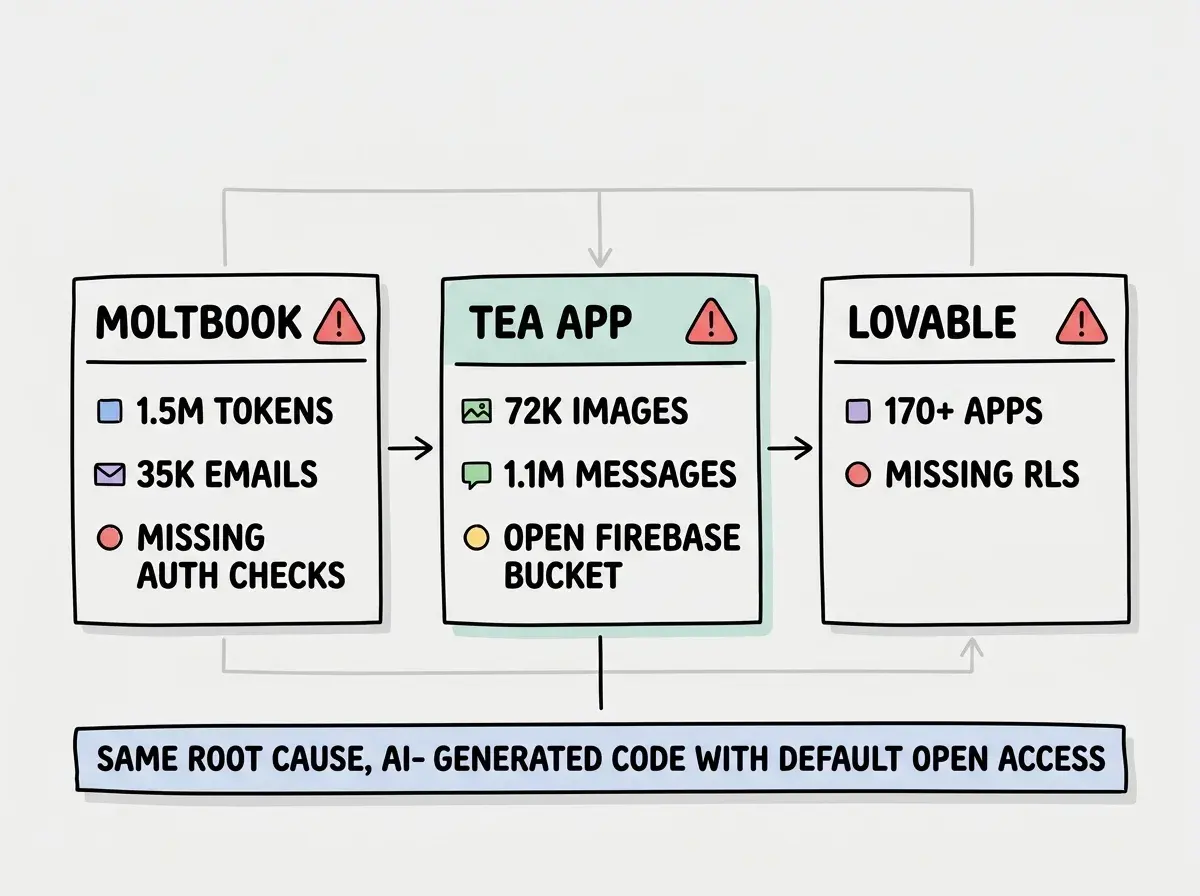
Security researchers discovered that Tea App's Firebase Storage bucket was configured with public read access, meaning anyone who knew (or guessed) the bucket URL could browse every file stored in the system. The damage: 72,000 private images and 1.1 million direct messages, all accessible without authentication, without credentials, without any barrier at all.
Glass Walls
Think of a building made entirely of glass. From the street, it looks impressive. Modern, clean, transparent in a way that feels intentional. People inside go about their business, confident they are in a secure structure. The walls are solid. The roof does not leak. The doors lock.
But every wall is transparent. Anyone who walks close enough can see everything happening inside. The conference rooms, the private offices, the filing cabinets. The building functions perfectly. It just has no privacy.
That is what Tea App built. The application worked. Messages sent. Images uploaded. Users interacted. But the storage layer, the place where all that private data lived, was a glass wall. Firebase Storage was configured with rules that allowed public read access, the equivalent of building a vault and leaving the door propped open.
The difference between a functional app and a secure app is not visible in the user interface. It lives in configuration files that most users, and many AI coding tools, never think to examine.
How Firebase Storage Security Works (and How It Fails)
Firebase Storage uses security rules to control who can read and write files. These rules are defined in a file called storage.rules and deployed alongside the application. When configured correctly, they restrict access based on authentication status, user identity, file paths, and other conditions.
Here is what a secure Firebase Storage configuration looks like:
rules_version = '2';
service firebase.storage {
  match /b/{bucket}/o {
    match /users/{userId}/{allPaths=**} {
      allow read, write: if request.auth != null
                         && request.auth.uid == userId;
    }
  }
}
This rule says: a user can only read and write files within their own directory, and only if they are authenticated. Simple, effective, and standard.
Here is what Tea App had in production:
rules_version = '2';
service firebase.storage {
  match /b/{bucket}/o {
    match /{allPaths=**} {
      allow read, write: if true;
    }
  }
}
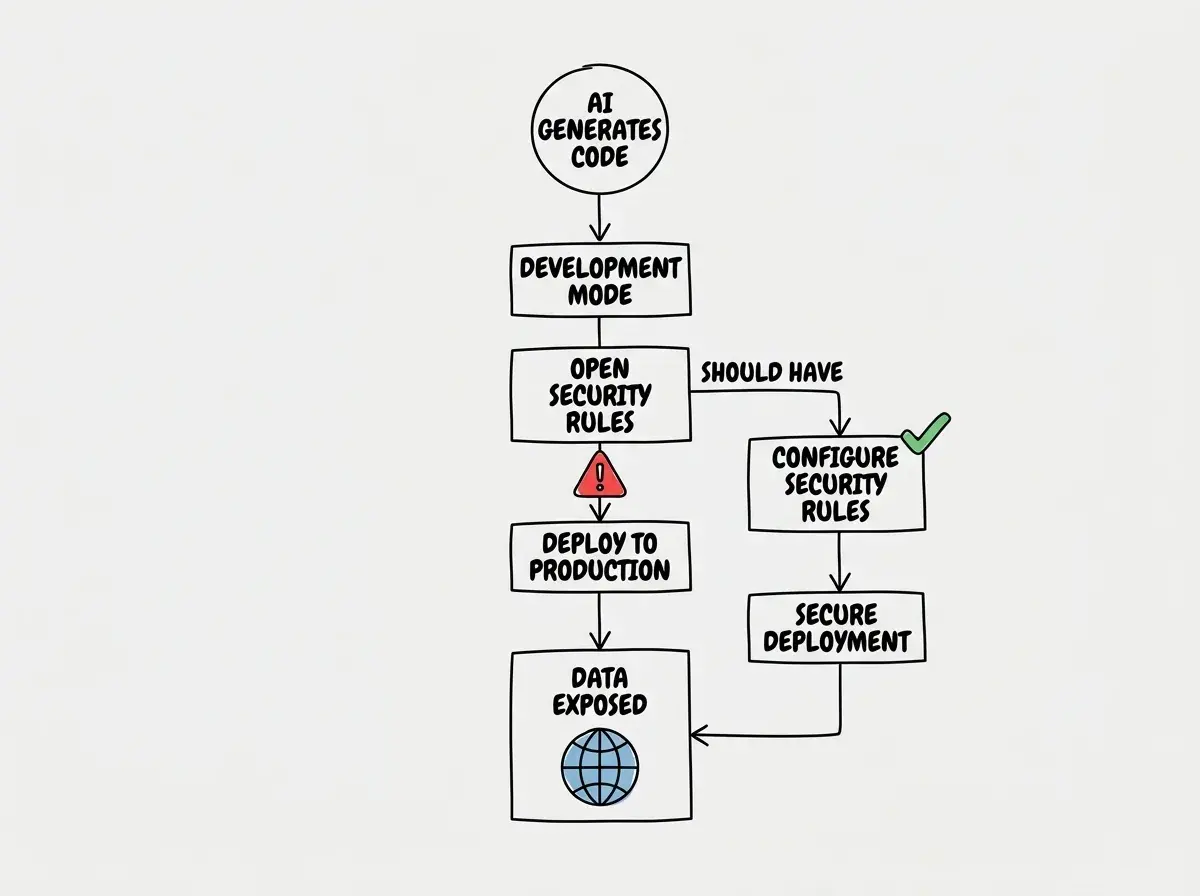
allow read, write: if true is the Firebase equivalent of removing every lock from every door. Any request, authenticated or not, from any user or any automated script, gets full access to every file in the bucket. This is the default rule Firebase generates for development mode. It is meant to be temporary. For Tea App, it was permanent.
Firebase defaults to open access rules during development to reduce friction while building. The expectation is that developers will replace these rules before going to production. When AI tools generate Firebase configurations, they almost always produce these development-mode rules, because development mode is where the AI "tested" the output. The rules work, the uploads succeed, and the AI moves on to the next task. Nobody goes back to tighten the lock.
The Root Cause Is Systemic
Tea App's failure was not a unique mistake by one careless developer. It was the predictable result of how AI coding tools interact with Firebase's security model.
When you ask an AI tool to "add image upload to my app," it generates the Firebase Storage integration code, the upload function, the download URL retrieval, and the UI components. It produces code that works. The image uploads. The preview renders. The user sees a functional feature.
What the AI does not generate is the security rule that restricts who can access those uploaded files. The rules file either stays at the development default (allow read, write: if true) or gets generated with permissive rules that let the demo work without authentication friction. The AI optimizes for the thing the user will see immediately: a working upload. It deprioritizes the thing the user will never see: the access control layer that prevents strangers from browsing every upload.
This is the same pattern that caused the Lovable CVE (missing Row Level Security on Supabase databases) and the Moltbook leak (API endpoints returning auth tokens without authorization checks). The technology differs, but the failure is identical. AI builds the visible layer and skips the invisible one. Walls go up, locks stay off.
The industry data confirms this is not anecdotal. Veracode's 2025 study found that 45% of AI-generated code introduces OWASP Top 10 vulnerabilities. Escape.tech scanned 5,600 applications built with AI tools and identified over 2,000 security vulnerabilities across them. Broken access control, the exact category that sank Tea App, was the most common finding.
Why Development Defaults Are So Dangerous
Firebase's development defaults exist for a legitimate reason. When you are building locally, testing uploads, and debugging storage paths, you do not want authentication checks blocking every request. Open rules let you iterate quickly. The intent is that developers lock down access before deploying.
The problem is that AI coding tools do not have a concept of "before deploying." They generate code in development mode because that is where the code runs successfully. They test against permissive configurations because those configurations produce no errors. From the AI's perspective, the code works. The fact that it works because all security has been disabled is not something the model reasons about.
This creates a dangerous gap. Firebase's own documentation warns, in multiple places, that development rules should never be used in production. But AI tools do not read documentation warnings. They do not follow post-setup checklists. They generate the configuration that makes the feature work and move to the next prompt.
For a traditional developer, the deployment step includes a mental checklist: update the rules, restrict access, test with real auth flows. For someone building with AI, that checklist does not exist unless they know to create it. And the people most likely to build entire applications with AI, non-technical founders and first-time builders, are the people least likely to know that Firebase has a security rules system at all.
The Scale of What Was Exposed
72,000 images and 1.1 million messages represent real people's private communications. The images included personal photos, screenshots shared in private conversations, and content that users believed was visible only to the people they sent it to. The messages were the full text of private exchanges between users.
This was not a database of email addresses or hashed passwords. This was raw, intimate data. The kind of content people share when they believe the channel is private. The glass wall analogy holds precisely here: users behaved as if they were in a private room, because the application told them they were. The application lied, not through any malicious intent, but because nobody configured the privacy controls.
If your app uses Firebase Storage, verify your rules are not still set to development defaults.
Read the security guideA Firebase Security Checklist
If you are building with Firebase and AI tools, this checklist addresses the exact failures that caused the Tea App leak.
Check your storage rules file. Open storage.rules in your project. If you see allow read, write: if true, you are running development defaults in production. Replace them with rules that check request.auth at minimum.
Require authentication for every read and write. The bare minimum rule is allow read, write: if request.auth != null. This ensures only logged-in users can access files. For most applications, you should go further and restrict access to files owned by the requesting user.
Scope file access by user. Structure your storage paths as /users/{userId}/... and write rules that match request.auth.uid against the userId in the path. This ensures users can only access their own uploads.
Test with the Firebase Emulator. Firebase provides a local emulator that lets you test security rules without deploying. Write test cases that verify: unauthenticated requests are denied, users cannot read other users' files, and write operations are restricted to the appropriate paths.
Run firebase deploy --only storage separately. Deploy your storage rules independently from your application code. This forces you to review the rules file before it goes live, instead of bundling it into a larger deployment where it might go unnoticed.
Adding authentication to your application's UI without adding it to your Firebase rules. Client-side auth checks (like hiding an upload button from logged-out users) are cosmetic. They protect the interface, not the data. Anyone can bypass the UI and call Firebase Storage directly using the public API key visible in your client-side JavaScript. Security rules are the only layer that actually enforces access control at the storage level.
The Glass Wall Problem at Scale
The Tea App leak, the Lovable CVE, and the Moltbook breach all share a single structural flaw. In each case, the visible layer of the application, the UI, the features, the user experience, worked correctly. The invisible layer, access controls, security rules, authorization checks, was either missing or misconfigured.
This is the glass wall problem. AI tools are excellent at building walls. They generate interfaces, database schemas, API routes, file upload systems, and real-time messaging. The output looks solid. It functions correctly. Users interact with it and everything responds as expected. But the walls are glass. The privacy that users assume is not actually there.
The glass wall problem is particularly dangerous because it is invisible to the builder. When you use AI to build an app and the app works, every signal tells you the job is done. The feature runs. The data flows. The demo impresses. Nothing in the visible behavior of the application hints that 72,000 images are accessible to the entire internet. You only discover the walls are glass when someone presses their face against one.
What This Means For You
The Tea App leak is not ancient history. It is the present reality of how AI-built applications fail. The pattern is consistent, documented, and preventable. What you do with that information depends on where you sit.
-
If you are a founder, your AI tool will not warn you about open Firebase buckets. It will generate configuration that works in development and deploy it without modification. Before any user touches your product, open your
storage.rulesfile and read it. If you do not understand what you are reading, pay someone who does. A 30-minute security review costs less than explaining to your users why their private photos are on the public internet. -
If you are an indie hacker, add one step to your deployment process: verify security rules. Firebase has a Rules Playground in the console that lets you simulate requests and see whether they would be allowed or denied. Run three tests before every deploy. Test an unauthenticated read (it should fail). Test a user reading another user's file (it should fail). Test a user reading their own file (it should succeed). If all three pass, your rules are doing their job.
-
If you are a senior developer, treat every AI-generated Firebase configuration as suspect. The development defaults are not a bug in Firebase. They are a feature that assumes a competent operator will replace them. When AI is the operator, that assumption breaks down. Add
storage.rulesto your code review checklist with the same priority you give authentication flows and API authorization. One line in a rules file caused 72,000 images to leak. One review could have stopped it.
The Tea App built glass walls and called them secure. The building looked impressive. The architecture worked. And everything inside was visible to anyone who looked. The tools you use to build are powerful. The configurations they generate are not safe by default. The gap between those two facts is where the next leak lives.
Open storage rules are the most common security failure in AI-built apps. Fix yours today.
Start with the basics