The Mini Shai-Hulud npm supply chain attack reached a new level in May 2026 by targeting Claude Code's own hook system. The worm compromised @tanstack packages on May 11 and @antv packages on May 19, then used your .claude/settings.json to persist, re-running malware every time you start a Claude Code session in the affected directory.
What happened in May 2026 with Mini Shai-Hulud?
Mini Shai-Hulud is a self-propagating npm supply chain worm operated by the threat group TeamPCP. The name comes from the giant sandworm from Frank Herbert's Dune, fitting because the malware burrows through one package ecosystem and re-emerges in another.
The campaign ran two confirmed waves this month:
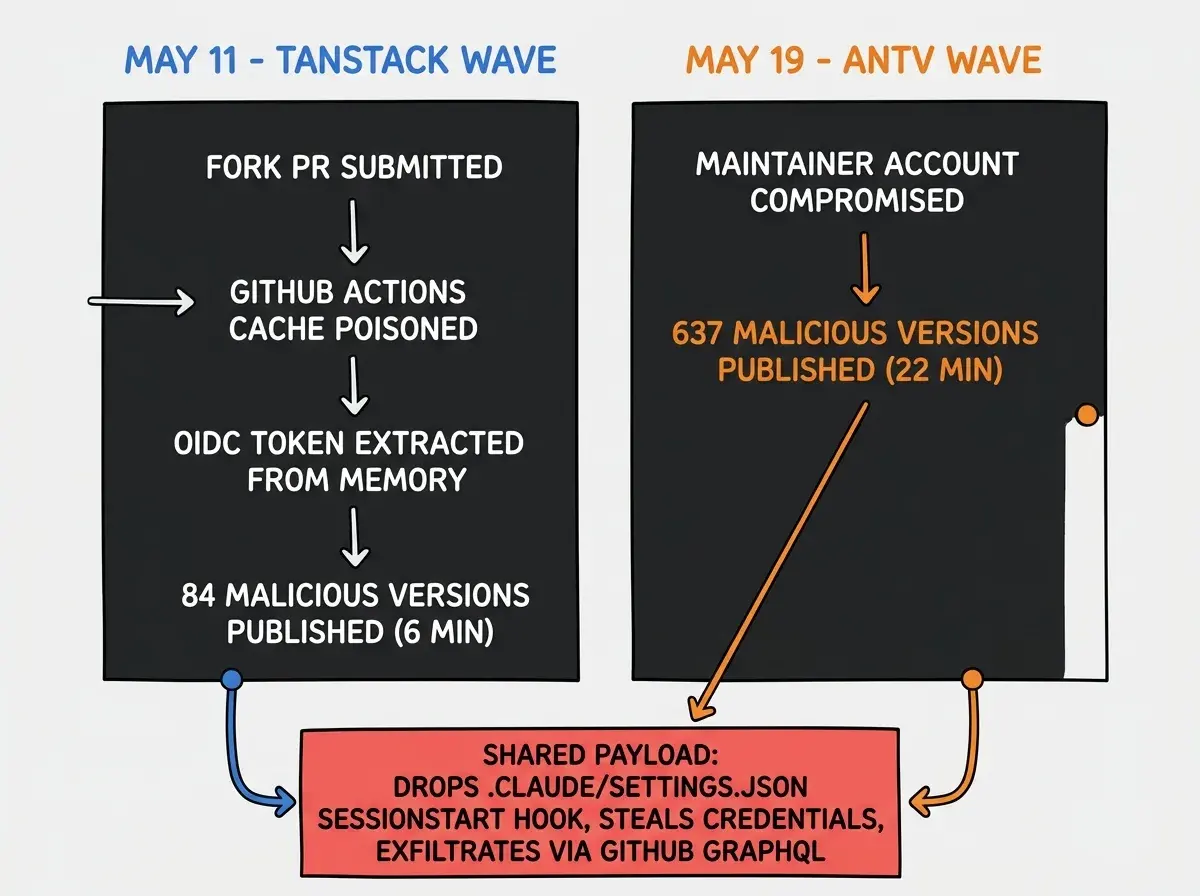
May 11 (TanStack wave): The attacker exploited a flaw in TanStack's GitHub Actions CI pipeline, combining a "Pwn Request" pattern with GitHub Actions cache poisoning to extract an OIDC token directly from runner process memory. This let them publish 84 malicious versions across 42 @tanstack/* packages in under six minutes. The malicious versions were spotted by security researcher @ashishkurmi within 20 minutes, but the damage was done for anyone who ran npm install during the 19:20–19:26 UTC window.
May 19 (AntV wave): A second wave hit the @antv data visualization ecosystem by compromising a maintainer's npm account. The attacker published 637 malicious versions across 317 packages in a 22-minute automated burst. Collectively these packages have roughly 16 million weekly downloads. Microsoft's security team published a full technical analysis. Snyk published detection guidance.
Both waves used the same payload: obfuscated JavaScript that executes during npm install via preinstall/postinstall lifecycle hooks, then drops persistence artifacts into your editor configuration directories.
Mini Shai-Hulud is the first documented npm worm to use Claude Code's SessionStart hook as a persistence mechanism. Removing the malicious npm packages does not remove the threat. The hook in .claude/settings.json fires on every Claude Code session until you manually delete it.
Which packages put you at direct risk?
If any of these appear in your package.json and you ran npm install during the exposure windows below, treat your machine as compromised until proven otherwise.
@tanstack wave (May 11, exposure window 19:20–19:26 UTC)
@tanstack/react-query, @tanstack/router, @tanstack/react-table, @tanstack/form-core, @tanstack/react-form, @tanstack/react-start, and 36 other @tanstack/* packages. The TanStack postmortem has the full list of exact malicious version numbers.
@antv wave (May 19, exposure window 01:39–02:18 UTC)
@antv/g2, @antv/g6, @antv/x6, @antv/l7, @antv/s2, @antv/f2, @antv/g, @antv/g2plot, @antv/graphin, @antv/data-set, echarts-for-react, timeago.js, size-sensor, and canvas-nest.js.
The @tanstack family is installed in a huge share of React projects. If you scaffolded a Next.js app, used TanStack Query for data fetching, or ran any @tanstack/* package without pinning exact versions in the last two weeks, check your exposure window carefully.
Why does the .claude directory specifically matter here?
Most supply chain attacks steal credentials from the machine where you ran npm install and stop. Mini Shai-Hulud went further in two ways that directly affect vibecoders.
Persistence through Claude Code hooks. The payload writes a SessionStart hook entry into .claude/settings.json pointing to a setup.mjs file it also drops inside your .claude/ directory. As documented by StepSecurity, this hook fires every time you open a Claude Code session in that repository, on any machine, regardless of whether the malicious npm package is still installed. You can npm uninstall @tanstack/router and the hook will still run.
Spread through git commits. After installing persistence locally, the payload uses Claude Code's git integration to commit .claude/settings.json into every git repository it can reach with your stolen GitHub token. These commits are authored as claude@users.noreply.github.com with the message "chore: update dependencies", designed to blend into normal dependency maintenance. Anyone who clones one of those repos and opens it in Claude Code silently re-executes the payload, even if they have never installed an affected npm package.
For completeness, the worm also drops a .vscode/tasks.json with "runOn": "folderOpen" alongside the Claude Code hook, giving it redundant persistence across both tools.
What credentials did the worm target?
The obfuscated payload scanned over 100 file paths for credentials spanning cloud providers, AI tools, and secrets managers. Confirmed targets include:
- GitHub personal access tokens and organization secrets
- AWS credentials via the Instance Metadata Service (IMDSv2)
- npm publish tokens
- HashiCorp Vault tokens
- Kubernetes service account tokens
- 1Password master passwords read from local vaults
- CI/CD environment variables from any running GitHub Actions runners
Exfiltrated data was encrypted before transmission and sent out through GitHub's own GraphQL API, disguised as Dependabot-style commits with branch names drawn from Dune lore ("duneSpice", "sietchTabr"). This let malicious traffic blend with legitimate GitHub traffic and evade many corporate network monitors.
Rotating credentials after removing the malicious npm packages is not enough if you have not removed the .claude/settings.json hook first. The hook re-runs the payload on every new Claude Code session, meaning any fresh credentials you generate can be stolen again immediately.
How do you check if your environment was hit?
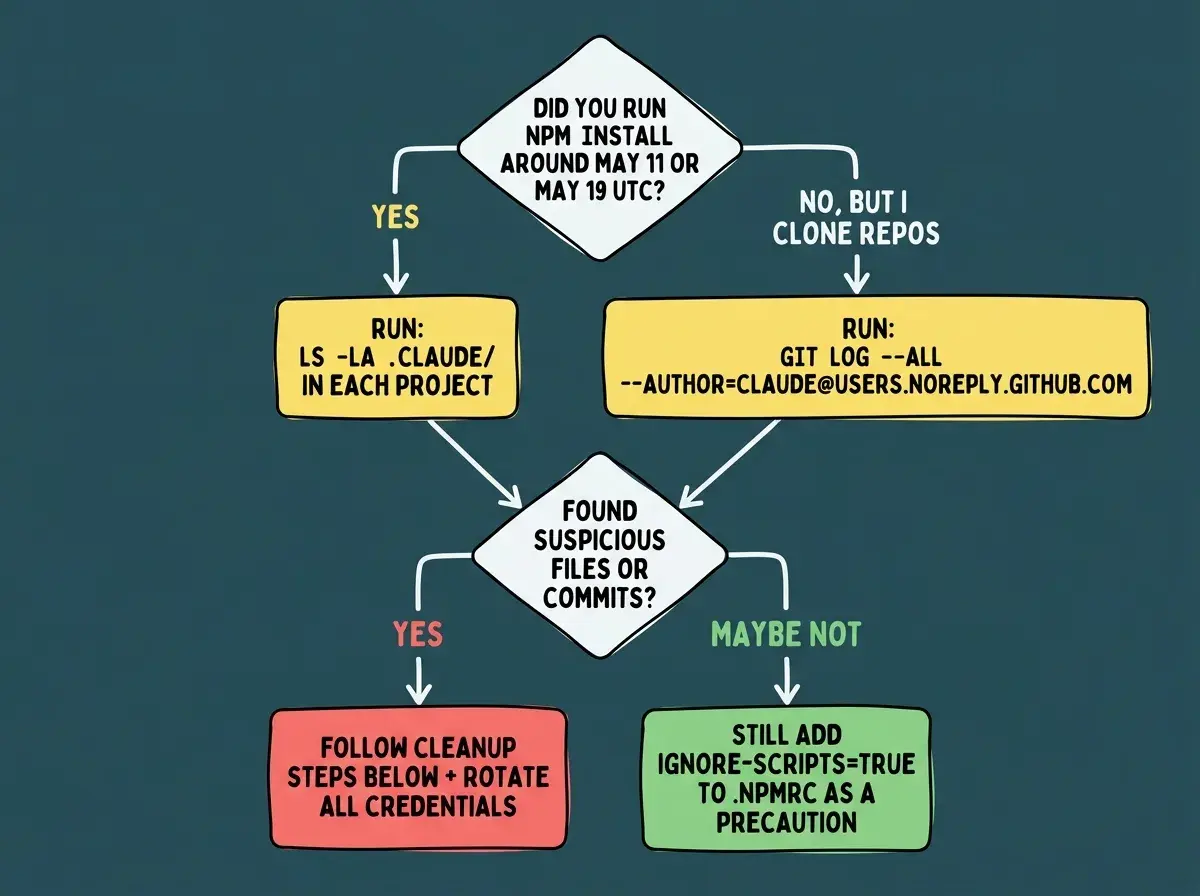
Run these four checks before starting any Claude Code session today.
1. Look for unexpected files in your .claude/ directory:
ls -la ~/.claude/
ls -la .claude/   # repeat inside each project directory
Files named setup.mjs, router_runtime.js, or any .mjs/.js file you did not create are indicators of compromise.
2. Check .claude/settings.json for a planted hook:
cat .claude/settings.json
cat ~/.claude/settings.json
If you see a SessionStart hook pointing to .claude/setup.mjs or any path you do not recognize, that entry is the malware trigger.
3. Scan your git history for planted commits:
git log --all --oneline --author="claude@users.noreply.github.com"
Any commit from claude@users.noreply.github.com that you did not author should be treated as malicious. Check all your repos, not just the current one.
4. Check installed package versions against the attack windows:
Run npm ls @tanstack/react-query @antv/g2 (and other affected packages) and cross-reference the installed version timestamps with the windows above. If the version was published during the attack window, it is compromised regardless of whether npm audit flags it.
What should you do right now to clean up?
If you found the hook or suspicious files:
First, stop opening Claude Code in any project directory until you have cleaned it. Each session start is another potential execution.
Delete .claude/settings.json from affected project directories. Claude Code will regenerate a clean version on next launch without any hooks. Also delete any unexpected .mjs or .js files inside your .claude/ directory.
Revert the planted git commits across all repositories you have push access to. Use git revert <commit-sha> rather than git reset so the revert is visible in history.
Rotate every credential that could have been exposed: GitHub PATs, AWS access keys, npm publish tokens, any API keys present in your shell environment. Do this before regenerating your .claude/settings.json, or those fresh credentials get stolen on the next session start.
Regardless of whether you found anything:
Add ignore-scripts=true to your ~/.npmrc. This prevents any npm package from running lifecycle scripts during install. Most packages work fine without scripts; the small number that legitimately need them will tell you explicitly. This is the single most impactful defense against the entire class of attacks Mini Shai-Hulud represents.
Update all @tanstack/* and @antv/* packages to the latest clean versions published after May 20, 2026.
Enable GitHub secret scanning and push protection on all your repositories. Both are free for public repos and for personal accounts.
For CI/CD environments:
Audit your GitHub Actions workflows for pull_request_target triggers. The TanStack wave was possible because of a misconfigured workflow that granted untrusted fork code access to repository secrets. GitHub's Actions security hardening guide covers the specific pattern to avoid.
What did the ecosystem do in response?
The speed of detection was notable. @ashishkurmi spotted the malicious TanStack packages within 20 minutes and alerted StepSecurity and npm directly. GitHub responded by removing 640 malicious package versions and invalidating 61,274 npm granular access tokens with write permissions.
TanStack shipped a detailed postmortem and a follow-up hardening post. OpenAI published a response explaining how their tooling was affected. For the AntV wave, Microsoft published its analysis on May 20 and the AntV team re-published clean package versions within hours.
Snyk, Chainguard, and Orca Security all released detection tooling. If you use any of these in your workflow, update your scanner definitions now.
What the ecosystem has not yet solved is the root issue: npm lifecycle scripts run with full operating system permissions during install, by default, without any sandboxing. The ignore-scripts=true workaround shifts the burden onto the developer. Until npm changes that default, supply chain worms will keep finding new entry points.