Dynamic workflows shipped in Claude Code v2.1.154 on May 28, alongside Claude Opus 4.8 as the new default model. The core shift is architectural: instead of describing a task and watching Claude work through it turn by turn, you include the word "workflow" in your prompt and Claude writes a JavaScript orchestration script that fans the work across dozens to hundreds of parallel subagents running in the background. Your session stays responsive. Progress is saved if the run is interrupted. You get one coordinated result at the end.
This is meaningfully different from opening several terminal windows and running Claude in each one. The script is the coordination layer, not you.
Why the Turn-by-Turn Model Has a Ceiling
The existing way Claude Code handles complex tasks works well up to a point. You describe what you want, Claude plans and works through the solution over several turns, and each result lands in Claude's context window. That context growth is the bottleneck. By the time you are doing a codebase-wide audit, a 500-file migration, or a research synthesis that requires cross-checking dozens of sources, the context window becomes the limiting factor rather than Claude's capability.
There is also a reliability issue with long sequential agentic runs. If Claude makes a wrong assumption midway through a 20-turn job, everything downstream inherits that error. There is no isolation between steps.
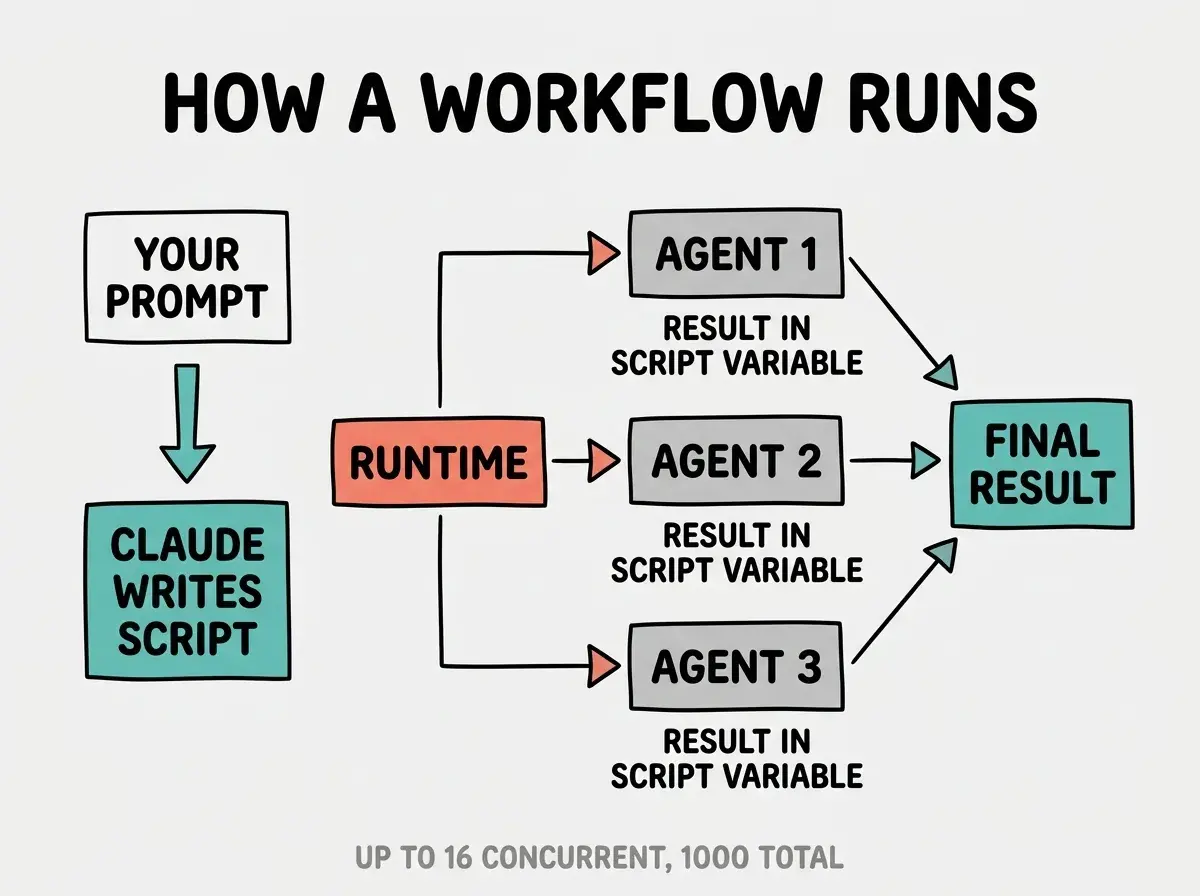
The workflow runtime addresses both problems. Intermediate results stay in script variables rather than Claude's context, so the conversation does not balloon as the job progresses. And because each subagent operates independently with a focused mandate, a wrong result from one agent does not contaminate the others. The official documentation describes this directly: "Moving the plan into code also lets a workflow apply a repeatable quality pattern, not just run more agents: it can have independent agents adversarially review each other's findings before they're reported, or draft a plan from several angles and weigh them against each other."
Dynamic workflows move the orchestration plan from Claude's context into executable JavaScript. The runtime holds intermediate results in script variables, so the context window is no longer the limiting factor for large tasks. Each subagent operates independently with a focused mandate. A codebase-wide audit that would overflow a single session now runs as a scripted job with up to 1,000 subagents and 16 running in parallel, resumable if interrupted.
The technical limits are 16 concurrent subagents and 1,000 total per run. These exist to bound local resource use on the machine running Claude Code, not as architectural constraints. Most tasks never approach them. The ceiling for a single Claude Code session is now measured in thousands of file operations rather than context tokens.
How a Dynamic Workflow Actually Runs
You do not write the orchestration script. Claude writes it. Include the word "workflow" in your prompt and Claude Code highlights it, plans the phases, generates the JavaScript, and shows you the plan before anything executes. You can approve, view the raw script, or adjust the prompt before the run starts.
The bundled /deep-research workflow is the fastest way to see this without writing any prompt. Run it with a question and it fans out web searches across several angles, fetches and cross-checks the sources it finds, votes on each claim, and returns a cited report with claims that did not survive cross-checking already filtered out.
Once a run starts, you manage it from /workflows. The progress view shows each phase, its agent count, token total, and elapsed time. You can pause a run with p, stop an individual agent with x, restart a running agent with r, or drill into any agent's prompt, tool calls, and result with Enter. If you stop a run partway through, you can resume it: agents that already completed return cached results and the rest run live. Resume works within the same Claude Code session. If you exit Claude Code while a workflow is running, the next session starts fresh.
When a run does what you wanted, press s in the /workflows view to save the orchestration script as a reusable command. Project-scoped workflows go to .claude/workflows/ and are available to everyone who clones the repository. Personal workflows go to ~/.claude/workflows/. Both show up in / autocomplete alongside built-in commands.
What Ultracode Mode Changes for Daily Work
Ultracode is a new effort setting: /effort ultracode. It combines xhigh reasoning effort with automatic workflow orchestration. With ultracode on, Claude plans a workflow for each substantive task in the session without waiting for you to mention the word "workflow" in your prompt.
A single request under ultracode can turn into several workflows in sequence: one to understand the code, one to make the change, one to verify it. This uses significantly more tokens per request than lower effort settings. The intended use case is work where quality matters more than speed, such as a hard architectural decision, a security audit, or a complex migration you want done right the first time.
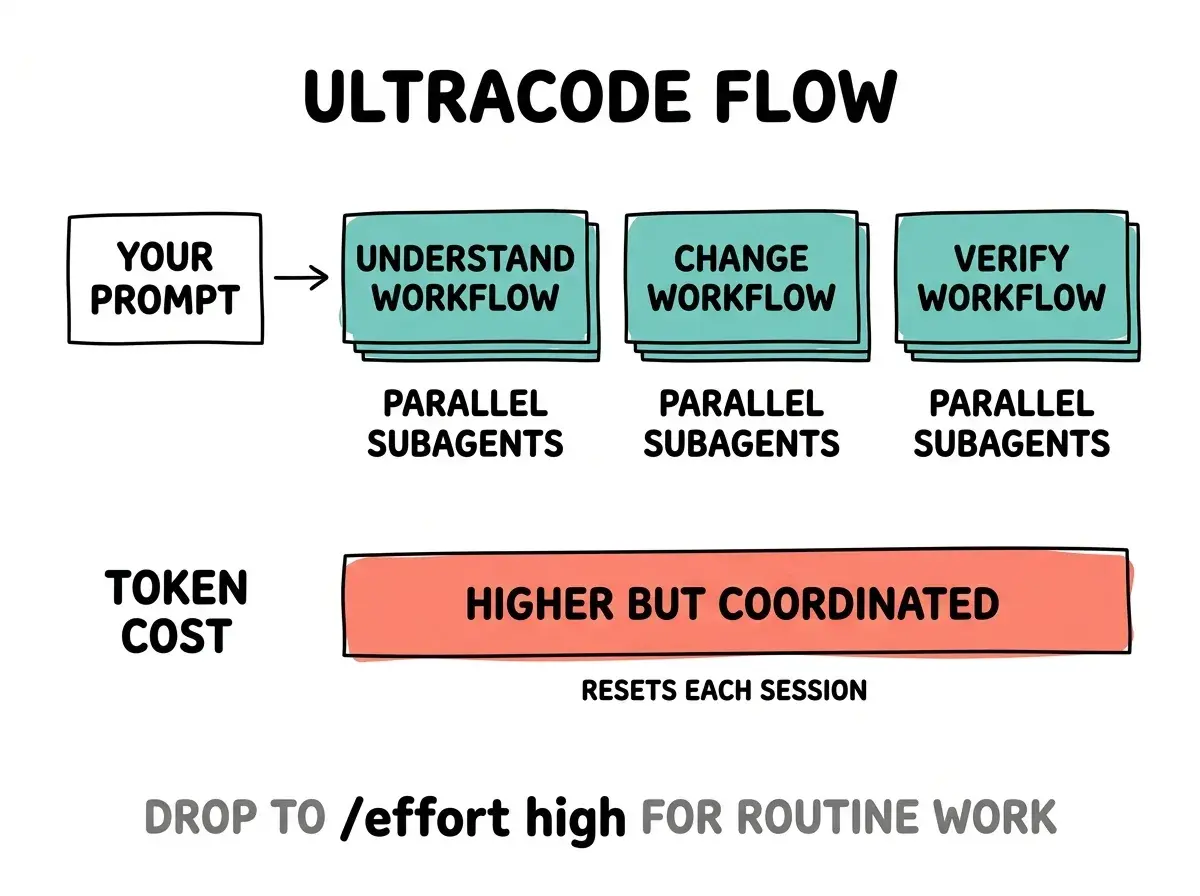
Ultracode lasts for the current session and resets when you start a new one. The guidance is to drop back with /effort high when returning to routine work. It is available on models that support xhigh effort; on other models it does not appear in the /effort menu.
Weekly pulse analysis for vibecoders on every capability that changes how you ship
Read more pulse postsPro plan users need to opt in before any of this works. Enable dynamic workflows from the Dynamic workflows row in /config. Team and Enterprise plans have it on by default. Administrators on Enterprise can disable it organization-wide via managed settings or the Claude Code admin page.
What Changed in Opus 4.8
Opus 4.8 shipped the same day as dynamic workflows and is now the default model in Claude Code. The primary improvement Anthropic highlights is a reduction in unreported code issues. According to the Anthropic announcement, Opus 4.8 is roughly four times less likely than Opus 4.7 to allow flaws in generated code to pass without flagging them. The model also flags uncertainty more readily and makes fewer unsupported claims than its predecessor.
Fast Mode on Opus 4.8 is 3x cheaper than it was on 4.7. The math: 2.5x speed at double the per-token rate, versus the considerably higher fast mode premium on the previous model. Standard pricing stays at $5/$25 per million tokens, unchanged from 4.7.
One notable real-world test of dynamic workflows with Opus 4.8: Jarred Sumner, creator of the Bun JavaScript runtime, used the combination to port Bun from Zig to Rust producing roughly 750,000 lines of Rust with 99.8% of the existing test suite passing, in eleven days from first commit to merge. A port at that scale has historically required a large team and months of coordination. The fact that it completed in under two weeks as a primarily AI-orchestrated job is the clearest signal yet of what the workflow runtime actually unlocks for ambitious solo projects.
Reaching for ultracode on every task. Dynamic workflows consume tokens proportionally to the number of subagents spawned, and ultracode adds xhigh reasoning on top of that. For routine work, a single-turn response at default effort is faster, cheaper, and usually sufficient. The right cue for a workflow is that the task is too large for one conversation, needs many results cross-checked against each other, or will be repeated often enough that a reusable script has real value.
The effort controls on Opus 4.8 are also more granular. The /effort slider now labels its ends "Faster" and "Smarter" instead of "Speed" and "Intelligence," which is a minor but telling change: Anthropic is explicitly framing effort as a quality dial, not a speed toggle. Claude now also reserves multiple-choice prompts for decisions it genuinely cannot make itself, reducing the noise of unnecessary clarification questions during agentic runs.
What This Means for You
Dynamic workflows change the scale of what a solo developer can realistically tackle in a single Claude Code session. A few practical implications depending on where you work:
- For codebase audits: "Run a workflow to audit every API endpoint under
src/routes/for missing auth checks" produces a scripted run you can save and rerun on every branch. The result is a coordinated findings list, not a turn-by-turn summary. - For large refactors: 500-file migrations are now tractable without coordinating a team. The Bun port is an extreme case, but the pattern scales down to any sufficiently large refactor.
- For research and documentation:
/deep-researchdoes adversarial source validation automatically, filtering claims that do not survive cross-checking. Run it before writing technical documentation or doing competitive analysis. - For teams: Saving workflows to
.claude/workflows/means the orchestration pattern lives in the repository. Every developer who clones the project gets the same quality-checked automation. - For Pro users: Enable dynamic workflows from
/configbefore your first session. It is off by default on Pro and nothing works until you toggle it. - For budget-conscious builders: Opus 4.8's standard pricing is unchanged. Fast Mode is now much more affordable if you have been avoiding it on 4.7 due to cost. The 3x price reduction makes it a realistic option for longer sessions.
Opus 4.8 is already the default model in every Claude Code session you open today. The honesty improvement and cheaper fast mode are in effect with no configuration needed.
Analysis for vibecoders on every Claude Code and AI coding release that changes how you build
Read the latest