The METR study found that experienced developers were 19% slower when using AI coding tools on familiar codebases, despite believing they were 20% faster. This is the most rigorous controlled study of AI coding productivity to date, and its results challenge nearly everything the industry has been saying about AI making developers more productive.
That gap between perception and reality is not a minor footnote. It is the central finding. Developers did not just misjudge their speed by a small margin. They thought they were significantly faster when they were actually significantly slower. This disconnect has major implications for how we evaluate AI tools, how we plan projects, and how we think about the relationship between feeling productive and being productive.
Why This Study Matters More Than the Others
The AI coding space is full of productivity claims. "10x developer." "Ship in a weekend." "81% productivity gains." Most of these numbers come from self-reported surveys or vendor-sponsored studies with obvious incentive problems. If a company sells AI coding tools, their study about AI coding productivity should be read with appropriate skepticism.
The METR study (Model Evaluation and Threat Research) took a different approach. They ran a randomized controlled trial with experienced open-source developers working on their own familiar codebases. These were not students completing toy problems. These were seasoned contributors working on real projects they already knew intimately. The study measured actual time to completion, not self-reported estimates, not lines of code produced, not "feeling of productivity." Wall clock time. Start to finish.
And the result was clear. With AI tools, these experienced developers took 19% longer to complete their tasks.
The METR study measured actual completion time, not self-reported productivity. Experienced developers were 19% slower with AI tools but estimated they were 20% faster. The gap between perception and reality was roughly 39 percentage points.
This does not mean AI coding tools are useless. But it does mean the conversation about productivity needs to become much more nuanced than "AI makes you faster." The reality, as this study reveals, is more complicated and more interesting than the simple narrative.
The Treadmill That Feels Faster
Imagine stepping onto a treadmill that makes a lot of noise. The belt hums loudly. The display shows impressive numbers. Your feet are moving quickly. You feel like you are running fast. After thirty minutes, you step off feeling accomplished and guess you covered four miles. Then you check the actual distance: two and a half miles.
The noise and motion created a feeling of speed that did not match the actual output. Your perception was shaped by sensory feedback (the loud belt, the moving display, the sensation of effort) rather than by the actual distance traveled.
This is almost exactly what the METR study revealed about AI coding tools. The tools create a powerful sensation of productivity. Code appears on screen faster. You spend less time staring at a blank file. The AI responds instantly to every question. You feel like you are flying through the work. But when someone measures the actual time from "task started" to "task completed," the number tells a different story.
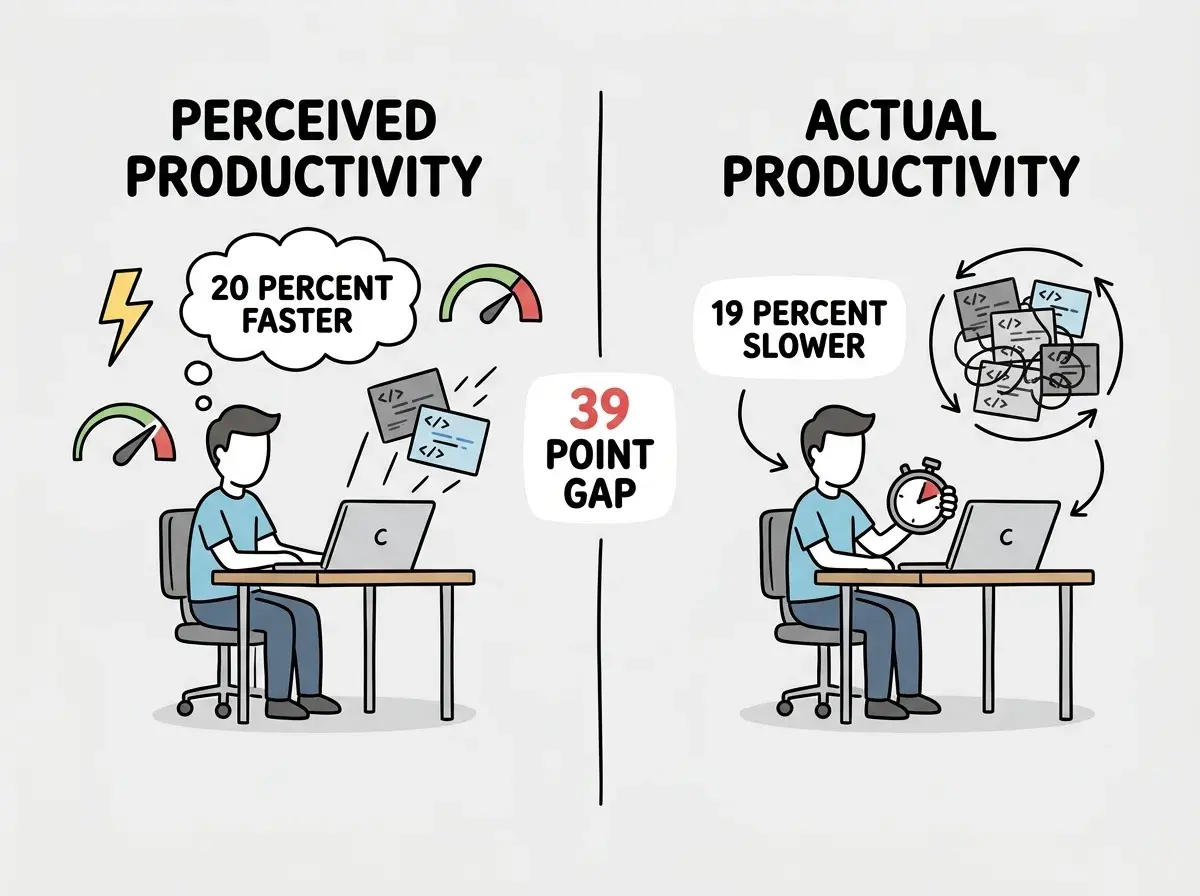
The treadmill analogy holds up because it identifies the specific mechanism behind the illusion. The AI is generating visible output constantly. That visible output creates a feeling of momentum. But visible output is not the same as progress toward completion. Some of that output needs to be reviewed, debugged, revised, or thrown away entirely. The time spent on those activities, which did not exist in the pre-AI workflow, is the hidden cost that turns a perceived speed boost into an actual slowdown.
What Actually Slowed Them Down
The 19% slowdown was not caused by one big problem. It was the accumulation of several small overhead costs that individually seem minor but compound across a full task.
Context switching between coding and prompting. Without AI, a developer thinks about the problem and writes code. With AI, they think about the problem, write a prompt, wait for a response, read the response, evaluate whether it is correct, decide whether to accept or modify it, and then integrate it into their work. Each prompt introduces a decision point that did not exist before. On complex tasks, developers made dozens of these decisions per hour.
Debugging AI output. When AI generates code that is almost right, fixing the subtle errors can take longer than writing the code from scratch. The developer has to understand what the AI wrote (which may use a different style or approach than they would have chosen), identify where it went wrong, and fix it without breaking the parts that work. This is a different cognitive task than writing code yourself, and for experienced developers on familiar codebases, it is often slower.
Prompt crafting overhead. Writing a good prompt takes time. Experienced developers found themselves spending significant time trying to communicate precisely what they needed, including context about the codebase, constraints, and requirements. For problems they could have solved directly in a few minutes, the time spent formulating and refining prompts exceeded the time the actual coding would have taken.
False starts and backtracking. AI sometimes produced plausible-looking code that took the developer down a path they would not have chosen themselves. By the time they realized the approach was wrong, they had invested time in understanding and partially integrating the AI's suggestion. Rolling back and starting over cost more than if they had simply written the code themselves in the first place.
Understand the research before you build your workflow.
Start hereYou might think this means AI tools are only useful for beginners. But actually, the study specifically tested experienced developers on codebases they knew well. The 19% slowdown applied precisely to the scenario where you would expect AI to help most: skilled people doing familiar work. The finding is not that AI never helps. It is that the help is not automatic, and the situations where AI adds genuine speed are more specific than the marketing suggests.
What This Does Not Mean
It would be easy to read the METR findings and conclude that AI coding tools are worthless. That conclusion would be wrong, and the study's own authors caution against it.
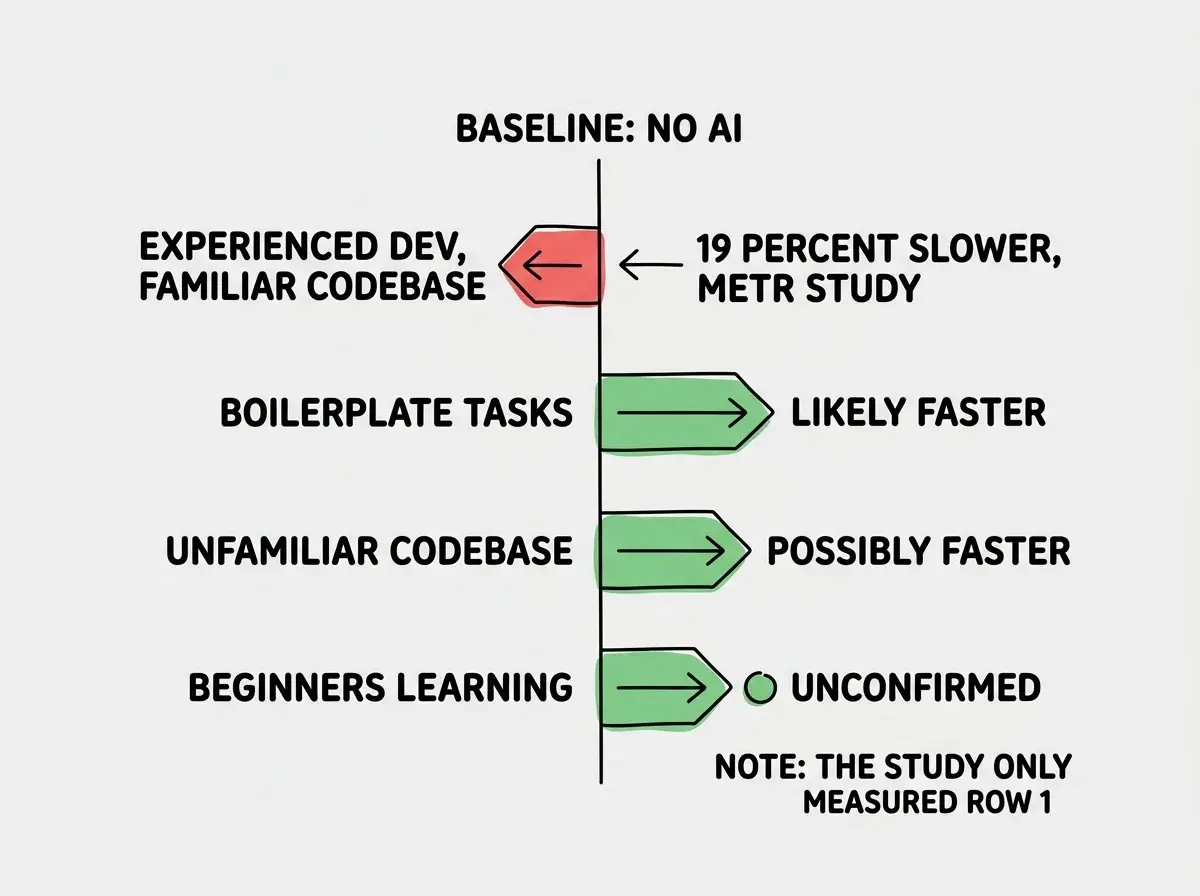
The study measured one specific scenario: experienced developers working on their own open-source projects. It did not measure beginners learning to code. It did not measure developers working in unfamiliar codebases. It did not measure the quality of code produced (only the speed). It did not measure tasks like writing boilerplate, generating tests, or exploring unfamiliar APIs, areas where many developers report genuine time savings.
The study also measured a snapshot in time. AI tools are improving rapidly. Developer workflows with AI are still evolving. The 19% slowdown may reflect the awkwardness of a new tool that has not yet been integrated smoothly into experienced workflows, similar to how early adopters of any new technology often experience a temporary productivity dip before the long-term gains appear.
What the study does establish, convincingly, is that the productivity gains from AI coding tools are not automatic or universal. They depend on the task, the codebase, the developer's familiarity, and how the tool is integrated into the workflow. The blanket claim that "AI makes developers faster" is, at minimum, incomplete.
The 81% productivity gain that senior developers report in surveys is not necessarily fabricated. It may reflect different tasks, different codebases, or different definitions of "productivity." But the METR study reveals that self-reported productivity is deeply unreliable. Developers who were 19% slower genuinely believed they were 20% faster. If your only evidence for AI productivity gains is how fast people say they feel, that evidence has a credibility problem.
Citing self-reported productivity numbers as proof that AI tools make you faster. The METR study showed that self-reported estimates can be off by nearly 40 percentage points. If you want to know whether AI is actually saving you time, measure wall-clock completion time, not how productive you feel during the process.
The broader lesson for the industry is about measurement discipline. When 92% of developers use AI tools daily but only 33% trust the accuracy, something more complex than "AI is great" is happening. Developers are hooked on something they do not fully trust. The METR study suggests one reason: the tools feel productive in a way that does not always translate to actual productivity. The feeling is real, even when the speed is not.
What This Means For You
The METR study is not an argument against using AI coding tools. It is an argument for using them with more awareness. The sensation of speed is seductive, and it can lead you to overcommit on timelines, underestimate complexity, or skip the review process because you feel like the work is already done.
- If you are a senior developer, measure your actual completion times on a few tasks with and without AI. Do not trust your gut feeling about which was faster. The METR study shows your gut is probably wrong. You may find that AI genuinely helps on certain types of tasks and hurts on others, and that information lets you deploy the tool more strategically.
- If you are a product manager, be cautious about project timelines based on "AI will make us faster." The productivity gains are real in some contexts but the METR study shows they are not universal. Build in buffer time and verify speed claims against actual delivery dates rather than developer estimates.
- If you are changing careers or just starting out, this study should not discourage you from using AI tools. It measured experienced developers on familiar codebases, which is a very different situation from a beginner learning new concepts. AI tools likely do help beginners move faster because the alternative (learning everything from scratch) is much slower than even imperfect AI assistance. But be aware that feeling fast and being fast are not always the same thing, and build the habit of measuring your actual progress.
Understand the research and build a workflow that actually works.
Explore more