Vibe coding for designers means turning your Figma files into real, functional applications without waiting for engineering to interpret (and inevitably alter) your designs. AI tools now let designers bridge the gap between what you designed and what actually gets built, giving you direct control over the final product for the first time.
Every designer has felt this frustration. You spend weeks perfecting a design in Figma. The spacing is intentional. The type hierarchy is carefully considered. The interaction patterns are documented in detail. Then engineering builds it, and what comes back looks close but wrong. The padding is off by eight pixels. The font weight is heavier than you specified. The hover state does not match. You file a ticket, wait a sprint, and the fix introduces a new inconsistency somewhere else. Vibe coding breaks this cycle entirely.
Why the Design-to-Code Gap Persists
The gap between design and implementation has existed for as long as digital design has been a profession. Designers work in visual tools. Engineers work in code. Every handoff between these two worlds is a translation, and every translation loses something.
This is not an engineering failure. It is a structural problem. Figma communicates design intent through visual representation. Code communicates design intent through precise values, conditional logic, and responsive behavior. Translating between these two representations is inherently lossy, like translating poetry between languages. The meaning survives, but the nuance often does not.
AI coding tools change this equation because they can look at your design and generate code that matches it directly. The translation still happens, but instead of happening through a human who is juggling your design, twelve other tickets, and a deadline, it happens through an AI that has seen millions of design-to-code examples and can reproduce visual patterns with remarkable accuracy.
44.2% of non-technical designers rate vibe coding favorably, but adoption is still early compared to visual development tools (71.9% favorable). Designers who get in now will have a significant skill advantage as the tools continue improving rapidly.
The favorability gap between vibe coding (44.2%) and traditional visual development tools (71.9%) tells an important story. Designers are interested but cautious. That caution is reasonable, because the tools are still maturing. But the trajectory is clear, and designers who start learning now will be ahead of the curve when these tools reach the maturity that visual builders already have.
The Architect Who Lays the First Bricks
Think of yourself as an architect who can also lay the first bricks. You are not replacing the construction crew. You are not going to wire the electrical or pour the foundation. But you can build the model home yourself, set the quality standard, and ensure that what gets built matches what you envisioned.
This analogy matters because it reframes the relationship between design and development. Traditionally, the architect draws the blueprints and the construction crew interprets them. The architect might visit the site, notice deviations, and file change orders. The construction crew might push back, citing constraints the blueprints did not account for. The project takes longer than it should, and the final building never quite matches the original vision.
When the architect can build the model home, everything changes. The construction crew has a physical reference, not just blueprints. They can walk through it, see exactly what the architect intended, and build the full structure to match. Disagreements about interpretation disappear because the reference is concrete, not abstract.
Your vibe-coded prototype serves the same function. When you hand engineering a working version of your design (with the right spacing, the right interactions, the right responsive behavior), the conversation shifts from "here's what I meant" to "match this." That is a fundamentally different starting point.
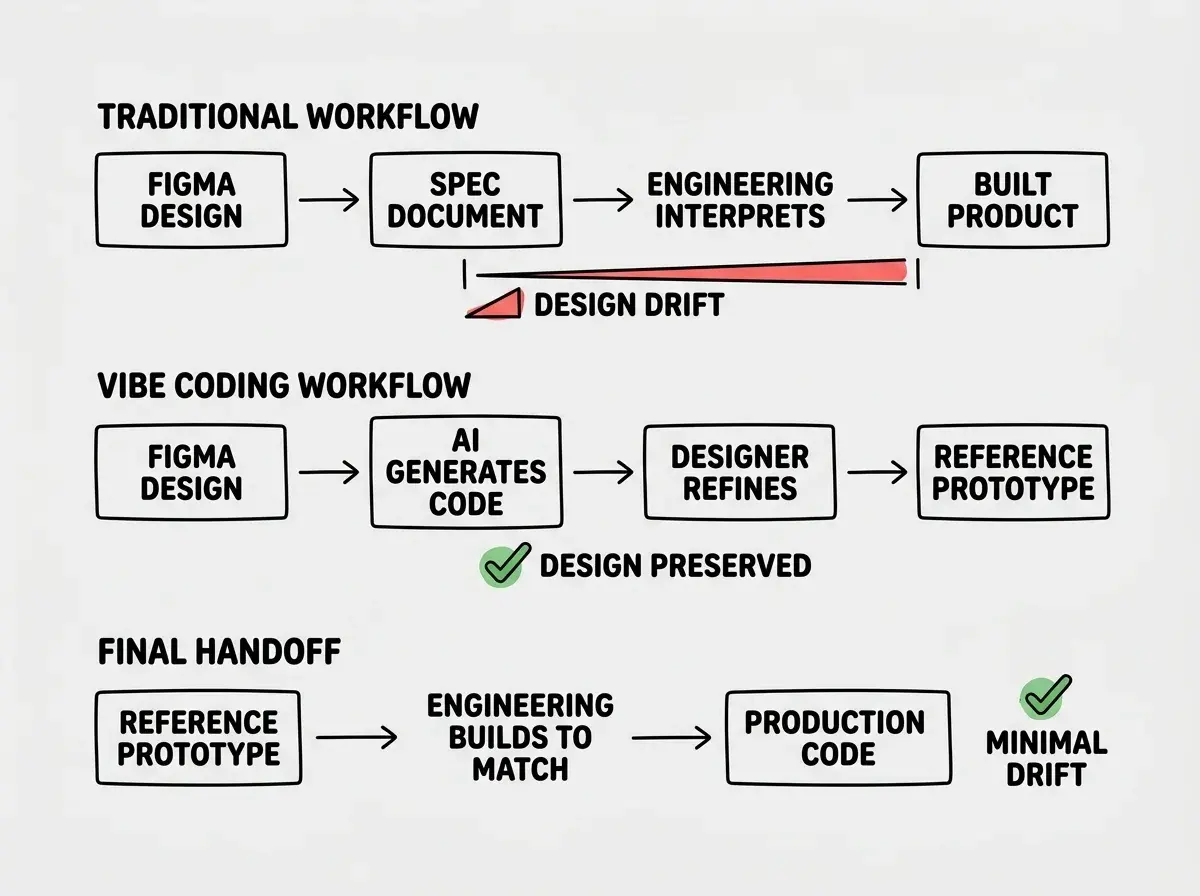
The model home does not need to pass a structural inspection. It needs to show the quality standard. Similarly, your vibe-coded prototype does not need to handle edge cases, process payments, or scale to a million users. It needs to demonstrate exactly how the interface should look and behave so that engineering has an unambiguous reference.
The Figma-to-Code Workflow
The practical workflow for designers is more intuitive than you might expect. This confuses everyone at first because designers assume they need to learn programming concepts. You do not. You need to describe your design decisions in the same language you already use in design reviews.
Start with a single screen. Do not try to convert your entire Figma file at once. Pick one screen, the most important one, and focus on getting that right. Export it or screenshot it, provide it to an AI tool, and describe what it should do. "This is a settings page. The sidebar navigation highlights the active section. Clicking a toggle saves the preference immediately with a subtle confirmation animation."
Speak in design language, not code language. You already know the vocabulary that matters. "8px padding." "16px between these elements." "The font is Inter Medium at 14px." "This card has a 1px border with 8px radius and a subtle shadow on hover." The AI understands design terminology because it has been trained on millions of design-to-code examples. You do not need to translate your language into technical terms.
Iterate visually. When the AI generates the first version, compare it side-by-side with your Figma design. Tell the AI specifically what does not match: "The spacing between the cards is 24px in my design, but this looks like 16px." "The button should be rounded-full, not rounded-md." You are doing design review, which is a skill you already have. The only difference is that you are reviewing code output instead of another designer's work.
Start with the fundamentals that every vibe coder needs to understand.
Learn the basicsThe beauty of this workflow is that it leverages the skills you already have. You know what good design looks like. You know how to spot when something is off by a few pixels. You know the difference between a smooth animation and a janky one. Those skills transfer directly to evaluating AI-generated code, even if you never read a single line of that code.
Addressing the Elephant in the Studio
There is something that needs to be said directly. Some designers face social stigma from senior colleagues when they start writing code, even AI-generated code. The criticism comes in different forms: "That's not a designer's job." "You're going to produce bad code." "Stay in your lane."
You might think this stigma is about maintaining quality standards. But actually, it is about a shifting professional identity that makes some people uncomfortable. The design profession has spent decades establishing its boundaries, its tools, and its role within product teams. Vibe coding blurs those boundaries, and that feels threatening to people who built their career on the old lines.
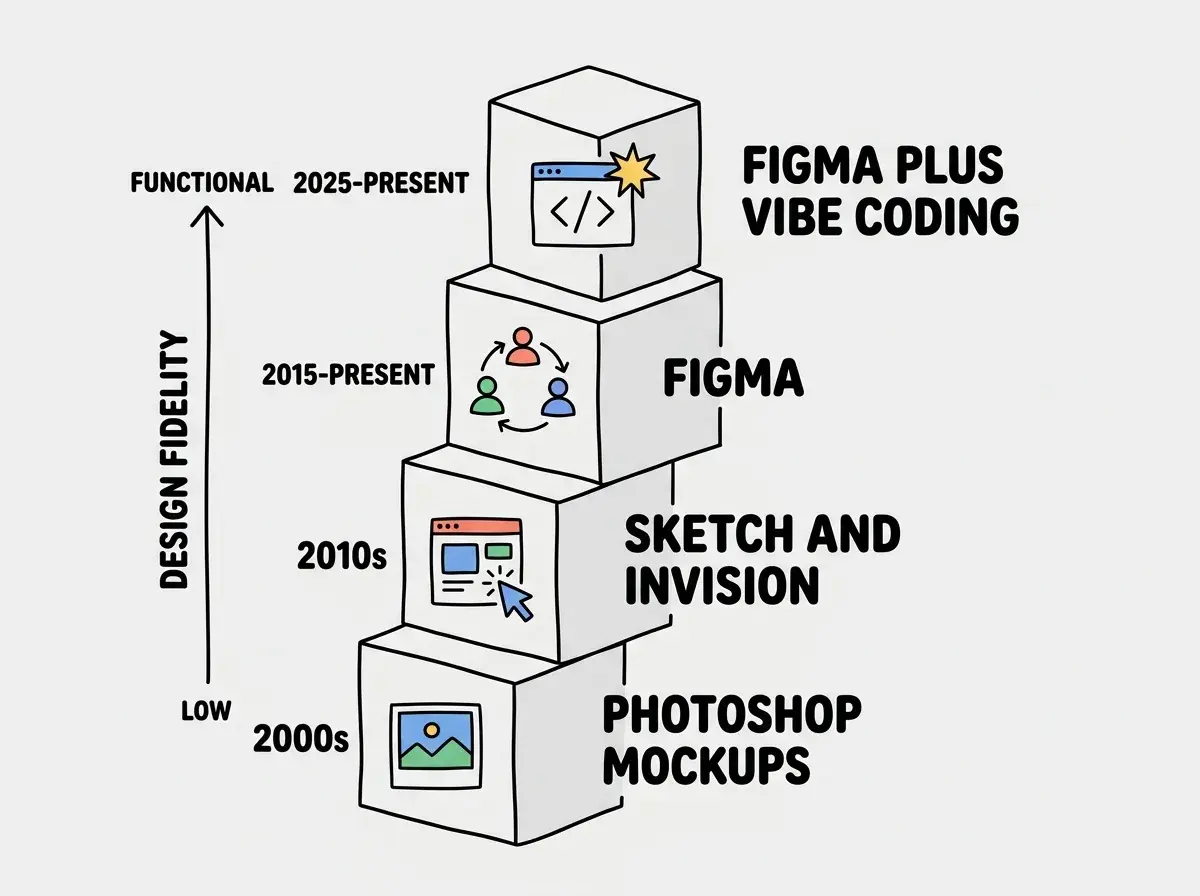
Younger designers are embracing vibe coding at higher rates than their senior colleagues. This generational split suggests the stigma will diminish over time. But if you are navigating it right now, here is the framing that works: you are not writing code. You are creating a design artifact, a functional prototype, using a new medium. Just as designers adopted Figma after Sketch after Photoshop after hand-drawn mockups, this is the next evolution of the tools designers use to communicate their intent.
The practical benefit of learning this workflow outweighs the social friction. Designers who can produce functional prototypes are more valuable in every hiring market because they reduce the design-to-development cycle, catch implementation issues earlier, and give their teams a concrete reference instead of an abstract specification.
Trying to learn programming concepts instead of using your existing design skills. You do not need to understand React components, CSS grid, or JavaScript events. Describe your design in the language you already know (spacing, typography, color, interaction behavior) and let the AI handle the translation. Designers who try to learn code first get stuck. Designers who use design vocabulary from the start move fast.
The designers who get the most from vibe coding are not the ones who become the best coders. They are the ones who stay designers while adding a new output format to their repertoire. Your Figma file is the source of truth. The vibe-coded prototype is a translation of that source of truth into a medium that engineering can reference directly. You remain the design authority. The AI is just a new brush.
Dig deeper
A few hand-picked sources if you want to go further.
What This Means For You
Vibe coding does not ask you to become a developer. It asks you to take more control over how your designs get built. The gap between "what I designed" and "what shipped" has frustrated designers for decades. For the first time, you have a tool that can close that gap without requiring you to learn a new profession.
- If you are a UI designer: Start with a single component from your design system. Convert one card, one form, or one navigation pattern into working code using an AI tool. Compare the output to your Figma file and iterate until it matches. That one component will teach you more about the workflow than any tutorial, and you will have a working reference to show engineering exactly what you intended.
- If you work with developers: Frame vibe coding as a collaboration tool, not a replacement for their work. Your prototype is a reference implementation that reduces ambiguity in handoffs. The best design-engineering relationships are built on shared understanding, and a functional prototype creates understanding faster than any spec document. Engineers who see this as a threat usually change their minds once they experience fewer revision cycles.
- If you freelance: The ability to deliver both design and a functional prototype makes your proposals significantly more compelling. Clients who used to need a designer and a front-end developer for a project now need just you for the initial phase. You can deliver a working prototype alongside your Figma files, giving clients something they can interact with immediately instead of waiting for a separate development phase. That speed and completeness will set you apart.
Learn how AI tools turn visual ideas into working products.
Explore more