Choosing a database for your first app feels like choosing your first apartment. You have never rented before, you are not sure what questions to ask, and every listing makes different promises. Most Supabase vs Firebase beginner comparisons assume you already know what SQL means. This one does not.
Think of a database as the building where your app's information lives. Supabase, Firebase, and Convex are three different apartment buildings, each with a different front desk, different amenities, and different lease terms. Your job is to figure out which building fits the life you are actually going to live, not the one that looks fanciest in the brochure.
With 63% of vibe coding users being non-developers and 92% of devs using AI tools daily, the database your AI picks on the first prompt often becomes permanent. Understanding what you are getting into matters.
Quick Verdict
| Supabase | Firebase | Convex | |
|---|---|---|---|
| Best for | Structured data, growing apps | Quick prototypes, mobile apps | Real-time apps, reactive data |
| Price | Free to 500MB, then $25/mo | Free tier generous, pay-as-you-go | Free to 1M function calls/mo |
| Strength | Full SQL database, open source | Massive ecosystem, Google backing | Real-time sync, TypeScript-first |
| Weakness | Steeper learning curve for beginners | Complex pricing, vendor lock-in | Smaller community, newer platform |
What Even Is a Database (And Why Should You Care)
A database stores your app's information so you can find it again later. When someone creates an account, that goes into the database. When they save a to-do item, that goes in too. When they come back tomorrow and see their stuff, that is the database doing its job.
Without a database, your app has amnesia. Every time someone closes the browser, everything vanishes. You definitely need one. The question is which building gives you the best experience.
Supabase Is the Traditional Apartment Building
Supabase is like a well-established apartment complex with a professional management office. Everything is organized into clearly labeled floors and rooms. Your data lives in tables with rows and columns, similar to a spreadsheet.
What makes it beginner-friendly. Supabase gives you a visual dashboard where you can see your data laid out like a spreadsheet. You can click around, add rows, edit values, and see exactly what your app is storing. Seeing everything in a familiar grid format removes a lot of fear.
What makes it powerful long-term. Supabase runs on PostgreSQL, the most popular open-source database in the world. Every tutorial, every AI tool, and every developer you might hire someday knows how to work with it. If you ever want to move, you can take your PostgreSQL database anywhere.
The front desk experience. Supabase includes authentication, file storage, and real-time subscriptions all in one platform. One account, one dashboard, one bill. For a beginner juggling twenty new concepts, fewer accounts to manage is a genuine advantage.
Supabase vs Firebase beginner decisions often come down to one thing. Supabase organizes data like a spreadsheet with strict columns and rows. Firebase lets you dump data in a more freeform way, like tossing items into labeled storage bins. If your app's data has clear structure (users have names, emails, subscription plans), Supabase's approach will save you headaches as you grow. If your data is messy and unpredictable, Firebase's flexibility might feel easier at first.
Firebase Is the All-Inclusive Resort
Firebase is like an all-inclusive resort owned by a major hotel chain (Google). Everything you could possibly need is somewhere on the property. Authentication, databases, file storage, hosting, analytics, push notifications. The list goes on.
What makes it beginner-friendly. Firebase has been around since 2014. The volume of tutorials, YouTube videos, and Stack Overflow answers is unmatched. For someone learning by copying examples, Firebase has the largest library to copy from.
Two database options inside one resort. Firebase offers two databases. Realtime Database is the original. Firestore is newer, better organized, and more scalable. Most new projects should use Firestore. If your AI tool generates Firebase code, check which one it picked.
The catch with the all-inclusive model. Google's lease terms are complex. Firebase charges based on document reads, writes, and bandwidth. A single page load might trigger dozens of reads you did not realize were happening. Beginners regularly get surprised by bills. The free tier is generous, but the jump to paid can feel sudden.
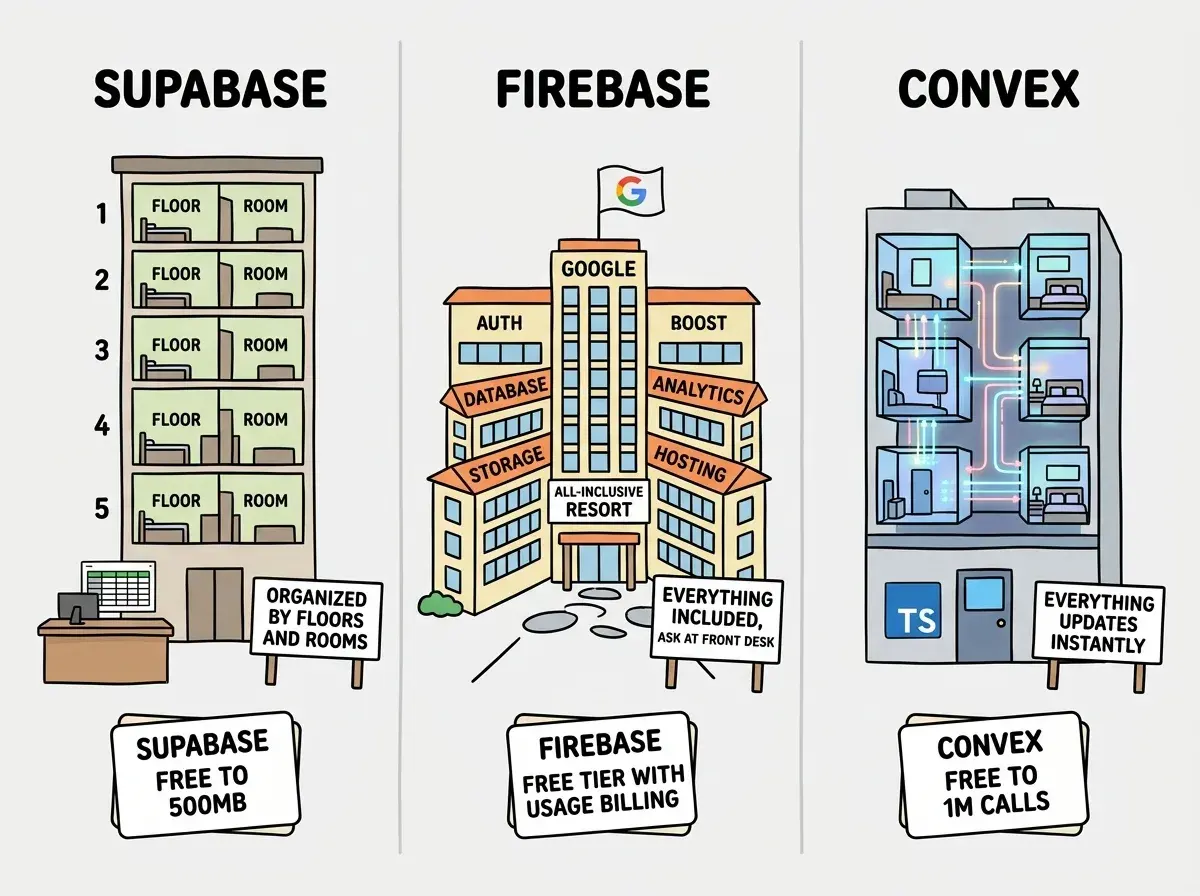
Convex Is the Smart Building
Convex is the newest option, like a modern smart building where everything is automated and connected. Information flows through the building in real time without you having to ask for it.
What makes it different. With Supabase and Firebase, your app asks the database for data and shows the response. If the data changes, your app has to ask again. Convex flips this. Your app subscribes to data, and whenever it changes, Convex pushes the update to every connected user instantly. For chat apps, collaborative editors, or live dashboards, this is genuinely magical.
TypeScript all the way through. If your AI tool writes TypeScript (and most do in 2026), Convex feels natural. Your database queries, server logic, and frontend code all use the same language. This means your AI tool can generate Convex code that catches errors before you even run it.
The tradeoff for being new. Convex launched in 2022. The community is smaller and your AI tool has less training data to draw from. When you hit a problem with Supabase or Firebase, thousands of forum posts exist. With Convex, you might be among the first to encounter a specific issue.
Which Is Easier Firebase or Supabase
The honest answer depends on what "easier" means to you.
Firebase is easier to start. You can have a working prototype in under thirty minutes. The SDK is forgiving, and your AI tool probably knows Firebase's API by heart. For a proof of concept that needs to work by Monday, Firebase gets you there fastest.
Supabase is easier to understand. Because your data lives in tables with clear columns, you can always open the dashboard and see exactly what is happening. With Firebase, data is nested in a tree structure that becomes confusing as your app grows. Debugging a SQL table where you can see every row beats debugging a nested Firestore query every time.
Supabase is easier to grow with. Adding a new feature usually means adding a new table and connecting it to existing ones. With Firebase, adding complexity often means restructuring data you have already stored.
For founders and career changers building their first real project, the recommendation is Supabase. The initial learning curve is slightly steeper, but the payoff in clarity and maintainability is worth the extra hour of setup.
Picking Firebase because your AI tool generated Firebase code on the first try. AI tools default to Firebase frequently because it has the most training data, not because it is the best fit. Before accepting the first suggestion, ask your AI tool to explain the tradeoffs. A two-minute conversation can prevent a painful database migration three months later.
How AI Coding Tools Pick Your Database
Most comparison articles skip this, but it matters enormously when you are building with Cursor, Lovable, Bolt, or Claude Code.
Lovable and Bolt default to Supabase. These tools scaffold complete apps with Supabase already wired in. Your database decision is effectively made unless you override it.
Cursor and Claude Code lean toward Firebase or Supabase depending on your prompt. Ask for "a database" and you might get Firebase. Ask for "Supabase" specifically and you will get Supabase. Being explicit gives you control.
Convex requires intentional prompting. AI tools rarely suggest it unprompted. If you want Convex, explicitly request it and potentially provide their documentation as context.
Start with the fundamentals before picking your tech stack.
Learn the basicsPricing That Actually Makes Sense
Let's translate the pricing into apartment lease terms.
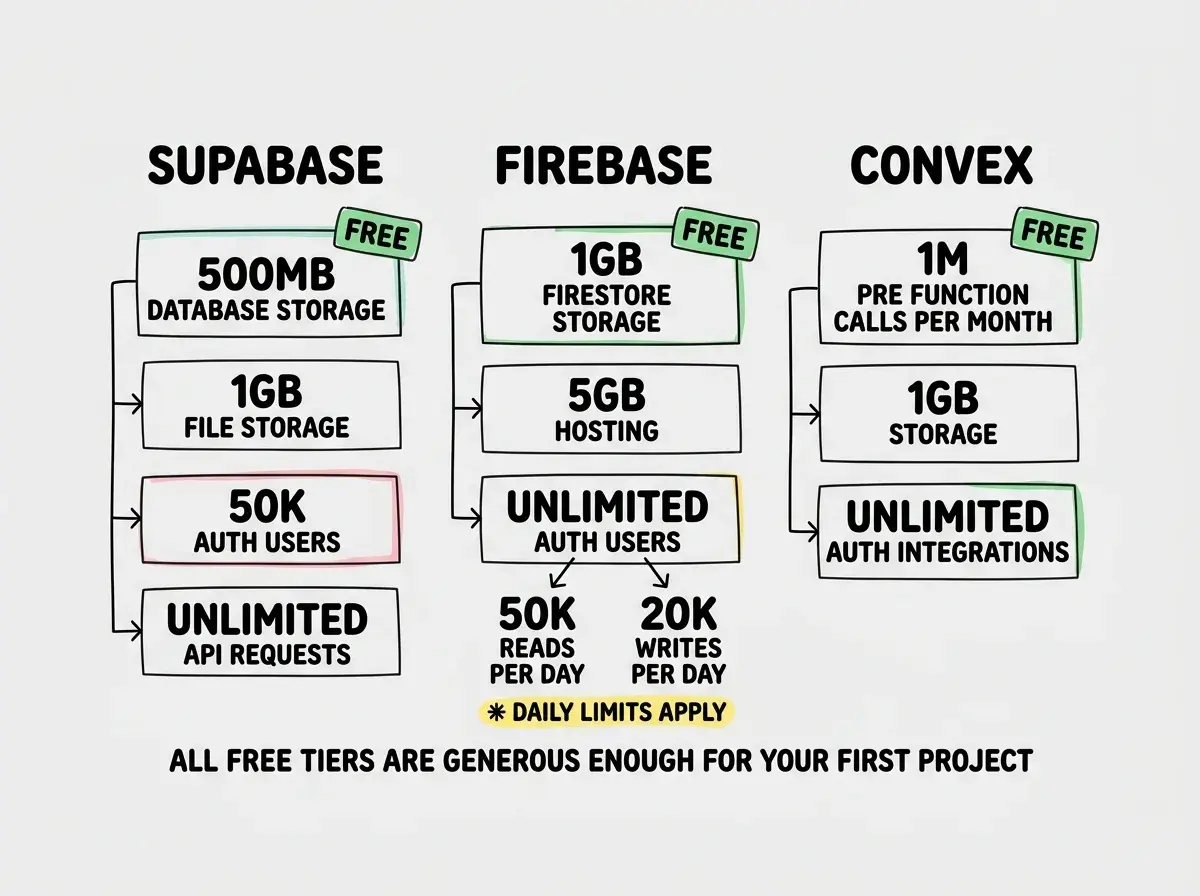
Supabase gives you a studio apartment free (500MB of data, 50,000 auth users). The Pro plan is $25/mo with 8GB of storage. Pricing is predictable because it is based on storage size, not how often you open the fridge.
Firebase gives you a free apartment with a catch. Generous limits on storage and auth, but you pay per "action." Every read, write, and data transfer is metered. The Blaze plan only charges for what you use, but what you use can surprise you.
Convex offers 1 million free function calls per month. The Pro plan starts at $25/mo. Pricing is based on function executions and storage.
For a beginner, all three cost $0 until your project gets real traction.
What This Means For Your First Project
The database decision feels high-stakes because switching later is painful. Here is the practical reality.
If you are using Lovable or Bolt, go with Supabase. It is already wired in and tested. Focus your energy on making your app useful, not configuring infrastructure.
If you are building something collaborative or real-time (chat, shared workspaces, live dashboards), give Convex a serious look. Real-time sync is its superpower.
If you want the most tutorials and community support, Firebase wins. Sometimes having someone else's exact solution to copy is worth more than having the "better" technology.
If you want the most future-proof choice, Supabase wins. PostgreSQL is the industry standard and the structured approach scales cleanly from a weekend project to a real business.
Pick a project idea and start building this weekend.
Browse project ideasThe Honest Recommendation
For most founders and career changers, start with Supabase. It is the apartment building with the clearest floor plan, the most reasonable lease, and the easiest move-out process if you ever need to leave. When you eventually bring on a technical co-founder, they will know exactly how to work with what you have built.
The worst choice is no choice. Letting your AI tool pick your database without understanding what it picked is like signing a lease without reading it. Spend thirty minutes learning which building your data lives in.