How AI coding tools work is simpler than most people assume. These tools are trained on billions of lines of existing code and learn to predict the next token, the next word or symbol, based on patterns in that training data. They do not understand your code. They recognize what typically comes next.
That single sentence explains nearly every behavior you have observed while vibe coding. Why AI is incredible at generating boilerplate. Why it hallucinates APIs that do not exist. Why it sometimes writes beautiful code and sometimes writes nonsense. All of it traces back to pattern matching at an enormous scale.
Why This Changes How You Prompt
Understanding the mechanism behind AI coding tools is not just academic trivia. It directly affects how productive you are every day. Developers who understand how these tools work write better prompts, catch errors faster, and avoid entire categories of frustration that plague developers who treat AI as a black box.
The core problem is a mismatch between mental models. Most people approach AI coding tools as if they are talking to a very fast programmer. You describe what you want, and the programmer writes it. But that is not what is happening. You are interacting with a statistical model that has memorized patterns from the largest collection of code ever assembled. It is not thinking about your problem. It is recalling patterns that match the shape of your prompt.
This distinction matters because it predicts exactly when AI will succeed and when it will fail. Common patterns, the ones that appear thousands of times in the training data, get generated accurately. Uncommon patterns, the ones specific to your project, your edge cases, your unusual architecture, get generated poorly because the model has fewer examples to draw from.
AI coding tools are pattern-matching engines, not reasoning engines. They generate code by predicting what token is most likely to come next based on billions of training examples. This is why they excel at common patterns and struggle with anything unique to your project.
Once you internalize this, you stop expecting AI to reason about your code and start giving it the patterns it needs to match well. That shift in approach can double your effective productivity with these tools.
The Librarian Who Has Read Everything
Imagine an incredibly well-read librarian who has memorized millions of books. When you walk in and ask a question, this librarian does not reason from first principles. They do not think about your question logically. Instead, they search their memory for the most relevant passage they have ever read and adapt it to fit your question.
Most of the time, this works remarkably well. If you ask about a common topic, the librarian has read hundreds of books about it and can synthesize an excellent answer. If you ask how to build a React login form, the librarian has memorized thousands of React login forms and can produce one that works perfectly.
But sometimes the librarian does something strange. They confidently cite a book that does not exist. They combine details from two different books in a way that creates a contradiction. They give you an answer that sounds authoritative but is subtly wrong because the passages they recalled do not quite fit your specific situation.
This is exactly what AI coding tools do when they hallucinate. When Copilot suggests an API method that does not exist, it is not making a mistake in the way a human programmer makes a mistake. It is recalling a pattern that statistically fits the shape of what you are writing. In its training data, code that looks like yours was often followed by a method call that looks like the one it suggested. The method just happens to not exist in the library you are actually using.
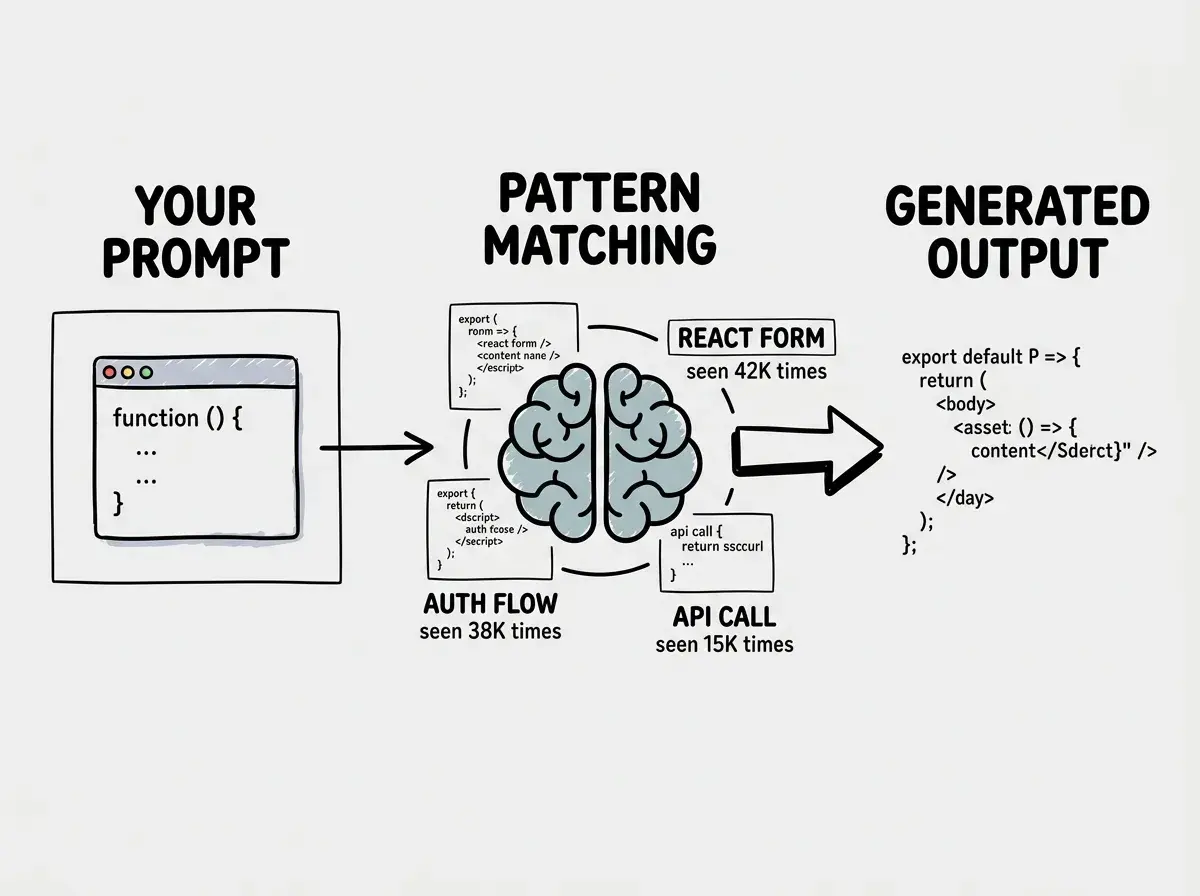
The librarian analogy also explains why AI gets worse as your project grows more specific. At the start of a project, you are asking common questions with common answers. Build a landing page. Set up a database connection. Create a user model. The librarian has read thousands of books about these topics. But as your project develops its own unique logic, you start asking questions the librarian has never encountered. The answers get less reliable because the matching passages are less relevant.
The Token Prediction Machine
Under the hood, the process is remarkably mechanical. When you type a prompt, the AI model breaks your text into tokens, which are small pieces of text, usually a few characters or a word. It then predicts the most probable next token given all the tokens that came before. It generates that token, adds it to the sequence, and predicts the next one. This repeats until the response is complete.
Every choice is a probability distribution. When the model generates a function name, it is not choosing the "right" name. It is choosing the most statistically likely name given the context. When the probability distribution is concentrated, the model is confident and usually correct. When the distribution is spread out, the model is uncertain and more likely to pick something wrong.
This is why you sometimes see AI produce code that is almost right but has one wrong detail. The model got the overall pattern correct because the broad shape was high-probability. But one specific detail fell into a lower-probability zone, and the model picked a plausible token that happened to be wrong. A function name with a typo. A parameter that exists in version 2 of a library but not version 3. A variable reference that points to the wrong scope.
Understanding how AI tools work is the foundation for using them effectively.
Start hereYou might think that bigger models with more training data would solve this problem entirely. But actually, more data improves the average case without eliminating the edge cases. A model trained on more code has better probability distributions for common patterns, but your project's unique logic is still not in the training data. The librarian has read more books, but they still have not read the book about your specific application.
Context Windows and Why AI Forgets Your Instructions
The context window is the amount of text the AI model can "see" at one time. Depending on the model, this ranges from roughly 8,000 tokens to over 1,000,000 tokens. Everything you send to the model, your prompt, the code you pasted in, the conversation history, all of it must fit in this window.
When the window is mostly empty, the model has plenty of attention capacity for your instructions. It follows them well. But as the window fills with conversation history, earlier instructions start to lose influence. The model does not delete them. It just pays less attention to them relative to more recent content. This is context window degradation, and it explains why AI starts "forgetting" what you told it earlier in a long session.
Developers report the model "conjoining words into gibberish" and "making unrelated changes" when the context window fills up. These behaviors are not random failures. They are the predictable result of a pattern-matching system running out of attention capacity. The model is still predicting the most probable next token, but its view of the relevant context has become noisy and fragmented.
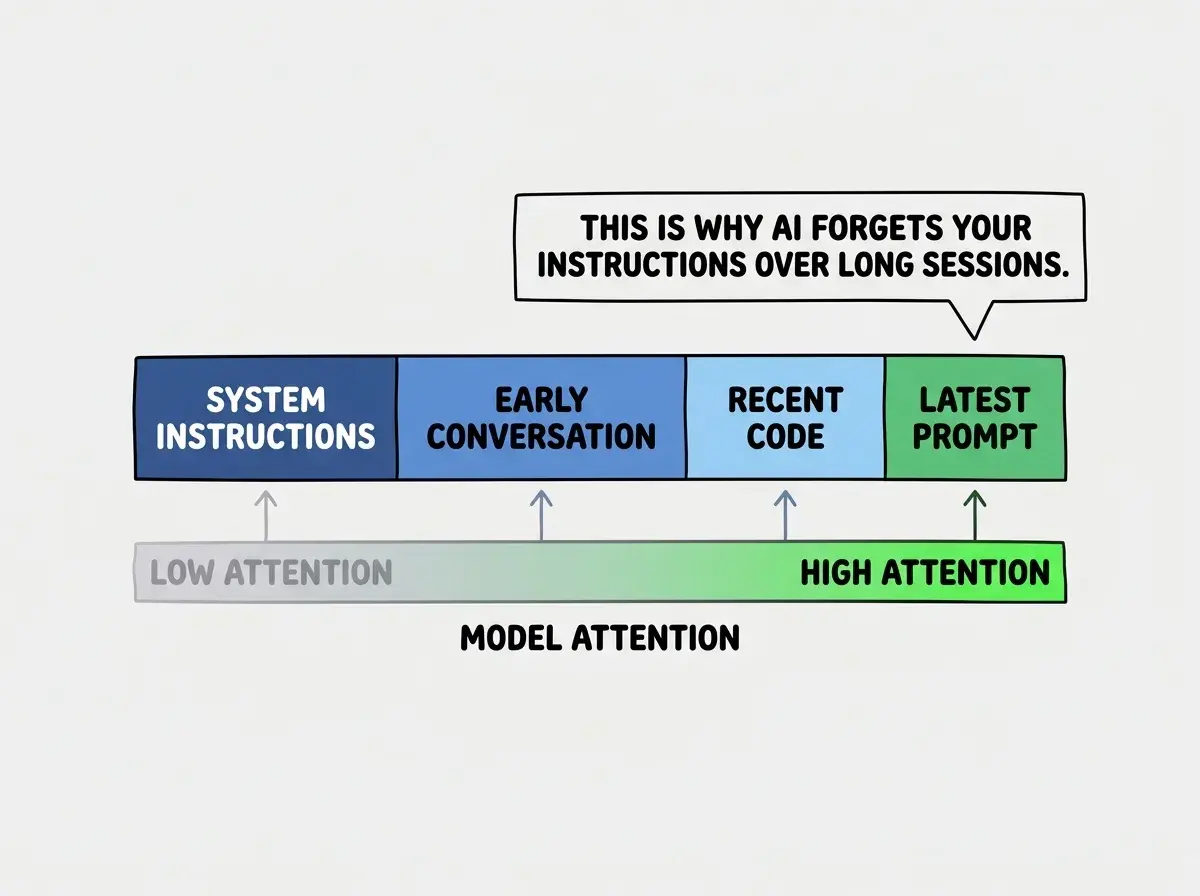
This confuses everyone at first because the AI never tells you it has stopped paying attention to your earlier instructions. It continues generating confidently. It does not say "I can no longer see what you told me twenty prompts ago." It just quietly stops following those instructions. The confidence stays constant even as the reliability drops.
Pasting your entire codebase into the context window hoping the AI will "understand" your project. This fills the context with code the model cannot fully attend to, pushes out your actual instructions, and produces worse results than sending small, focused snippets with clear context about what you need.
The practical implication is clear: shorter, focused conversations produce better results than long, sprawling ones. Start new conversations frequently. Provide the minimum context needed for each task. And never assume the AI remembers what you told it fifty prompts ago, because statistically, it is barely paying attention to it.
Dig deeper
A few hand-picked sources if you want to go further.
What This Means For You
Understanding how AI coding tools actually work is not about becoming a machine learning expert. It is about building an accurate mental model that predicts when AI will help and when it will hurt. The librarian metaphor, the token prediction process, the context window limits; these are the three concepts that explain nearly every behavior you will encounter.
- If you are a student, this knowledge puts you ahead of most professional developers. Many people with years of experience still treat AI as a black box. Understanding the mechanism means you will write better prompts, catch hallucinations faster, and build more reliable software from the start of your career.
- If you are a senior developer, map these concepts onto your existing debugging skills. When AI generates suspicious code, ask yourself whether the pattern it matched is actually relevant to your context. Check library versions, verify API signatures, and test edge cases. Your experience gives you the ability to spot where the probability distribution went wrong.
- If you are changing careers, do not let the complexity of machine learning intimidate you. You do not need to understand backpropagation or transformer architectures. You just need to understand that AI predicts patterns, not logic, and that your job is to give it good patterns to match and verify that the matches are correct.
The more you understand these tools, the more effective you become.
Explore more